
HOW TO PRE-SCREEN LEADS BY FINANCIAL READINESS
How to Pre-Screen Leads by Financial Readiness
Your closers are spending real hours on people who were never able to buy. Here is how to pre-screen the leads you already have by financial readiness, route SQL vs NQL, and give every lead a next step that fits.
- Soft pull — no impact to their credit
- From name, email, phone — no address or SSN
- Sits behind your form, funnel, and CRM
Watch a contact get pre-qualified.
This is exactly what your CRM gets back.
Your opt-in form
Soft pull · no impact to their credit
This is not a real soft pull. It's an example of the data points that land in your CRM contact record when a lead fills out your form.
LEADFI DEMO
Watch the demo, then start free or book a call.
WHAT IT IS
What financial-readiness qualification is
Most teams selling a high-ticket offer do not have a lead-volume problem. They have a fit problem. A large share of the people filling out your form, booking a call, or downloading your lead magnet were never in a position to buy — and your reps find that out one draining conversation at a time.
Pre-screening leads by financial readiness fixes the order of operations. Instead of discovering who can afford the offer on the call, you learn it before the call, so qualified buyers reach a closer fast and everyone else gets a next step that actually fits them. This guide walks through what financial-readiness qualification is, how a soft-credit pre-screen works without touching anyone's credit, and a repeatable playbook you can run on the leads you already have.
One framing to keep throughout: this is lead qualification and routing, not lead generation, and it is not lending. Nothing here approves, denies, or extends credit. It scores your existing flow by ability to pay and points each lead at the right door.
Financial-readiness qualification is the step between capturing a lead and routing it. You take a thin record — often just a name, an email, and a phone number — and enrich it with signals that indicate whether the person is positioned to afford what you sell today.
Traditional lead scoring ranks people by behavior (opens, clicks, page views) or firmographics (company size, title). Those tell you who is interested. They do not tell you who can pay. Financial-readiness qualification adds the missing dimension: a read on buying power, expressed as configurable signals such as VantageScore 4.0 credit standing, available credit, and debt-to-income, rolled up into a simple qualified / not-yet decision your CRM can act on.
Interest tells you who raised a hand. Financial readiness tells you whose hand is worth reaching first.
WHY PRE-SCREEN
Why pre-screen instead of asking
The obvious alternative is to just ask — a “what is your budget?” field, an income question on the application, a qualifying question early on the call. Self-reported answers have two problems. They are easy to game or fudge, and they add friction that quietly kills conversion on the very buyers you most want. A pre-screen sidesteps both: it runs quietly in the background on data the lead already gave you, and it returns a consistent, structured signal on every single lead instead of a patchy set of form fields.
Pre-screening also scales in a way manual qualification never will. Whether ten leads come in today or ten thousand, each one is evaluated against the same bar the moment it arrives — no triage backlog, no reps eyeballing a spreadsheet deciding who looks promising.
HOW IT WORKS
How a soft-credit pre-screen works
The engine behind readiness signals is a soft-credit pull, sometimes called a soft inquiry. A soft pull reads a consumer's credit profile without registering the hard inquiry that a loan or card application triggers. Because of that, a soft pull does not impact the consumer's credit score. That is the entire reason it is appropriate at the top of a funnel, where a hard inquiry would be both inappropriate and harmful.
Here is the shape of it, without the plumbing:
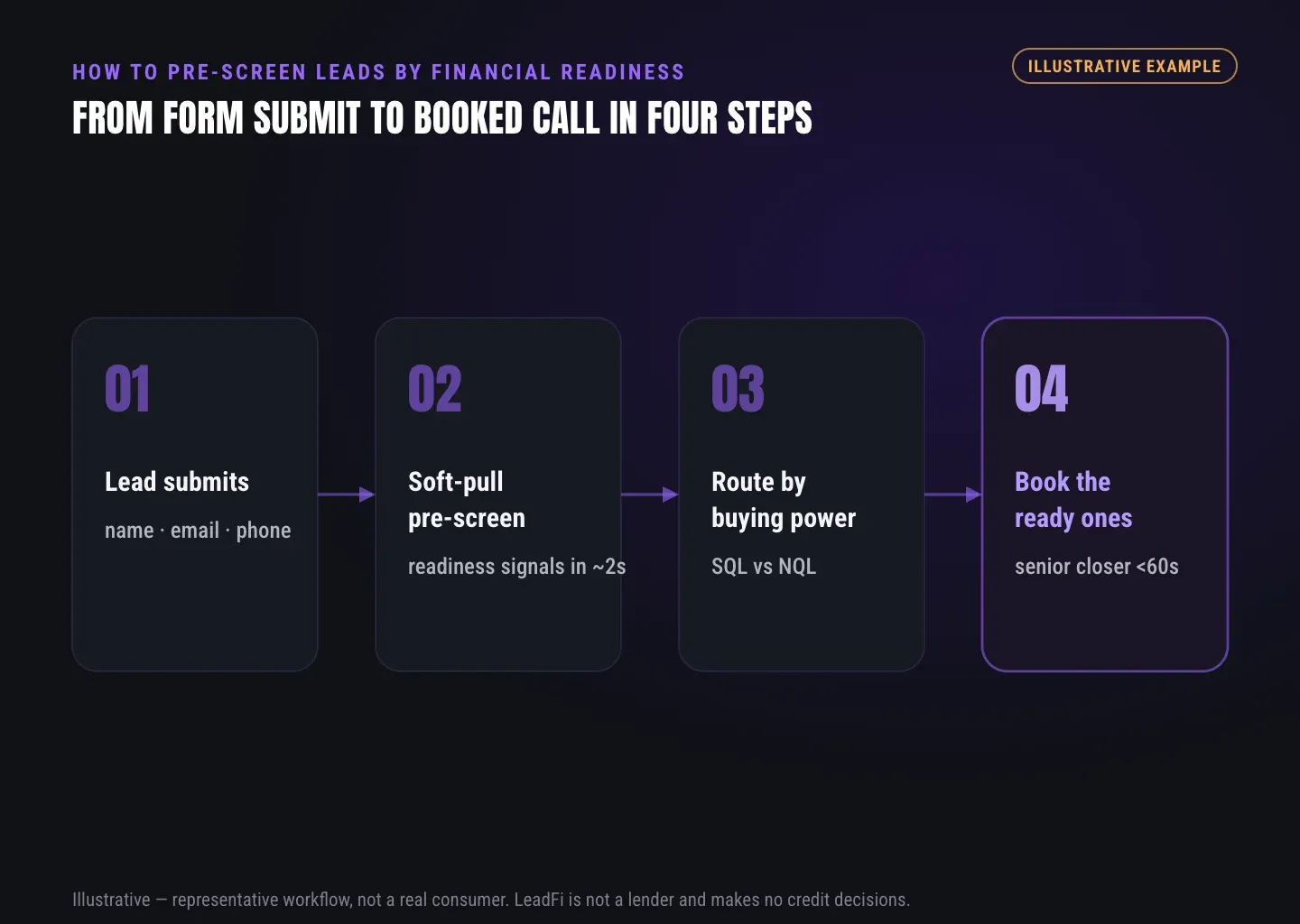
- Opt-in first. The person submits your existing form, funnel, or booking page and consents. Nothing about your front end changes.
- Identity match. From name, email, and phone, an identity match locates the right person. No SSN or mailing address is required from the lead.
- Soft pre-screen. A permissioned soft-credit pre-screen returns the financial-readiness signals you have configured — VantageScore 4.0 among them — with a consent reference attached to the request.
- Decision back. Those raw signals are turned into a routing decision and written into your CRM, usually within seconds.
Crucially, a well-designed workflow returns a routing decision to your systems — not a pile of raw financial literals for your reps to read and react to. That keeps sensitive values out of your day-to-day sales surface and keeps your team focused on the action, not the number.
SQL VS NQL
From signals to an SQL vs NQL decision
Signals are only useful once they collapse into a decision. The common pattern is a two-way split with tiers:
- SQL — sales-qualified. The lead clears the financial-readiness bar you set for your offer. Route straight to a booked call and prioritize on the calendar for speed-to-lead.
- NQL — not yet qualified. The lead does not clear the bar for the top offer today. Route to a low-ticket product, a payment plan, or a financing path — a fitting next step, not a dead end.
The important design choice is that you set the threshold. “Qualified” for a $2,000 program is a very different line than “qualified” for a $40,000 one. Split your SQLs into tiers so your strongest closers get your highest-readiness prospects first, and place the SQL/NQL line where your unit economics actually demand. These are routing tiers you configure — never credit decisions, and never an approval or denial of a person.
THE PLAYBOOK
A five-step pre-screening playbook
Here is a concrete sequence you can stand up on an existing funnel without ripping anything out.
- Map your current flow. Write down every place a lead enters — forms, webinars, calendars, ad lead forms — and where each currently routes. This is the surface your pre-screen will sit behind.
- Define “qualified” for your offer. Decide what financial readiness means at your price point, and roughly where the SQL/NQL line sits. Start simple; you will tune it with real data.
- Add the pre-screen on opt-in. Trigger a soft-credit pre-screen the moment a lead submits — via an API call, an agent tool, or a no-code script on your form. Attach a consent reference to every request.
- Wire the routing. SQLs go to your calendar or top closer; NQLs go to a low-ticket offer, a payment plan, or financing. Write the decision back to the CRM contact so the whole team sees the same routing.
- Measure and tune. Watch what share of leads qualify, how SQLs convert versus your old unsegmented flow, and where NQLs end up. Move the threshold until the pipeline reflects reality. Reported results vary — treat the first few weeks as calibration.
See which of the leads you already have can actually afford to buy.
ROUTING
What to route where
The point of pre-screening is not to throw leads away — it is to give each one a path that respects both their situation and your reps' time. A useful default:
- Top-tier SQLs → your best closer, immediately. Highest readiness deserves the fastest human and the least friction.
- Standard SQLs → the booked-call calendar. Qualified, prioritized ahead of unscored leads.
- NQLs → a right-sized offer. A lower-ticket product, a payment plan, or a financing path keeps a “not yet” from becoming a “never,” with dignity intact.
- Qualified events → your ad platforms. Feeding readiness-qualified conversions back through conversion APIs teaches Meta and Google to optimize toward buyers with real capacity rather than the cheapest opt-in. Reported results vary.
COMPLIANCE
Compliance you design with your advisors
Anything that touches consumer financial data lives in a regulated space, and this guide is not legal advice. Pre-screening should be built as a compliance-aware workflow you design with your own advisors — not something anyone should market as “guaranteed compliant” or “certified.” A few principles that tend to hold up:
- Permission and purpose. Pull only after a clear opt-in, for a defined purpose, with a consent reference on record.
- Soft, not hard. Top-of-funnel pre-screening uses a soft pull so there is no impact to the consumer's credit and no application-style inquiry.
- You are not the lender. Pre-screening produces readiness signals and a routing decision. It does not approve, deny, or extend credit, and it should never be presented to the consumer as a lending outcome.
- Keep the sensitive values off-stage. Route on the decision. Your sales surface needs the action (“send to calendar”), not a consumer's raw financial figures.
Bring your counsel in early. The businesses that do this well treat compliance as part of the design, not a disclaimer bolted on at the end.
WHERE LEADFI FITS
Where LeadFi fits
LeadFi is the financial-readiness qualification and lead routing layer for the flow you already run. After a lead opts in, LeadFi runs a soft-credit pre-screen from just name, email, and phone, returns the readiness signals you configure, tags each lead SQL or NQL, and hands the routing decision back to your CRM. It sits behind your existing forms, funnels, calendars, and CRM — no rip-and-replace — and connects three ways: a REST API, an MCP server that works with Claude and Cursor, or a no-code form-routing script. It qualifies and routes the leads you already have. It is not a lead source and not a lender.
If you want to go deeper on a specific piece, these walk through the mechanics: financial-readiness qualification for leads, the soft credit check for lead qualification, lead scoring based on buying power, and lead qualification software for high-ticket sales. Or see how it maps to your world on the use-cases pages.
The takeaway is simple: you probably already have more than enough leads. Pre-screening by financial readiness just makes the ones you have work far harder — sending the right people to your closers and giving everyone else a door that actually opens.
RELATED READING
Related guides
Key takeaways
The short version
- Pre-screening qualifies the leads you already have by financial readiness — it never sources, buys, or sells new leads.
- A soft-credit pre-screen runs after opt-in from just name, email, and phone, and does not impact the consumer's credit.
- Readiness signals — VantageScore 4.0, available credit, and debt-to-income — drive an SQL vs NQL routing decision before the first call.
- Not-yet-qualified (NQL) leads are routed to a low-ticket offer, a payment plan, or financing — not discarded.
Quick answers
Fast answers before you dig in
Does pre-screening a lead by financial readiness hurt their credit?
No. Financial-readiness pre-screening uses a soft-credit pull, run after the person opts in on your own form. A soft pull does not impact the consumer's credit. LeadFi is not a lender and makes no approve-or-deny decisions.
Is this the same as lead generation?
No. Pre-screening is about qualifying and routing the leads you already collect — your existing list and every new opt-in. It never sources, buys, or sells new leads. You bring the flow; the pre-screen tells you which leads are financially ready and where to send them.
What data do I need to pre-screen a lead?
Typically just the name, email, and phone your form already captures, after the lead opts in. No SSN or mailing address is required from the lead. From those fields, an identity match and a soft-credit pre-screen return financial-readiness signals and an SQL or NQL routing decision.
FAQ
Common questions
Does pre-screening a lead by financial readiness hurt their credit?
Is this the same as lead generation?
What data do I need to pre-screen a lead?
What credit-standing signal does financial-readiness pre-screening use?
What happens to leads that are not financially ready yet?
Sources
References
- CFPB — What is a credit inquiry? (hard vs. soft) (opens in a new tab)Federal regulator confirms a soft inquiry, unlike a hard inquiry, does not affect credit scores.
- VantageScore — VantageScore 4.0 credit scoring model (opens in a new tab)Official page describing VantageScore 4.0, the tri-bureau, trended-data model used to assess credit risk.
- CFPB — Who can request to see my credit report? (opens in a new tab)Federal regulator explains the FCRA disclosure rules governing who may obtain a credit report.
Pre-screen the leads you already have — before your reps call.
You don't need more leads. You need to know which of the ones you already have can actually buy.