
ROUTE LEADS TO CALENDARS BY QUALIFICATION
Route Leads to Different Calendars by Qualification
High-ticket teams can route leads to different calendars based on financial readiness instead of relying on form answers alone. Ready prospects can reach a closer quickly, while other leads enter a setter, nurture, alternate-offer, or review path.
Watch a contact get pre-qualified.
This is exactly what your CRM gets back.
Your opt-in form
Soft pull · no impact to their credit
This is not a real soft pull. It's an example of the data points that land in your CRM contact record when a lead fills out your form.
LEADFI DEMO
Watch the demo, then start free or book a call.
GUIDE
One calendar is why closers are buried
A single calendar gives every form submission access to the same limited sales capacity. A booking demonstrates interest and availability, but it does not establish readiness for a $3,000, $5,000, or $10,000 offer.
Quick answer: Calendar routing by financial readiness can reserve closer availability for SQLs while giving NQLs another relevant next step.
Booked interest is not buying power
Forms can ask about income, debt, credit, or available funds, but self-reported answers may be incomplete or outdated. A configured readiness workflow can add permissioned signals after submission so routing does not depend on one unchecked answer.
SQL means ready for the sales path
An SQL is a Sales-Qualified Lead that meets the financial-readiness and business rules selected for the primary sales path. Those rules might combine available credit, income, debt-to-income ratio, offer, and campaign context.
SQL is an operating status for routing and rep preparation. It is not a consumer approval decision.
NQL means a different next step
An NQL is a Non-Qualified Lead under the current campaign rules. The label can send the lead to a setter, education sequence, lower-ticket product, alternate offer, review queue, or later requalification.
This route should preserve value rather than end the relationship. In credit-adjacent or regulated use cases, counsel should review whether different routes create material eligibility, access, or terms concerns.
Closer capacity has a real limit
If four closers can each handle six calls per day, the team has 24 daily slots before accounting for no-shows, reschedules, and follow-up. Ten low-readiness bookings would consume more than 40% of that capacity.
Routing before the calendar loads helps protect those scarce call blocks.
High-ticket teams feel the pain first
Calendar splitting is useful when every sales call carries meaningful labor cost. Potential use cases include coaching, consulting, courses, agencies, and other businesses selling offers around $1,000 to $10,000 or more.
Mortgage, lending, funding, insurance, auto-finance, and real-estate workflows require additional industry-specific review before credit-derived routing is used. Teams exploring that context can also read the Mortgage Lead Readiness Routing Before the Call.
Sales leaders need route-level data
Track SQL bookings, NQL outcomes, show rates, response times, and close rates by route. A full calendar can hide weak close-ready demand, while an SQL backlog can reveal a staffing or capacity problem.
Example: A coaching application
A coaching company receives 60 daily applications for a $7,500 program. After the form, LeadFi returns a route status. SQLs see the senior closer calendar and generate a priority CRM task; NQLs receive a workshop and nurture path with an opportunity for later requalification.
Example: An agency sales floor
A marketing agency sells a $4,000 monthly service. Higher-readiness SQLs reach the closer calendar, while a middle route books an initial fit call with a setter. The routing rules, rather than one shared booking pool, determine the sales motion.
INTELLIGENCE LAYER
Splitting the booking path by readiness
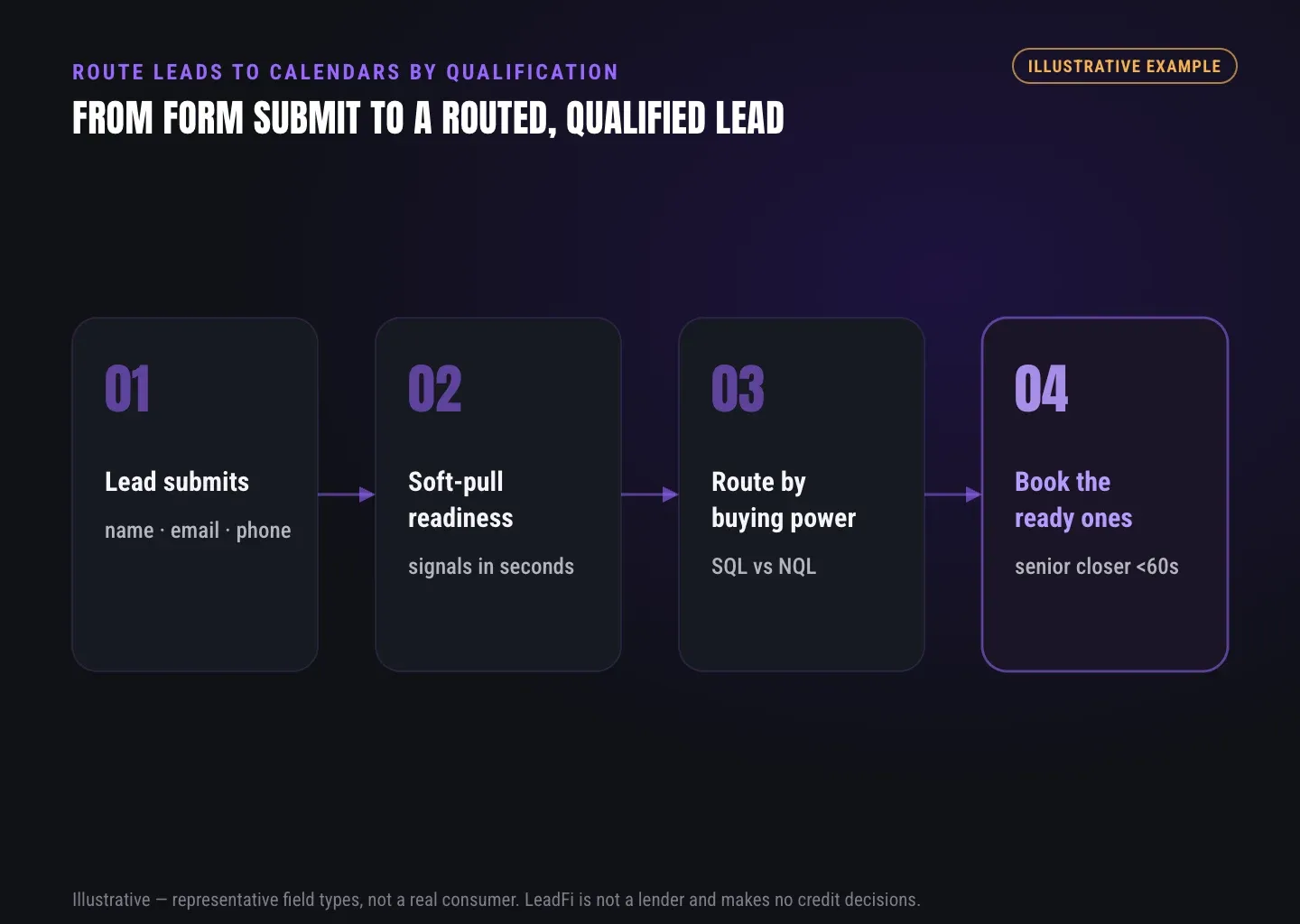
To route leads to different calendars, place the qualification result between form submission and calendar display. The concrete mechanic is:
- Capture: Collect the prospect's name, email, phone, and any business-required fields.
- Handoff: Send the submission through a webhook, API, Zapier, Make, or supported native workflow.
- Identity match: Patent-pending identity matching uses identity signals and identity-related information to seek a high-confidence match.
- Readiness workflow: Where the configuration, consent and disclosures support it, soft-pull prescreening returns applicable financial-readiness signals.
- Classification: Apply business rules to assign SQL, NQL, review, retry, or another defined status.
- Write-back: Return the status, route key, rule version, and selected fields to the CRM or automation layer.
- Calendar branch: Map the route key to a closer calendar, setter calendar, review path, nurture page, or alternate offer.
- Outcome tracking: Write booking, owner, stage, and follow-up events back to the CRM.
The scheduler continues to manage availability, time zones, reminders, and round robin. LeadFi supplies the financial-readiness result used to choose the appropriate booking path.
Quick answer: Use the qualification result as the branch before the calendar loads. For example, sql_closer can open a priority calendar, while nql_nurture can open an education or alternate-offer page.
Inputs start with thin contact data
LeadFi can begin with a name, email, and phone in many configured workflows. This thin-input approach can reduce form friction. Current address, age, or other identity-related information may also be used or returned where the workflow supports them.
Identity match comes before the pull
LeadFi's patent-pending identity matching is designed to establish a high-confidence match before soft-pull prescreening and, where applicable, deeper bureau-backed credit-report workflows. Unclear results should receive a defined retry, review, or neutral follow-up route.
Readiness uses more than one score
Depending on configuration and source, signals can include VantageScore 4.0, available credit, income, debt, debt-to-income ratio, age, address, and optional asset or net-worth-style context. Some values may come from different sources or calculations, so teams should document source, freshness, and permitted use.
These are readiness signals for routing and rep preparation. LeadFi does not approve or deny consumers.
Rules convert signals into routes
A rule set can combine financial-readiness signals with the offer, campaign, region, or sales motion. A $3,000 offer and a $12,000 offer may require different readiness bands and calendar pools.
For regulated or credit-adjacent sales, legal review should address whether a proposed route affects eligibility, access, pricing, or terms.
Route keys keep the build simple
Return a compact key such as sql_closer, setter_review, nql_nurture, or retry_match. The automation layer maps each key to one URL, owner pool, and fallback. The booking tool generally does not need every underlying financial field.
NQL paths preserve lead value
A useful NQL path might provide education, a setter conversation, a lower-cost entry offer, nurture, or later requalification. The CRM should retain the source, route, and outcome so marketing can evaluate lead quality without sending every applicant to a premium call.
Comparison: one calendar vs readiness routing
Readiness routing changes the decision before booking; it does not require replacing the existing scheduler or CRM. The comparison table summarizes the operating differences.
Example: Three routes from one form
An $8,000 consulting application returns one of three keys: sql_closer, setter_review, or nql_nurture. The SQL receives a priority calendar, the review lead receives a short screening calendar, and the NQL receives a training page and follow-up sequence.
Example: Existing booking before scoring
If a funnel collects a booking before qualification finishes, the result can update the CRM and trigger a review or rerouting workflow. When practical, branching before calendar display usually creates a cleaner prospect experience.
GUIDE
Keeping speed-to-lead on the ready path
Financial-readiness routing is most useful while intent remains fresh. Once an SQL result returns, the workflow can display the closer calendar, update the CRM, assign an owner, and create an alert.
Quick answer: Trigger the SQL path immediately after classification, but treat response-time goals as internal targets rather than guaranteed outcomes.
SQL alerts should fire at once
An SQL event can create a task and alert the assigned owner through the team's chosen channel. Include the lead source, offer, route, owner, and booking status. Financial context should be limited to approved fields needed for the workflow.
Calendar access should stay direct
The SQL branch should usually lead directly to its approved booking page. Avoid unnecessary intermediate steps or requests for information already captured.
Capacity rules protect response time
Set daily call limits and reserve enough near-term availability for expected SQL demand. Define an overflow calendar, alternate closer pool, rapid setter callback, or waitlist task for demand spikes.
Ownership should be deterministic
Use one authoritative assignment rule. Round robin may fit similar closers, while skill-based assignment can account for offer, language, geography, or deal type. Duplicated assignment logic across the CRM and scheduler can create conflicts.
Time zones need an explicit rule
Account for the prospect's time zone, staffed sales hours, and the promised response. An after-hours SQL can receive the next available calendar slot while a task waits for the next staffed window.
Booking events should return to the CRM
A calendar redirect does not confirm a booking. Write the event time, calendar, owner, booking result, and current stage back to the CRM so the team can distinguish booked SQLs from calendar abandonments.
No-book SQLs need fast follow-up
When an SQL reaches the calendar without selecting a time, create a short follow-up task. A rep can help find an available slot without assuming the lead has lost interest.
Readiness signals can improve ad learning
LeadFi can support approved SQL-quality events for Meta, Google, TikTok, Hyros, and operations stacks. Bureau-derived fields, credit scores, financial values, or inferable sensitive details should not be passed to advertising platforms. Any feedback event should follow platform rules, privacy requirements, contractual restrictions, and the client's approved data design. Campaign performance is not guaranteed.
Route metrics reveal the real bottleneck
Measure raw leads, match outcomes, SQLs, NQLs, bookings, shows, response time, and closed deals by route. A strong SQL rate paired with slow contact suggests a sales-process constraint rather than an immediate need for more lead volume.
Example: A 60-second response target
A funding sales team sets an internal target to contact new SQLs within 60 seconds during staffed hours. LeadFi returns the status, and the CRM assigns an owner and sends an alert. The target guides operations; it is not a promised result. Funding and credit-adjacent configurations require counsel and industry-specific review.
Example: Overflow from the closer pool
During a promotion, a course business fills its main closer calendar. Its SQL branch checks priority availability and then uses an overflow calendar or callback task. NQLs continue through nurture without consuming the remaining closer slots.
See which of the leads you already have can actually afford to buy.
GUIDE
What you set up: calendars, redirects, CRM tags
Start with a route map rather than an automation tool. Define each status, destination, owner pool, CRM update, timeout, and fallback before connecting live traffic.
Quick answer: Configure at least one SQL calendar, one NQL next step, clear CRM fields, and tested fallback rules for uncertain, delayed, duplicate, booked, and no-book outcomes.
Calendars map to sales motions
A basic build uses a priority closer calendar and a setter or nurture path. Larger teams can segment by offer, region, language, rep skill, or readiness band. Use the fewest routes that create a meaningful operational difference.
Redirects control the prospect path
Map each route key to one destination URL. Trigger the redirect after a valid result or a defined timeout, then record which destination the lead received.
CRM fields preserve the decision
Useful fields include qualification_status, route_key, qualification_time, rule_version, offer, and booking_status. Apply field-level access controls, retention limits, audit logging, and vendor review before storing sensitive context. Keep detailed financial fields out of the CRM unless they are necessary and approved for that workflow.
Stages show what happened next
Qualification status describes the route decision; pipeline stage records subsequent progress. An SQL might move through Qualified, Booked, Showed, and Closed. An NQL might move through Nurture, Re-engaged, and Requalified.
Webhooks carry the route result
A webhook, API, Zapier, Make, or supported native workflow can send the submission and return the route result. Assign one system as the owner of redirects and another, or the same one, as the explicit owner of CRM updates.
Teams using GoHighLevel can review the Adding Financial-Readiness Qualification to a GoHighLevel Workflow for related implementation context.
Fallbacks handle uncertain outcomes
Define routes for uncertain identity matches, timeouts, duplicate records, missing fields, integration errors, and full calendars. An uncertain record should receive its configured review, retry, or neutral follow-up path rather than automatically entering the premium calendar.
Consent language matches the data use
The form, privacy notice, customer-facing language, and follow-up should accurately describe the configured data use. LeadFi supports compliance-aware workflows and can help teams evaluate privacy language, consent language, TCPA-aware practices, and FCRA-aware workflow choices.
LeadFi does not provide legal advice or remove consent and disclosure obligations. Clients should review their use case with counsel.
Address fields depend on the workflow
Some thin-input workflows can begin with a name, email, and phone without requesting an address and date of birth up front. The input set depends on the workflow, match requirements, consent and disclosures, and data configuration. The central value is buying-power-aware routing, not avoiding an address.
Soft pulls support qualification, not approval
Through the applicable soft-pull product path, a soft pull is designed not to affect the consumer's credit score. Returned signals can support financial-readiness qualification and rep preparation. LeadFi does not approve or deny consumers.
Test cases should mirror live traffic
Test SQL, NQL, uncertain match, repeat lead, missing field, delayed webhook, integration error, full calendar, booking abandonment, and completed booking cases. Confirm both the prospect destination and CRM write-back for every route.
Launch reports should use route cohorts
Compare outcomes by qualification date, campaign, offer, rule version, and route. Avoid drawing firm conclusions from a small sample or combining SQL and NQL outcomes into one booking-rate metric.
Example: Basic two-calendar setup
A consulting team maps sql_closer to its closer pool and nql_setter to a setter calendar or nurture page. The same route status is written to the CRM before the destination loads.
Example: Four-path setup
A carefully reviewed mortgage-adjacent workflow defines closer, specialist review, nurture, and retry routes. Each route has an owner, destination, CRM status, and follow-up timer. Because the sector is regulated, counsel should review the use of financial or credit-derived signals before launch.
Example: Calendar routing by lead score
A high-ticket agency uses readiness bands based on approved signals and business rules. Higher-readiness leads reach the closer pool, a middle band reaches a setter, and lower-readiness leads receive education or a lower-cost entry offer. The agency then reviews route-level outcomes before revising its bands.
Related reading: a practical guide to lead routing by buying power sql nql, the Mortgage Lead Readiness Routing Before the Call, the Adding Financial-Readiness Qualification to a GoHighLevel Workflow.
| Workflow area | One-calendar model | Readiness-based model |
|---|---|---|
| Booking access | Form completions generally see the same calendar | Each route receives a defined calendar or next step |
| Closer focus | Closers receive a broad lead mix | SQLs can receive priority closer access |
| NQL treatment | NQLs may consume the same sales slots | NQLs can enter setter, nurture, review, or alternate-offer paths |
| CRM status | Records may show only booked or unbooked | Records can retain SQL, NQL, review, route key, and booking result |
| Qualification | Often relies on form answers or activity | Can incorporate configured financial-readiness signals with consent and disclosures |
| Speed-to-lead | Priority depends on general queue position | SQL status can create an immediate task and alert |
| Rep preparation | Reps see basic form data | Reps can receive approved, minimized route context |
| Ad feedback | Campaigns may optimize around forms or bookings | Approved, non-sensitive SQL-quality events may support campaign learning |
| Scheduler role | Scheduler handles booking and access | Scheduler handles booking while LeadFi supplies the route decision |
| Fallbacks | Often use one generic thank-you page | Retry, review, nurture, and overflow routes can be defined |
Key takeaways
The short version
- Branch on SQL/NQL status before the calendar loads.
- Send SQLs to closers and give NQLs a useful alternate path.
- Use route keys to connect LeadFi, the CRM, and the scheduler.
- Track booking and sales outcomes by route and rule version.
- Review consent, data handling, and regulated use cases before launch.
Quick answers
Fast answers before you dig in
How do you route leads to different calendars?
Place qualification between form submission and calendar display, return an SQL, NQL, review, or retry route key, and map that key to the appropriate calendar or next-step page.
What is the concrete SQL/NQL calendar-routing mechanic?
Capture the lead, run the configured identity and readiness workflow, classify the result, write a route key to the CRM, display the mapped calendar or page, and record the booking outcome.
Can LeadFi work with an existing calendar?
Yes. LeadFi can supply readiness and route data while the existing booking tool continues to manage availability, reminders, time zones, and calendar events.
What happens to an uncertain identity match?
Use a predefined retry, specialist-review, or neutral follow-up route, record the outcome in the CRM, and avoid automatically assigning the premium calendar.
FAQ
Common questions
How do I route leads to different calendars?
What is calendar routing by lead score?
What is closer calendar routing?
What is SQL/NQL routing?
Can LeadFi route leads without replacing my calendar?
Can LeadFi support a soft credit check without asking for an address?
Does a LeadFi soft pull affect the consumer's credit score?
Sources
References
- CFPB — What is a credit inquiry? (hard vs. soft) (opens in a new tab)Federal regulator confirms a soft inquiry, unlike a hard inquiry, does not affect the consumer's credit score.
- VantageScore — VantageScore 4.0 credit scoring model (opens in a new tab)Official page describing VantageScore 4.0, the tri-bureau, trended-data model used to assess credit risk.
- CFPB — Who can request to see my credit report? (opens in a new tab)Federal regulator explains the FCRA rules governing who may obtain a credit report.
- VantageScore 4.0 (opens in a new tab)Background on the named credit-scoring model referenced as a possible workflow signal.
Know who is ready before your next sales call.
LeadFi can sit behind your current form, funnel, CRM, and calendar to add financial-readiness qualification, SQL/NQL routing, CRM results, and booking-path decisions.