
MORTGAGE LEAD PREQUALIFICATION
Mortgage Lead Readiness Routing Before the Call
Mortgage lead prequalification is often used to describe sorting inquiries before an LO calls. In this article, the term refers strictly to internal financial-readiness qualification and sales routing. It is not a consumer lending outcome.
Watch a contact get pre-qualified.
This is exactly what your CRM gets back.
Your opt-in form
Soft pull · no impact to their credit
This is not a real soft pull. It's an example of the data points that land in your CRM contact record when a lead fills out your form.
LEADFI DEMO
Watch the demo, then start free or book a call.
GUIDE
What an LO learns too late
An LO may spend valuable call time discovering that an inquiry needs more information, education, or a different follow-up timeline. Conventional forms capture intent, but their income, debt, credit-range, and timing answers can be broad, incomplete, or stale.
Self-reported data can hide the gap
Two leads can select the same income range while having different debt or available-credit contexts. LeadFi can add selected financial-readiness signals after submission, subject to the configured workflow, consent, disclosures, and data availability.
The purpose is better routing and rep preparation. The signals are not consumer eligibility findings.
Booking intent does not prove readiness
A booked appointment shows interest and calendar intent. It does not show whether the inquiry fits the team's current sales route. Readiness enrichment gives RevOps another input for deciding whether the next step should be priority contact, review, education, or nurture.
Fast follow-up needs better priorities
Speed-to-lead is most useful when teams know which inquiries match the priority sales path. LeadFi can return an internal SQL or NQL status so the CRM can create the appropriate task or sequence.
These labels describe sales actions only. They must not be presented as mortgage findings or promises.
Marketing needs a quality signal
Cost per lead and booked-call volume do not show downstream readiness. Where supported by the platform and approved setup, teams can send financially qualified lead events to Meta, Google, TikTok, Hyros, or related systems for campaign analysis and testing. No advertising result is guaranteed.
INTELLIGENCE LAYER
Readiness signals before the first conversation
Depending on configuration and data access, LeadFi may surface VantageScore 4.0, available credit, income, debt, debt-to-income ratio, and optional asset context. These are readiness signals for routing and approved call preparation, not an underwriting file or consumer decision.
Identity signals support matching
Many LeadFi workflows can begin with name, email, and phone. Patent-pending identity matching is designed to establish a high-confidence match before soft-pull prescreening and, where applicable, deeper bureau-backed workflows.
Identity-related information can include current address or age. These identity signals should not be treated as sales-readiness criteria. Some workflows may not require address and date of birth on the initial form, but that does not remove consent, disclosure, matching, or review requirements.
Financial signals provide sales context
A soft-pull workflow may provide credit-related context without creating a consumer-facing mortgage result. Income supplies one view of capacity, while debt and DTI provide additional context. Available credit can help an approved user prepare more relevant questions.
No single signal needs to control the route. Teams can combine selected readiness data with intent, timing, source, and operational rules, subject to appropriate review.
Sensitive attributes require careful handling
Mortgage and credit-adjacent workflows require particular care. Routing criteria should be documented, access should be role-based, and outcomes should be monitored for unintended disparities. Protected characteristics and identity-only attributes should not drive priority treatment.
LeadFi supports compliance-aware workflows but does not provide legal advice. Clients should review their criteria, customer-facing language, and use case with counsel.
Who this workflow fits
Readiness routing is most useful for teams with meaningful inbound volume, expensive LO time, uneven source quality, established CRM automation, and distinct follow-up paths. A very low-volume operation that manually reviews every inquiry may receive less value from automated tiers.
INTELLIGENCE LAYER
Routing by readiness tier
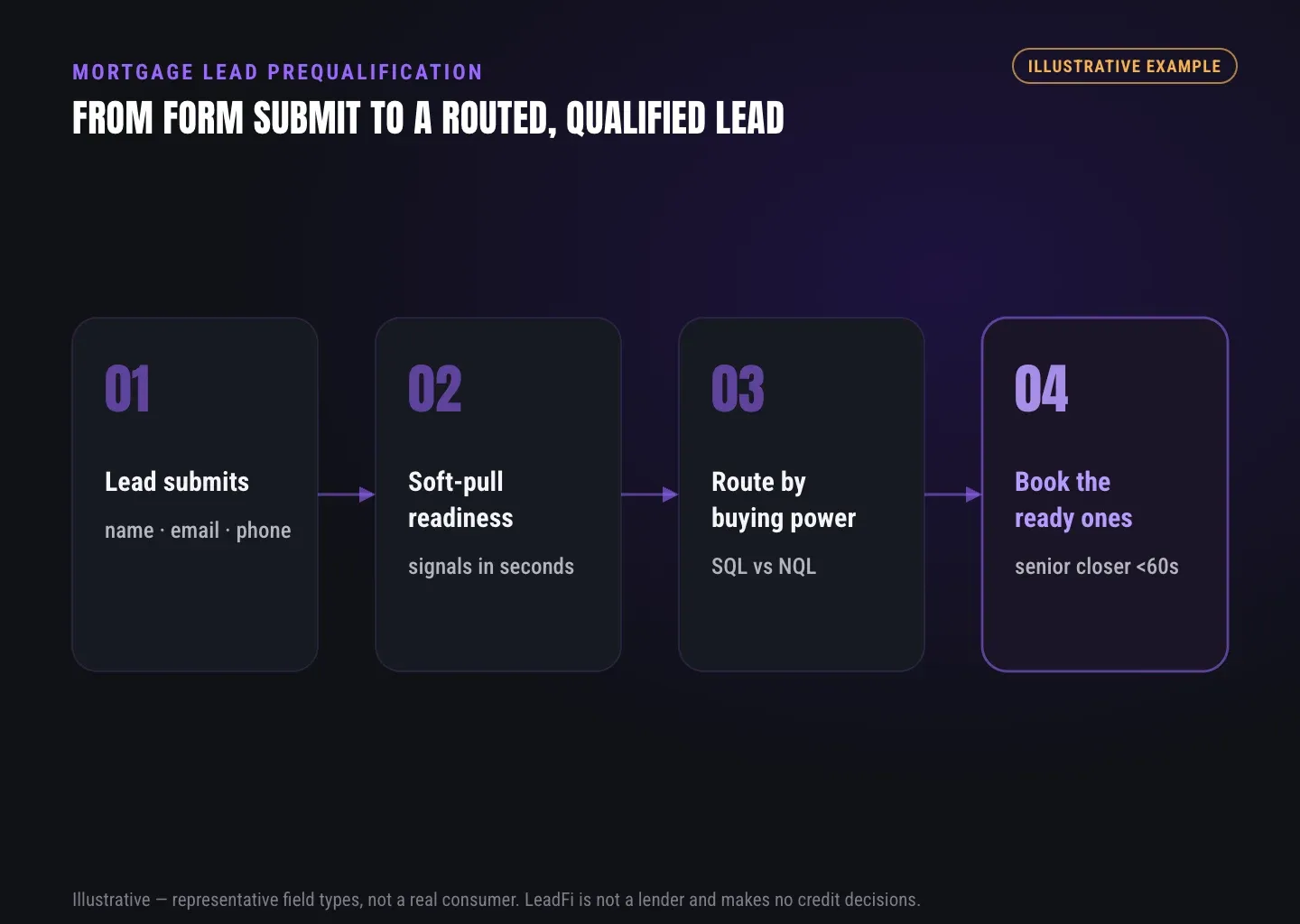
Readiness data becomes useful when it triggers a clear action. LeadFi helps teams map an internal status to a task, queue, stage, calendar, page, or nurture sequence.
SQLs enter the priority sales path
An SQL is an internal Sales-Qualified Lead under the client's documented sales rules. It can trigger a timely LO task, priority notification, or designated calendar. The label means only that the inquiry matches the priority sales route.
NQLs receive a useful next step
An NQL identifies an inquiry assigned to a non-priority route under the current rules. Rather than discarding the record, a team can send education, request additional details, schedule later follow-up, or use another approved path.
Customer-facing messages should use neutral next-step language rather than exposing an internal label that could be mistaken for a financial outcome.
Review routes handle uncertainty
Missing, unmatched, or ambiguous records should enter a review path instead of being forced into the strongest or weakest tier. A middle route can request one additional fact or create a human-review task before further automation runs.
CRM and ad-stack handoffs activate the result
LeadFi can connect through webhook, API, Zapier, Make, or supported native workflows. It can write a tier, route reason, timestamp, and next action into the CRM while limiting access to deeper signals.
Where supported and appropriately configured, the same readiness classification can inform quality-event feedback to advertising and attribution systems. LeadFi complements the CRM, funnel, form, and scheduler rather than replacing them.
See which of the leads you already have can actually afford to buy.
GUIDE
What you set up: intake, language, and CRM stages
A useful workflow begins with what the team should do next, not with collecting every available data point. Define the priority, review, nurture, and fallback actions before selecting signals.
Start with the desired sales action
Map the current journey from ad click through form submission, scheduling, CRM creation, and first LO contact. LeadFi generally sits after submission and before the next sales action so the readiness result can activate while interest is fresh.
Keep intake fields focused
Many workflows can start with name, email, and phone, plus operational fields such as intent, timeline, state, property goal, or contact preference. The exact fields depend on matching needs, the configured data path, and the client's reviewed workflow.
Align consent and disclosures
Customer-facing language should accurately reflect what happens after submission. Privacy language, consent and disclosures, and call or messaging practices should tell a consistent story.
LeadFi can help teams consider privacy- and consent-oriented workflow choices, TCPA-aware practices, and FCRA-aware setup. This support is not legal advice and does not guarantee compliance.
Separate status from supporting signals
A practical CRM record can contain the readiness status, route reason, timestamp, next action, source, review state, and only the supporting signals approved users need. Role-based access can keep deeper context away from users who only need the next task.
Test every route before launch
Test priority, nurture, review, unmatched, duplicate, and error paths. Confirm that internal stages and consumer-facing pages remain consistent and do not communicate a financial outcome. Continue monitoring source quality and routing patterns after launch.
INTELLIGENCE LAYER
Mortgage lead readiness workflow at a glance
| Workflow step | What happens | Example output |
|---|---|---|
| 1. Capture | An inquiry submits a form or booking request | Name, email, phone, and intent |
| 2. Match | Identity matching supports a high-confidence record match | Match status |
| 3. Enrich | Selected readiness signals are returned under the configured workflow | Income, debt, DTI, available credit, or VantageScore 4.0 |
| 4. Classify | Documented client rules assign an internal route | SQL, NQL, review, or custom tier |
| 5. Route | The stack activates the next sales action | LO task, calendar, nurture, or review |
| 6. Record | The result is written into the CRM | Field, tag, stage, reason, and timestamp |
| 7. Analyze | Teams compare readiness patterns by source | SQL share or route mix by campaign |
| 8. Refine | RevOps reviews criteria and workflows | Updated routing rules or campaign tests |
The exact timing and fields depend on the integration, data availability, reviewed criteria, consent, and disclosures. Every output remains an internal readiness and routing result.
| Qualification approach | Main input | Typical output | Best use | Main limitation |
|---|---|---|---|---|
| Basic form rules | Self-reported answers | Score, tag, or branch | Simple intake sorting | Answers may be broad or incomplete |
| Behavior scoring | Clicks, opens, visits, and bookings | Intent score | Measuring engagement | Interest does not establish financial readiness |
| Manual LO review | Form data and conversation | Rep judgment | Low-volume, high-touch sales | Context arrives after rep time is spent |
| Generic soft-pull tool | Credit-related data | Data response | Teams with separate decision logic | Data still requires reviewed rules and workflow activation |
| LeadFi readiness routing | Matched identity signals, selected financial-readiness signals, and client rules | Internal tier, CRM update, redirect, or task | High-ticket and credit-adjacent lead operations | Requires defined criteria, consent and disclosures, controls, and monitoring |
Key takeaways
The short version
- LeadFi adds financial-readiness routing after mortgage lead capture.
- Thin-input workflows can begin with name, email, and phone.
- SQL and NQL statuses trigger internal sales paths, not lending outcomes.
- Readiness signals can prioritize calls and support rep preparation.
- Consent, disclosures, reviewed criteria, and monitoring remain necessary.
Quick answers
Fast answers before you dig in
What does mortgage lead prequalification mean here?
It means internal financial-readiness qualification that routes an inquiry to priority contact, review, or nurture before an LO calls. It is not a consumer lending outcome.
What can an LO learn before the call?
Depending on the workflow, approved users may receive readiness context such as VantageScore 4.0, available credit, income, debt, and DTI for routing and call preparation.
How does SQL vs NQL routing work?
The client defines internal sales rules. LeadFi returns an SQL, NQL, review, or custom tier to the CRM, which activates the corresponding task, calendar, or nurture path.
Can LeadFi work from name, email, and phone?
Many configured workflows can begin with name, email, and phone. Patent-pending identity matching is designed to establish a high-confidence match before applicable soft-pull steps.
Does LeadFi make mortgage decisions?
No. LeadFi supports financial-readiness routing and rep preparation. It does not approve or deny consumers or communicate mortgage eligibility, terms, or outcomes.
FAQ
Common questions
What is mortgage lead prequalification?
Can LeadFi prequalify mortgage leads for an LO?
Does mortgage lead prequalification use a soft pull?
Can the workflow start without an address on the initial form?
What data can support mortgage lead readiness routing?
How does SQL vs NQL routing work for mortgage leads?
Does LeadFi replace a mortgage CRM or calendar?
Sources
References
- CFPB — What is a credit inquiry? (hard vs. soft) (opens in a new tab)Federal regulator confirms a soft inquiry, unlike a hard inquiry, does not affect the consumer's credit score.
- VantageScore — VantageScore 4.0 credit scoring model (opens in a new tab)Official page describing VantageScore 4.0, the tri-bureau, trended-data model used to assess credit risk.
- CFPB — Who can request to see my credit report? (opens in a new tab)Federal regulator explains the FCRA rules governing who may obtain a credit report.
Know who is ready before your next sales call.
Connect financial-readiness signals to clear CRM stages, rep tasks, NQL nurture, and approved campaign feedback without turning an internal route into a consumer lending outcome.