
GOHIGHLEVEL LEAD QUALIFICATION WORKFLOW
Adding Financial-Readiness Qualification to a GoHighLevel Workflow
Most GoHighLevel automations fire the same way for every contact. A form comes in, a tag gets set, a call books, and a rep dials — whether that lead can afford the offer or not. For high-ticket teams, that's exactly where sales time leaks.
Watch a contact get pre-qualified.
This is exactly what your CRM gets back.
Your opt-in form
Soft pull · no impact to their credit
This is not a real soft pull. It's an example of the data points that land in your CRM contact record when a lead fills out your form.
LEADFI DEMO
Watch the demo, then start free or book a call.
INTELLIGENCE LAYER
Where readiness fits in a GHL funnel
Quick answer: Financial-readiness qualification runs after the GHL form submit and before your routing branches. A lead comes in, LeadFi reads permissioned readiness signals from name, email, and phone, then writes an SQL or NQL result back to the contact. Your GoHighLevel workflow then branches on that field — a fast calendar for SQLs, a low-ticket offer or a payment plan for NQLs.
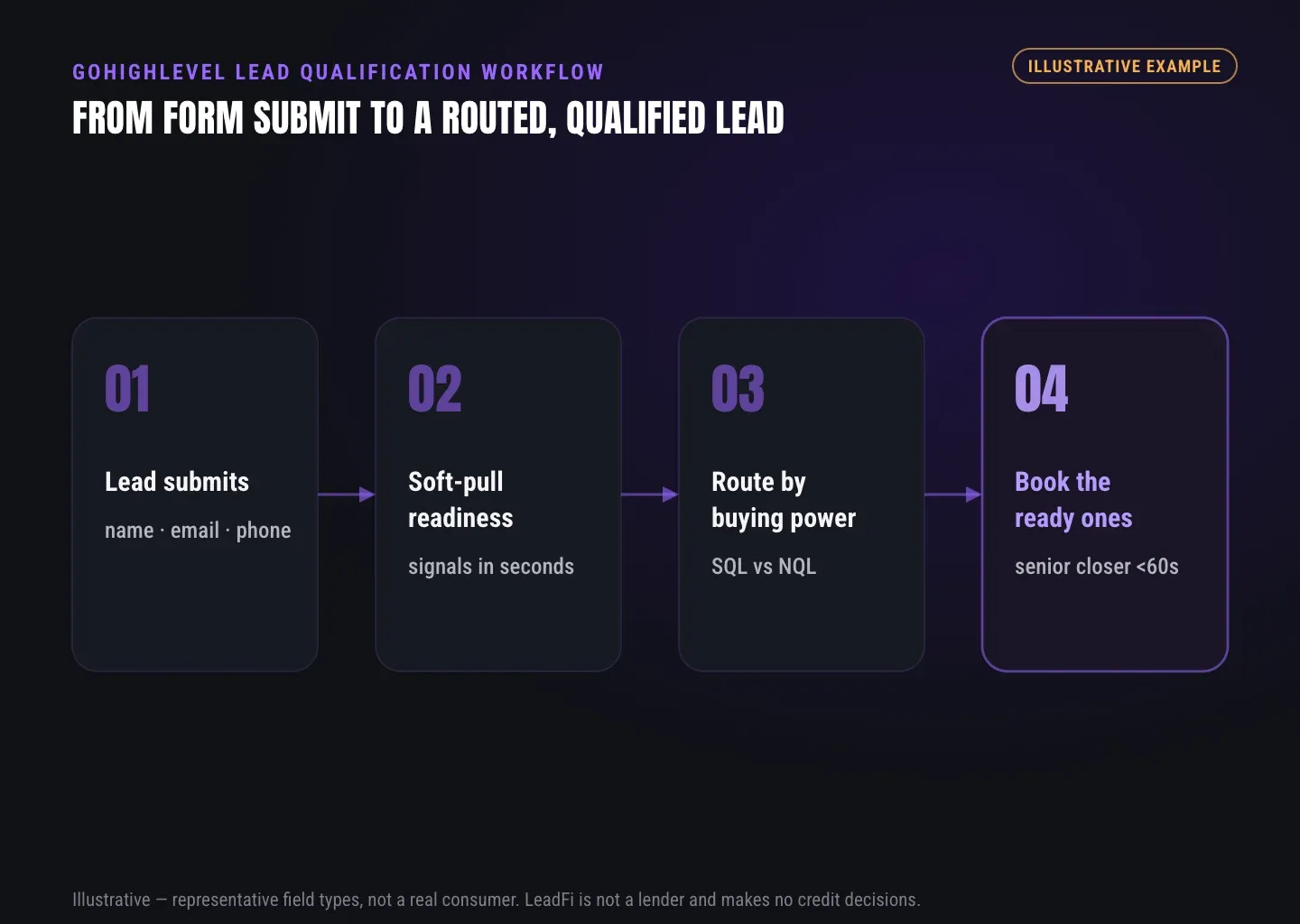
Think of your funnel in four moves: capture, enrich, classify, act. GoHighLevel already owns capture and act. Meanwhile, LeadFi slots into the middle, so the routing step has real buying-power context instead of a guess.
Financial readiness here means fit for the next step — not a credit decision or a judgment of the person. LeadFi does not approve or deny anyone. Instead, it classifies and routes so the right lead reaches the right rep faster.
Capture stays in GHL
Your GoHighLevel form, funnel page, or booking widget still collects the lead. Nothing changes about how contacts enter the system. The submit event is simply the trigger that kicks off the readiness step next.
Enrich after submit
Once a contact hits your form, GHL hands the payload to LeadFi by webhook or API. LeadFi can work from name, email, and phone for many workflows. As a result, you often skip long forms that ask for address and DOB up front.
Classify SQL vs NQL
LeadFi reads permissioned readiness signals and returns a tier. SQL means a sales-qualified lead with buying power for your offer. NQL means a non-qualified lead — still valuable, just routed to a different path.
Act inside your automations
From there, GoHighLevel takes over again. The SQL or NQL value drives your existing branches: calendar assignment, tags, pipeline stage, and rep notifications. As a result, your team keeps working where they already work.
GUIDE
Passing the lead after submit
Quick answer: GoHighLevel passes the lead to LeadFi with a webhook or API call fired on form submit. The payload carries identity signals — name, email, phone — consistent with your consent and disclosures. LeadFi enriches and classifies, then returns the result to the contact record. You can wire this through a native GHL workflow action, Zapier, or Make.
The handoff is the mechanical heart of this setup. Get it right once, and every future lead flows through readiness without extra clicks.
Speed matters here. For financially qualified leads, the goal is speed-to-lead — SQLs reaching a closer in minutes, not the next morning. As a result, a fast handoff keeps that momentum while the prospect's interest is high.
Webhook on form submit
The simplest path uses a GHL workflow with an inbound webhook or outbound POST. When a contact submits, GoHighLevel sends the payload to LeadFi. This keeps the trigger inside the CRM you already manage.
API for custom stacks
For teams with a dev resource, a direct API call gives more control. You choose exactly when to fire the call and how to map fields. In practice, this suits custom landing pages or apps feeding into GoHighLevel.
Zapier or Make as the bridge
No-code teams often route the submit through Zapier or Make. First, the Zap catches the GHL event. Then it calls LeadFi and writes the result back. This is the fastest way to launch without touching code.
Consent and disclosures first
Before any handoff goes live, align your form language, SMS consent, and CRM notes. Prospects should hear one consistent story about why you collect data. LeadFi helps you set up a compliance-aware workflow — that's onboarding help, not legal advice.
ROUTING
Writing SQL/NQL back to the contact record
Quick answer: LeadFi writes the qualification result into GoHighLevel as a custom field, a tag, or a pipeline stage — whatever your automations read. A contact might get an SQL tag, a readiness_tier field, and a move to a "Qualified" stage. Those writes are what your GHL workflow triggers listen for, so routing happens with no manual review.
The rule of thumb: write the result where your team already looks. For example, if your closers watch tags, write a tag. If your dashboards read pipeline stages, move the stage. The point is that qualification status lives inside GoHighLevel, not in a separate tool nobody checks.
For buyer dignity and cleaner ops, resellers and many teams surface the tier — not raw numbers. As a result, you route on "SQL" or "NQL," not on a visible credit or income value.
Custom fields for the tier
A custom field like financial_readiness or lead_tier holds the SQL/NQL result. Workflow conditions can then check that field to pick a branch. This keeps your logic clean and easy to audit later.
Tags for quick automation triggers
Tags are the fastest trigger in GoHighLevel. An SQL or NQL tag can launch a workflow the instant it lands. Many teams start here because tag-based automation is simple to build and test.
Pipeline stages for visibility
Moving an SQL to a "Sales Qualified" stage keeps your pipeline honest. Reps see readiness at a glance in the opportunities view. As a result, closers spend their day on contacts who can actually buy.
Notes and context for reps
Beyond the tier, LeadFi can pass permitted context into a note or field for rep prep. For example, a closer walks into the call already knowing the routing reason. This is readiness for the conversation — not a decision made for the buyer.
| Factor | Default GHL workflow | GHL + LeadFi readiness routing |
|---|---|---|
| Routing basis | Opt-in, tag, or form answer | Permissioned financial-readiness signals |
| Self-reported data | Relies on what the lead types | Reads signals from name, email, phone |
| SQL vs NQL split | Manual or none | Automatic tier written to the contact |
| Speed-to-lead | Same path for everyone | Fast path for SQLs; low ticket for NQLs |
| NQL handling | Often ignored or bulk-nurtured | Routed to low-ticket, payment plan, or financing |
| Ad signal quality | Optimizes on opt-ins | Can feed SQL-quality signals to ad platforms* |
*Ad platform feedback works where permitted by the platform and correctly implemented, with appropriate consent for any data shared. No platform performance is guaranteed.
See which of the leads you already have can actually afford to buy.
WORKFLOW DESIGN
Triggering different workflows per tier
Quick answer: With the SQL/NQL result on the contact, GoHighLevel workflow qualification becomes a branch. SQLs trigger a fast path — instant calendar, closer notification, priority follow-up. NQLs trigger a different path — a low-ticket offer under $3,000, a payment plan, financing options, or a custom page. One submit, two very different next steps, all inside GHL.
This is where the whole setup pays off. Instead of one workflow for everyone, you run tier-aware automation that matches effort to buying power. Your best leads get white-glove speed, while your other leads still get monetized — just through a path that fits them.
Nothing here guarantees a sale or an outcome. Still, the setup is designed to focus sales time on financially qualified demand and to keep every other lead in a productive path.
SQL path: speed-to-lead
An SQL tag fires your fast branch. The contact books instantly on a closer's calendar, and a rep gets an SMS or Slack ping. The aim is to reach the lead quickly while interest is hot.
NQL path: low ticket and monetize
An NQL result routes the contact to a low-ticket funnel, a payment plan, or an alternate offer. Nobody gets thrown away. Instead, lower-readiness leads enter a path built to progress them — or to sell an offer they can afford today.
Financing path for high-ticket offers
For offers over $10,000, income and DTI signals can route a lead toward a financing conversation. Meanwhile, GoHighLevel can send that contact to a financing page or a specialist. This is a readiness signal for routing — not a promise of approval or funding.
Redirects and dynamic next steps
The thank-you redirect can also branch by tier. An SQL sees a booking page; an NQL sees a low-ticket offer page. In practice, this keeps the buyer moving without a manual triage step in between.
WHO IT'S FOR
Who this is for
Quick answer: This setup fits high-ticket, lead-driven teams already on GoHighLevel — coaches, consultants, agencies, course creators, funding companies, mortgage and lending shops, real estate, insurance, and auto. The common thread is a $3,000+ offer (or an upsell that reaches it) and ad or organic lead flow. If you sell only low-ticket with no upsell, this is likely not a fit.
Sales time is the costly resource for these teams. When ads drive call volume but too few callers can afford the offer, capacity gets burned on the wrong conversations. As a result, readiness routing is designed to fix that split at the source.
High-ticket coaches and agencies
Coaches, consultants, and agencies live on booked calls. When half those calls can't afford the program, closers stall. That's why SQL/NQL routing keeps calendars focused on buyers, not tire-kickers.
Funding, mortgage, and lending
These teams already think in income, debt, and DTI. As a result, readiness signals map naturally to their offers. LeadFi routes the ready leads to reps and the rest to a low-ticket offer or alternate paths.
Lead-gen agencies and resellers
Agencies get blamed for "broke leads." First, connect LeadFi by API. Next, attach a readiness tag before delivery, and hand off prequalified leads instead of raw opt-ins. That's a quality upgrade the buyer can feel.
Key takeaways
The short version
- Financial-readiness qualification slots between GHL capture and your routing branches — LeadFi enriches after submit, not replaces your CRM.
- LeadFi can work from name, email, and phone, so long forms asking address and DOB up front are often unnecessary.
- GHL passes the lead by webhook, API, Zapier, or Make; the tier is written back as a custom field, tag, or pipeline stage.
- SQLs get a speed-to-lead fast path; NQLs route to a low-ticket offer, a payment plan, or a financing conversation.
- LeadFi supports compliance-aware setup and does not approve or deny consumers or provide legal advice — review your use case with counsel.
Quick answers
Fast answers before you dig in
Where does financial-readiness qualification fit in a GoHighLevel funnel?
It runs after the GHL form submit and before your routing branches. LeadFi reads permissioned readiness signals from name, email, and phone, writes an SQL or NQL result to the contact, and your GoHighLevel workflow branches on that field.
How does GoHighLevel pass a lead to LeadFi?
GHL fires a webhook or API call on form submit, carrying name, email, and phone consistent with your consent and disclosures. LeadFi enriches and classifies, then returns the tier to the contact record. You can wire it via native workflow, Zapier, or Make.
How is the SQL/NQL result stored in GoHighLevel?
LeadFi writes the tier as a custom field, tag, or pipeline stage — whatever your automations read. Teams typically surface the tier, not raw credit or income numbers, so routing runs automatically without manual review.
FAQ
Common questions
What is GoHighLevel lead qualification with financial readiness?
Does LeadFi replace my GoHighLevel workflows?
How does GHL lead routing change with SQL/NQL signals?
What signals does LeadFi read, and does it need an address?
Does a soft-pull prescreen affect my leads' credit?
How fast does the qualification data land back in GHL?
Do I need to worry about compliance to launch this?
Sources
References
- CFPB — What is a credit inquiry? (hard vs. soft) (opens in a new tab)Federal regulator confirms a soft inquiry, unlike a hard inquiry, does not affect the consumer's credit score.
- VantageScore — VantageScore 4.0 credit scoring model (opens in a new tab)Official page describing VantageScore 4.0, the tri-bureau, trended-data model used to assess credit risk.
- Experian — What Is a Soft Inquiry? (opens in a new tab)Major credit bureau explains soft inquiries are informational and have no impact on credit scores.
Know who is ready before your next sales call.
You already run capture, calendars, and automations in GoHighLevel. Readiness routing adds the missing middle step — a clean SQL/NQL split written straight to the contact record.