
SQL VS NQL LEAD ROUTING BY FINANCIAL READINESS
SQL vs NQL Lead Routing: How to Score High-Ticket Leads by Financial Readiness
Most high-ticket teams get plenty of form fills. The hard part is knowing which leads can afford a $3,000, $10,000, or larger offer — before a closer burns an hour on a call that was never going to close. SQL vs NQL lead routing solves for that.
Watch a contact get pre-qualified.
This is exactly what your CRM gets back.
Your opt-in form
Soft pull · no impact to their credit
This is not a real soft pull. It's an example of the data points that land in your CRM contact record when a lead fills out your form.
LEADFI DEMO
Watch the demo, then start free or book a call.
WHO IT'S FOR
What SQL vs NQL Means for High-Ticket Sales
Quick answer: An SQL (sales-qualified lead) is a lead your team should call now. An NQL (non-qualified lead) isn't ready for a high-ticket call yet, so it goes to a low-ticket offer, a payment plan, or a financing path. For high-ticket teams, "qualified" should mean real buying power — not just interest.
Many teams treat every booked call as equal. In practice, they are not. A prospect who fills out a form may be curious, early-stage, or ready to buy today. You can't tell from the form alone.
That's the gap financial readiness fills. Readiness means the lead shows signals of buying power: income, available credit, a workable debt-to-income ratio, and more. LeadFi reads those permissioned signals after submit and helps score the lead SQL or NQL.
SQL: The Lead Worth a Fast Call
An SQL shows real buying power for your price point. A coaching offer at $8,000, for example, might set an SQL bar around income, credit score, and available credit. When a lead clears it, your closer calls fast — often within seconds.
NQL: The Lead Worth a Different Path
An NQL isn't a bad lead. Instead, it's a lead that isn't ready for your top offer right now. So route it to a low-ticket offer, a payment plan, or a financing option. That way the lead still gets value and you still monetize the traffic.
Why "Interest" Is Not "Readiness"
Interest tells you someone clicked. Readiness tells you they show signals of buying power. High-ticket sales time is costly. As a result, mixing the two wastes your best closers on calls that stall at the finance step.
Sales-Qualified Lead vs Non-Qualified Lead in One Line
A sales-qualified lead vs non-qualified lead split is a routing decision, not a verdict on a person. Treat it as operational readiness for the next conversation — never a judgment of anyone's worth.
INTELLIGENCE LAYER
How LeadFi Splits SQLs From NQLs by Buying Power
Quick answer: LeadFi sits behind your form, funnel, calendar, or CRM. After a lead submits, it uses name, email, and phone to run soft-pull prescreening and read permissioned financial-readiness signals. Then it tags the lead SQL or NQL against thresholds you set — and no consumer is approved or denied.
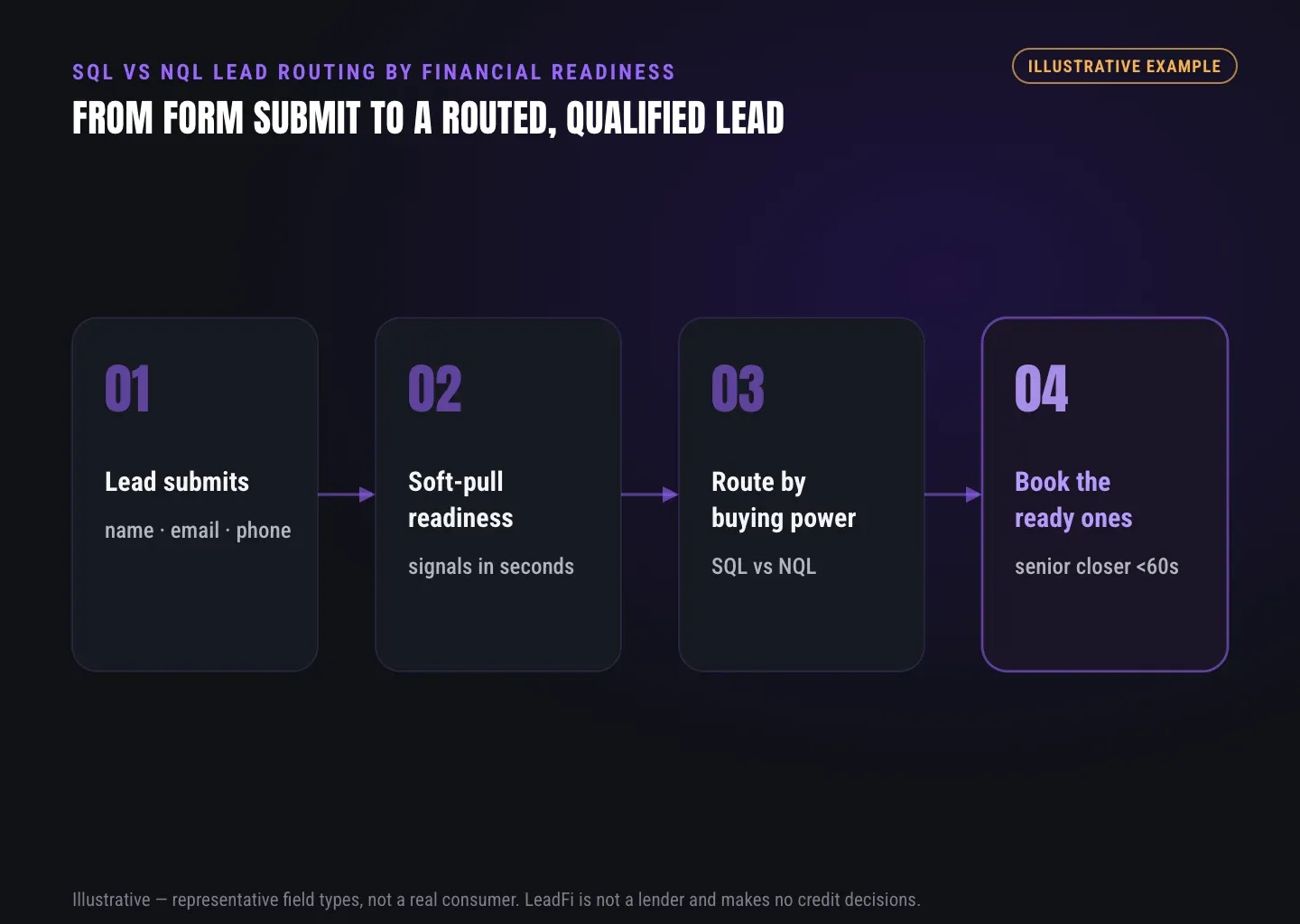
Here's the flow in plain terms. First, a lead submits on your form or application. Then the lead data hands off to LeadFi through a webhook, API, Zapier, Make, or a native path.
From there, LeadFi runs its identity match and the soft-pull prescreen. The prescreen reads readiness signals for routing and rep prep. Finally, LeadFi tags the lead SQL or NQL and writes that outcome back to your stack.
Thin-Input Match From Name, Email, Phone
LeadFi can work from just name, email, and phone. Patent-pending identity matching is designed to confirm a high-confidence match before any soft-pull prescreening runs. As a result, many workflows don't have to ask for a full address and date of birth up front.
Soft-Pull Prescreening for Routing
The soft pull is a prescreen — a read of readiness signals for routing and rep prep. It is designed for soft-pull prescreening and financial-readiness qualification, not a consumer approval or denial. When accurate for your workflow, a soft inquiry is not designed to affect the consumer's credit score. Confirm the specific path with your product and legal advisors.
Readiness Signals LeadFi Can Surface
Depending on consent and setup, signals may include VantageScore 4.0, available credit, income, debt, debt-to-income ratio, funding pre-approval signals, age, and address. In addition, optional net-worth or asset context can appear where available. LeadFi frames these as routing signals — not underwriting decisions.
Precise Signals, Not Just Broad Ranges
Many data tools return only an estimated band — say, a 650–750 score or $50k–$100k income. LeadFi is designed to surface more specific figures from bureau-backed and verified sources where available. For a $3,000+ offer, that added precision can change how confidently you route. No data source is error-free, so treat signals as readiness inputs, not guarantees.
Buyer Dignity Stays Intact
Readiness is operational, not moral. Your reps see a buyer-fit tag and the context they need to prep, so they are not judging anyone. That framing keeps the workflow respectful and keeps your team focused.
ROUTING
Lead Routing: SQLs to Closers, NQLs to Low Ticket
Quick answer: Once LeadFi tags a lead, your routing rules decide the next step. SQLs get speed-to-lead: an instant calendar, a closer notification, or a booked call. NQLs get a different path: a low-ticket offer, a payment plan, or a financing route. Each outcome writes back to your CRM as fields, tags, stages, and triggers.
The point of the SQL vs NQL split is action. A tag with no next step is just a label. So LeadFi is designed to feed the outcome straight into the tools your team already runs.
A funding agency, for example, might send SQLs to a senior closer's calendar and route NQLs to a credit-building offer. A coaching org, meanwhile, might redirect NQLs to a $497 self-study offer instead of a $10k call. Both paths monetize traffic that a single "book a call" button would waste.
SQL Path: Speed-to-Lead in Seconds
SQLs deserve your fastest response. LeadFi can trigger an instant calendar redirect, ping a closer by SMS or Slack pattern, and move the CRM record to a priority stage. As a result, your best leads reach a human while intent is still high.
NQL Path: Low-Ticket, Payment Plan, or Financing
NQLs route to value instead of a wasted call. Options include a low-ticket offer under $3,000, a payment plan, or a financing path where a lead may qualify for options. This is how you monetize or progress the lead without slowing your main sales team. Keep "may qualify" language as a signal, not a firm offer, and have any financing path reviewed by counsel.
CRM Write-Back That Reps Can Act On
LeadFi can write outcomes into standard or custom CRM fields, tags, lists, pipeline stages, and triggers. Qualification status then lives where your team already works — HubSpot, GoHighLevel, Close, Keap, and similar. So there's no separate dashboard to check.
Real-Time Redirects After Submit
Depending on your stack, LeadFi can drive a dynamic thank-you page. For instance, an SQL sees a calendar; an NQL sees a low-ticket offer page. The redirect happens while the lead is still on the page and still engaged.
Feed SQL Signals Back Into Ad Platforms
You can send SQL-quality events back into Meta, Google, TikTok, Hyros, or your ops stack — where permitted and correctly set up. As a result, this helps train your campaigns on real buying signals, not cheap opt-ins. LeadFi makes no platform performance or ROAS guarantee.
| Layer | Your existing tool | What LeadFi adds |
|---|---|---|
| Capture | Typeform, Jotform, ClickFunnels, GHL, HubSpot forms | Reads readiness after submit |
| Scheduling | Calendly, iClosed, booking tools | Helps decide who reaches which calendar |
| CRM | HubSpot, GoHighLevel, Close, Keap | Writes SQL/NQL fields, tags, stages, triggers |
| Attribution / ads | Hyros, SegMetrics, Meta, Google, TikTok | Sends SQL-quality signals (where permitted) |
| Routing | Manual or round-robin rules | Routes by buying power, not just availability |
See which of the leads you already have can actually afford to buy.
GUIDE
Setting Your Own Qualification Thresholds
Quick answer: You define the routing rules. LeadFi lets you set the readiness cutoffs that separate SQL from NQL — by income, credit score, available credit, debt-to-income, or other permitted signals. You can run different thresholds per campaign, audience, or offer price, and tune them as you learn.
There is no universal SQL bar. A $3,000 offer and a $30,000 offer need different cutoffs. That's why LeadFi is built around thresholds you own, not a fixed formula you can't see.
A financing-focused team, for instance, might use income at or above $45,000, a VantageScore 4.0 at or above 600, and DTI under 50% as a starting point. However, a younger, thin-credit audience might need a different bar entirely. You set the rule that fits your economics.
Tune Thresholds Per Offer and Audience
Different offers deserve different cutoffs. For example, you can run one threshold for a $3k course and a stricter one for a $15k mastermind. You can also adjust for a specific audience segment when your buyer profile shifts.
Run Multiple Campaigns With Separate Rules
Each campaign can carry its own SQL/NQL cutoffs. A cold-traffic funnel and a referral funnel don't have to share one bar. So you manage the logic per source without rebuilding the whole flow.
Reprocess a Lead Backlog
Have a database of old leads? You may be able to run an existing backlog through LeadFi to surface buying power you already paid for. Before any batch run, confirm that consent and disclosures still cover a new financial-readiness workflow — prior opt-ins may not. Review scope with counsel.
Compliance-Aware Setup Before Launch
LeadFi helps you stand up a compliance-aware workflow before go-live. It supports aligning form disclosures, consent language, and CRM notes so prospects hear one consistent story. To be clear, this is onboarding help, not legal advice. LeadFi does not guarantee compliance and does not approve or deny consumers.
HOW LEADFI FITS
How LeadFi Fits Alongside Your Current Stack
LeadFi does not replace your form, funnel, calendar, CRM, or attribution tool. Instead, it adds a financial-readiness and routing layer behind them. Here's a quick view of who does what.
The takeaway is simple. Your capture, scheduling, and CRM tools keep doing their jobs. Meanwhile, LeadFi helps decide what should happen to each lead based on readiness.
Key takeaways
The short version
- SQL vs NQL routing scores leads on real buying power after submit, so closers spend time only on financially ready high-ticket prospects.
- LeadFi runs soft-pull prescreening from name, email, and phone — it classifies and routes leads but never approves or denies a consumer.
- You set the readiness thresholds (income, VantageScore 4.0, DTI, available credit) per offer, audience, or campaign.
- SQLs get speed-to-lead to a closer or calendar; NQLs route to low-ticket, payment-plan, or financing paths that still monetize traffic.
- LeadFi sits behind your form, CRM, calendar, and ad stack — writing SQL/NQL status back via webhook, API, Zapier, Make, or native workflow.
Quick answers
Fast answers before you dig in
What is SQL vs NQL lead routing?
SQL vs NQL lead routing scores leads into sales-qualified (SQL) and non-qualified (NQL) lanes after they submit, then sends each to the right next step. SQLs go to a closer or calendar fast; NQLs go to a low-ticket offer, a payment plan, or financing. LeadFi bases the split on financial readiness, not just interest — and never approves or denies a consumer.
Sales-qualified lead vs non-qualified lead difference
A sales-qualified lead shows real buying power for your price point, so it's worth a fast sales call. A non-qualified lead isn't ready for that offer yet, so it earns a different path like a low-ticket offer or a payment plan. The label is a routing decision — not a judgment of the person.
Does a soft-pull prescreen affect the consumer's credit score?
A soft-pull prescreen is designed for routing and rep prep, not a hard inquiry and not a consumer approval or denial. When accurate for your workflow, a soft inquiry is not designed to affect the consumer's credit score. Confirm the specific path with your product and legal advisors.
FAQ
Common questions
What is SQL vs NQL lead routing?
What's the difference between a sales-qualified lead vs a non-qualified lead?
How does LeadFi decide financial readiness?
Does the soft pull hurt the lead's credit score?
Can I set my own routing rules and thresholds?
Does LeadFi replace my CRM or calendar?
Is LeadFi compliant, and does it handle consent for me?
Sources
References
- CFPB — What is a credit inquiry? (hard vs. soft) (opens in a new tab)Federal regulator confirms a soft inquiry, unlike a hard inquiry, does not affect the consumer's credit score.
- VantageScore — VantageScore 4.0 credit scoring model (opens in a new tab)Official page describing VantageScore 4.0, the tri-bureau, trended-data model used to assess credit risk.
- Experian — What Is a Soft Inquiry? (opens in a new tab)Major credit bureau explains soft inquiries are informational and have no impact on credit scores.
Know who is ready before your next sales call.
You've seen how the SQL vs NQL split works. Next, you can see it run against your real leads and your real offer economics.