
SOFT CREDIT PULL SOFTWARE FOR LEAD GENERATION
Soft Credit Pull Software For Lead Generation: Qualify By Buying Power
Most lead-gen tools tell you a lead is interested. Few tell you whether the lead can actually buy. That gap costs high-ticket teams real money: booked calls fill up, yet collected revenue stays flat.
Watch a contact get pre-qualified.
This is exactly what your CRM gets back.
Your opt-in form
Soft pull · no impact to their credit
This is not a real soft pull. It's an example of the data points that land in your CRM contact record when a lead fills out your form.
LEADFI DEMO
Watch the demo, then start free or book a call.
PLATFORM OVERVIEW
What Soft Credit Pull Software For Lead Generation Does
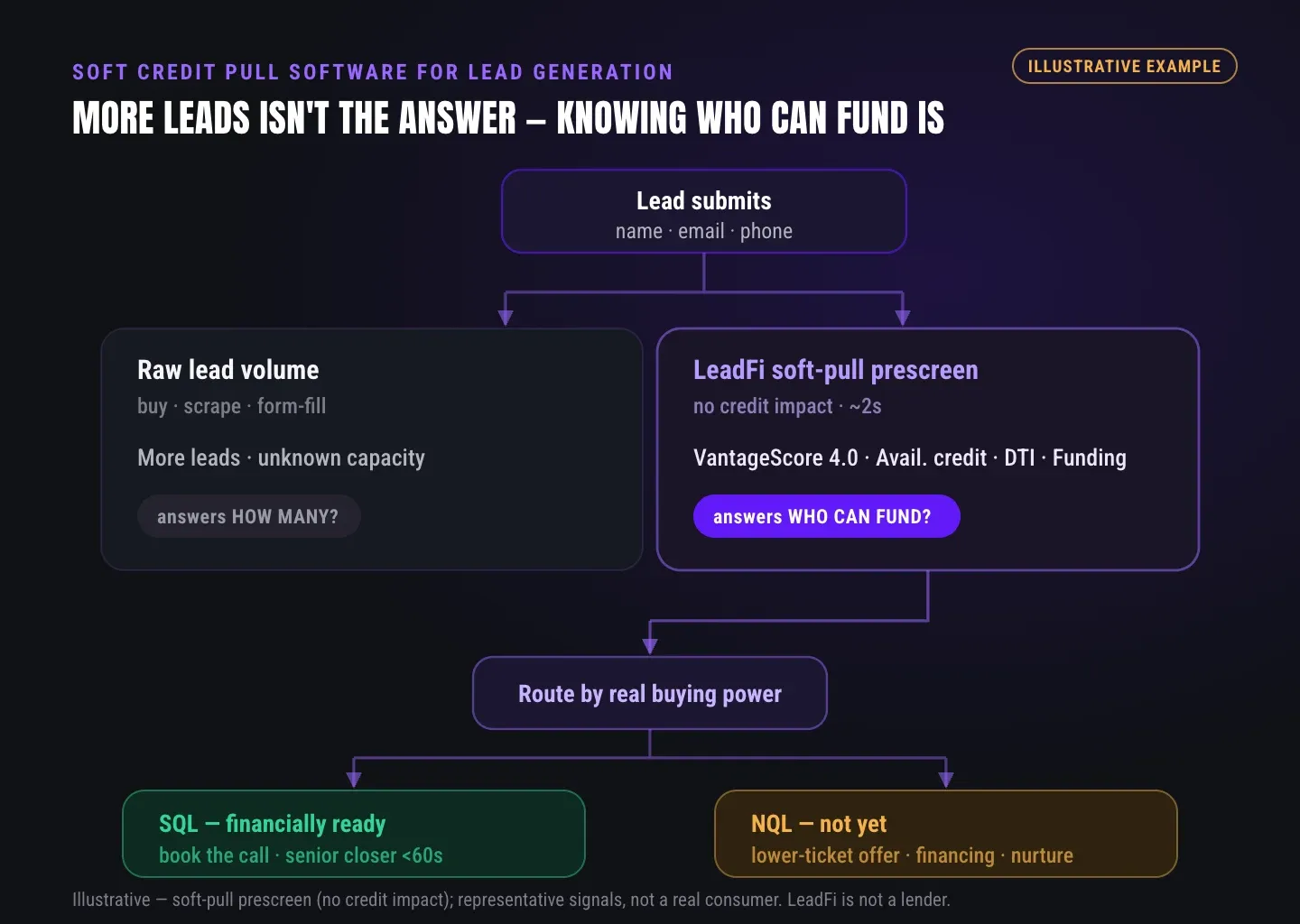
Quick answer: Soft credit pull software for lead generation reads financial-readiness signals from lead data without a hard inquiry, so prescreening doesn't create a hard credit pull on the consumer. LeadFi uses it to classify leads as sales-qualified or not, then routes each one to the right next step. It informs your routing and rep prep. It never approves or denies a consumer.
A "soft pull" is a prescreen, not a credit decision. As a result, prescreening reads readiness signals rather than creating a hard inquiry. Confirm the exact "no credit impact" framing fits your specific workflow with your counsel.
Most soft-pull tools stop at the data append. LeadFi is built to do more. It pairs the readiness signal with routing, CRM workflow, and ad feedback. The score is a starting point, not the finish line.
Soft pull vs hard pull, in plain terms
A hard pull happens when someone applies for credit and a lender decides. A soft pull, by contrast, reads readiness signals for prescreening. LeadFi uses the soft pull for qualification and routing, not lending.
Readiness, not approval
LeadFi reads buying power so you know who to prioritize. However, it does not underwrite, approve, or deny anyone. Treat the score as context for the next conversation, not a judgment of the person.
Built for routing, not just data
Raw credit data alone won't fix your pipeline. Instead, LeadFi turns each readiness signal into a next step: closer call, low-ticket offer, payment plan, or financing path. As a result, every lead triggers the right action within your counsel-approved workflow.
Thin-input by design
LeadFi can work from name, email, and phone — the fields you already collect at submission. For many workflows, that means lighter inputs up front. So opt-in friction stays low. Actual data and identity matching depend on consent, disclosures, and configuration.
INTELLIGENCE LAYER
Qualify Leads By Financial Readiness From Name, Email, And Phone
Quick answer: LeadFi can start from name, email, and phone — fields you usually capture at submission. From those inputs, it is designed to support a high-confidence identity match, then run soft-pull prescreening. Where consent, disclosures, and configuration support it, it can surface readiness signals like VantageScore 4.0, available credit, income, debt, debt-to-income ratio, and funding pre-approval context to inform routing and rep prep.
Self-reported answers are often wrong. For example, people round up income, hide debt, or guess at their own numbers. Because of that, reps walk into calls blind — or worse, confident about the wrong leads.
LeadFi reduces that reliance on guesswork. Instead, it uses permissioned readiness signals tied to your workflow and disclosures. So your team sees real buying-power context within the use and access controls you've defined.
Identity match before the soft pull
LeadFi can match identity-related information — such as current address and age — to support a high-confidence match first. This step is designed to happen before prescreening, so the readiness data maps to the right person. Reliability depends on the inputs and configuration in your workflow.
Readiness signals you can route on
Where consent and disclosures support it, signals can include VantageScore 4.0, available credit, income, debt, and debt-to-income ratio (DTI). For example, DTI compares monthly debt to income — a quick read on real capacity. Each signal feeds routing rules you and your counsel approve.
Funding pre-approval context
For offers that lean on financing, LeadFi can surface funding pre-approval signals and pay-path context. These are signals, not a promise of funding outcomes. As a result, you spot who may need a financing branch versus self-pay before the call, not after a stall.
Rep prep that respects buyer dignity
Readiness is operational, not moral. In practice, reps get context to serve the buyer better: the right offer, the right pace, the right pay path. The goal is fit, not a verdict on anyone's worth. Surface only what your disclosed purpose and data-minimization practices allow.
ROUTING
Route SQLs To Closers And Monetize NQLs
Quick answer: LeadFi splits leads into SQLs (sales-qualified, financially ready now) and NQLs (lower readiness today). SQLs get fast-tracked to closers for speed-to-lead. NQLs route to low-ticket offers, payment plans, or financing paths, so no traffic gets wasted. LeadFi informs routing and does not approve or deny consumers. Because routing can rely on readiness data, review your routing logic with counsel.
Speed matters most for ready buyers. When an SQL submits, LeadFi can trigger an instant calendar path or a closer notification. As a result, your best leads reach a human while momentum is high, not the next morning.
Lower-readiness leads aren't dead leads. Instead of dumping them, LeadFi can route NQLs to a sub-$3,000 low-ticket offer, a payment plan, or a financing branch. That turns wasted calls into recoverable pipeline.
SQL routing for speed-to-lead
Financially ready leads jump the line. LeadFi can send SQLs straight to a closer calendar or fire a notification with permitted readiness context. First the lead is classified, then it lands where it converts.
NQL paths that still monetize
NQLs route to low-ticket continuity, payment plans, or alternate offers. For example, a lead who can't fund the flagship today may engage a $997 entry path. The CRM keeps the door open instead of slamming it. Note: differential treatment based on credit-derived data can carry notice obligations — confirm your approach with counsel.
Financing-ready vs self-pay branches
Some buyers want the offer but need a pay path. LeadFi can flag likely financing candidates using income and DTI context. Then your team routes them to a financing branch instead of losing the deal to sticker shock.
Cleaner calendars for closers
Closers should spend time on people who can buy. By filtering NQLs to other paths, LeadFi helps keep premium calendars focused. Results vary by team and offer; LeadFi makes no performance guarantees.
| Dimension | LeadFi (thin-input) | Address-required soft-pull tools |
|---|---|---|
| Minimum inputs | Name, email, phone (many workflows) | Name + address minimum (varies by vendor) |
| Funnel friction | Lower — fewer fields up front | Higher — address adds form fields |
| Primary use | Financial-readiness routing for high-ticket sales | Often financing prequal in lending/auto/home |
| Routing logic | SQL/NQL routing built in | Varies; may be data-only |
| Ad signal loops | Can feed Meta, Google, TikTok, Hyros (where permitted) | Varies by vendor |
| Consumer decision | Does not approve or deny consumers | Varies by vendor |
Vendor details vary and change. Confirm any competitor specifics directly with that vendor.
ATTRIBUTION & FEEDBACK
Feed Qualified-Lead Signals Into Your CRM And Ad Stack
Quick answer: LeadFi sits behind your form, funnel, calendar, or CRM and enriches leads after submission. It can write qualification status, tags, stages, and permitted readiness fields into your CRM via webhook, API, Zapier, Make, or native workflow. It can also feed qualified-lead signals back into Meta, Google, TikTok, and Hyros — where permitted by the platform and your setup — so spend can optimize toward real buyers. No platform performance guarantees.
LeadFi doesn't replace your stack; it complements it. First, the capture tool catches the lead. Then LeadFi adds the readiness layer and routing on top.
This creates leverage across both teams. Sales gets buying-power context before the call. Meanwhile, marketing gets a cleaner signal to train ad algorithms on real buyers, not just cheap opt-ins.
CRM updates, not vague "integration"
LeadFi can push SQL/NQL status, permitted financial fields, tags, pipeline stages, and workflow triggers. So qualification lives where your team already works: GoHighLevel, HubSpot, Close, Pipedrive, Keap, and similar CRMs. Apply data-minimization and access controls so only the right people see sensitive fields.
Ad signal feedback loops
LeadFi can send qualified-lead events back to Meta, Google, TikTok, and Hyros where supported and permitted. There are no ROAS guarantees — only a cleaner signal. Confirm data-sharing permissions and each platform's policies before sending any credit-derived signals.
Real-time redirects and next steps
After submit, LeadFi can drive a dynamic next step: a closer calendar for SQLs, a low-ticket offer page or financing path for NQLs. The redirect depends on your stack, but the logic follows your readiness rules.
Works with your capture surfaces
LeadFi can receive leads from ClickFunnels, Typeform, Jotform, GoHighLevel forms, HubSpot forms, custom landing pages, and webhook submissions. Connectors depend on your setup, but the pattern stays the same: capture, enrich, classify, act.
See which of the leads you already have can actually afford to buy.
INTELLIGENCE LAYER
Why High-Ticket Teams Choose Soft-Pull Prescreening
Quick answer: High-ticket teams choose soft-pull prescreening because sales time is expensive and self-reported data is unreliable. Readiness signals from name, email, and phone help reps focus on buyers who can afford a $1,000–$10,000+ offer. The aim is SQL quality over raw lead volume — fewer wasted calls, better speed-to-lead, and ad spend pointed at real buyers.
When ads drive volume but few buyers, closers burn hours on the wrong calls. That's the moment readiness matters. The pain isn't "more leads" — it's sales capacity eaten by interested-but-not-ready prospects.
Some soft-pull tools need name plus address at minimum to run a pull. As a result, that adds form fields and can lower opt-in conversion. By contrast, LeadFi can work from name, email, and phone for many workflows. So you can qualify by buying power without heavier inputs up front.
Thin-input vs address-required tools
Address-required tools add funnel friction. However, LeadFi's thin-input path keeps forms short, which can protect opt-in rates. Where true for your workflow, that means lighter inputs up front to start qualification.
Quality over volume
A healthy lead count can hide low SQL quality. Instead, LeadFi optimizes for financially qualified demand, not vanity opt-ins. As a result, booked calls are more likely to reflect real buying power.
Less wasted sales time
Every mismatched call has a cost. By routing NQLs elsewhere, LeadFi helps closers spend hours on probable buyers. The deals don't speed up because of magic — they speed up because the queue is cleaner.
Built for high-ticket verticals
LeadFi fits coaching, consulting, course creators, agencies, funding, mortgage, lending, real estate, insurance, and auto loans. In short, any team selling roughly $1,000–$10,000+ where buying power decides the deal.
Comparison: thin-input vs address-required soft pull
See the comparison table below. Vendor details vary and change. Confirm any competitor specifics directly with that vendor.
WORKFLOW DESIGN
Compliance-Aware Setup Before Launch
Quick answer: You don't need a finished compliance program before working with LeadFi. As part of onboarding, LeadFi helps teams set up a compliance-aware qualification workflow — including privacy policy language, consent language, and TCPA-aware and FCRA-aware practices. This is a value-add that speeds launch, not a blocker. LeadFi supports compliance-aware workflows, does not provide legal advice, and does not guarantee compliance; clients should review their use case with counsel.
Compliance shouldn't feel like a wall. Instead, the goal is one consistent story: form disclosures, SMS consent, and CRM notes that all match what happens next.
LeadFi helps you align that story during setup. So you can launch a clean, readiness-based workflow without standing up a heavy program first. That said, your counsel still reviews customer-facing language and your specific use case.
Onboarding help, not a blocker
Setup includes guidance on privacy and consent language plus TCPA-aware practices. However, this is workflow help, not legal advice. It is designed to shorten time-to-launch, not delay it.
Consent and disclosures stay
LeadFi never minimizes consent or disclosures. In practice, readiness workflows run inside disclosures you and your counsel approve. The soft pull is a prescreen, so confirm the "no credit impact" framing and disclosure basis fit your specific path.
LeadFi's clear boundary
LeadFi classifies and routes; it does not approve or deny consumers. Likewise, it does not provide legal advice or guarantee compliance. Those lines protect your buyers and your business alike.
Key takeaways
The short version
- Soft credit pull software for lead generation reads readiness signals without a hard inquiry — LeadFi uses it to qualify and route, not to approve or deny consumers.
- LeadFi can start from name, email, and phone, support a high-confidence identity match, then run soft-pull prescreening (data depends on consent and disclosures).
- Readiness routing splits SQLs (fast-tracked to closers) from NQLs (low-ticket, payment-plan, or financing paths) so no traffic is wasted.
- LeadFi writes SQL/NQL status and permitted fields to CRMs and can feed qualified-lead signals to Meta, Google, TikTok, and Hyros where permitted — no performance guarantees.
- Compliance-aware setup is onboarding help, not legal advice; confirm consent and disclosures with your counsel.
Quick answers
Fast answers before you dig in
What does soft credit pull software for lead generation do?
It reads financial-readiness signals from lead data without a hard inquiry, so you can qualify and route leads by buying power. LeadFi uses it to classify SQLs vs NQLs and route each to the right next step — informing routing and rep prep, not approving or denying consumers.
Can LeadFi qualify leads from just name, email, and phone?
For many workflows, yes. LeadFi can start from name, email, and phone, support a high-confidence identity match, then run soft-pull prescreening. Actual data and matching depend on consent, disclosures, and configuration.
Does LeadFi approve or deny consumers?
No. LeadFi classifies and routes leads using permissioned readiness signals. It does not approve, deny, or underwrite anyone, and it does not provide legal advice or guarantee compliance.
FAQ
Common questions
What is soft credit pull software for lead generation?
Soft pull vs hard pull — what's the difference?
Can LeadFi run a soft pull from name, email, and phone?
What readiness signals can LeadFi surface for lead qualification?
How does LeadFi fit my CRM and ad stack?
Does LeadFi approve or deny consumers, or make funding decisions?
What is a soft credit pull (soft inquiry), in plain terms?
Does a soft pull require the consumer's consent or disclosures?
Can a soft pull run without a full SSN or a mailing address?
Is using soft-pull data for lead qualification legal and FCRA-appropriate?
How is a soft pull different from standard data enrichment?
How long does a soft pull take to return signals?
Does the consumer get notified of, or see, a soft pull?
Sources
References
- CFPB — What is a credit inquiry? (hard vs. soft) (opens in a new tab)Federal regulator confirms a soft inquiry, unlike a hard inquiry, does not affect credit scores.
- VantageScore — VantageScore 4.0 credit scoring model (opens in a new tab)Official page describing VantageScore 4.0, the tri-bureau, trended-data model used to assess credit risk.
- Experian — What Is a Soft Inquiry? (opens in a new tab)Major credit bureau explains soft inquiries are informational and have no impact on credit scores.
Know who is ready before your next sales call.
Want to see thin-input soft-pull prescreening, SQL/NQL routing, and CRM and ad-signal feedback live? You can also walk through compliance-aware setup help before launch, so you start clean.