
FOLLOW UP AFTER A NOT NOW
How to Follow Up After a Sales Call When the Prospect Says “Not Now”
The right way to follow up after a sales call depends on why the closing call ended without a sale. A dated delay needs a calendar-based cadence, while an absent business decision-maker needs a short handoff plan and firm review date.
Watch a contact get pre-qualified.
This is exactly what your CRM gets back.
Your opt-in form
Soft pull · no impact to their credit
This is not a real soft pull. It's an example of the data points that land in your CRM contact record when a lead fills out your form.
LEADFI DEMO
Watch the demo, then start free or book a call.
GUIDE
What a “not now” leaves open after the call
A “not now” is not a complete CRM outcome. The follow-up record needs enough factual detail to guide the next action without requiring another rep to replay the call.
Log one reason code—dated timing delay, second business decision-maker, open question, or no agreed next step—plus one supporting fact, the next action, its owner, and any agreed date.
Keep the close record factual
Record what the prospect said, what both sides agreed to, and what remains open. For an absent decision-maker, use a business role such as operations lead, finance lead, or sales director; do not ask about or record marital, spouse, or household information.
The prospect’s contact consent and opt-out preferences continue to govern the cadence. If the buyer requested email only, the CRM should not start a call or SMS sequence.
Separate the stated reason from financial readiness
The stated reason explains why the closing call ended without a sale. Financial readiness is a separate internal routing input showing whether the existing inbound lead is financially fit for the core offer.
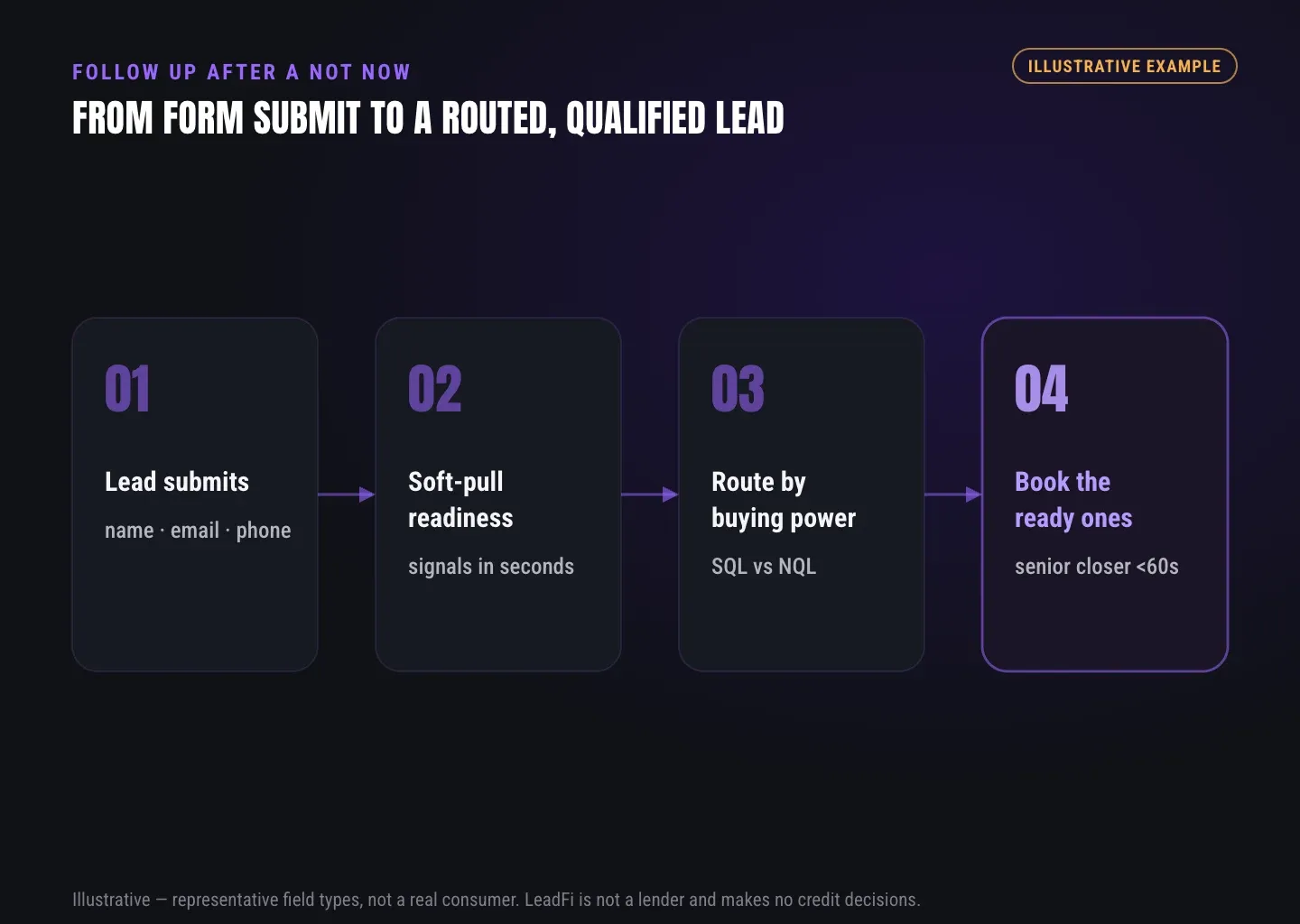
LeadFi can sit behind a form, funnel, calendar, or CRM after submission. When the buyer submits the business’s form with its disclosure, authorisation, and applicable consent language, LeadFi can work from name, email, and phone. Patent-pending identity matching is designed to establish a high-confidence match using identity-related information and identity signals before a configured soft-pull workflow and, where applicable, deeper bureau-backed workflows.
Depending on configuration, internal readiness signals may include VantageScore 4.0, available credit, income, debt, debt-to-income ratio, age, address, and optional asset context. These signals support routing and rep preparation; they should not be quoted, read back, or otherwise revealed to the buyer.
This page describes a routing input, not a credit decision, approval, or eligibility determination.
Use distinct SQL and NQL paths
An SQL, or Sales-Qualified Lead, is someone who is financially fit to buy your offer. An NQL, or Non-Qualified Lead, is someone who is not financially fit to buy your offer.
An SQL with a dated business delay can remain in a rep-owned timing workflow. An NQL can be sent to a lower-ticket offer or another product that meets the person’s financial capability.
If the call ends because of a funding gap, use the separate guide to lead routing by buying power and SQL/NQL status.
GUIDE
A follow-up schedule for a dated timing delay
A dated delay should produce a dated cadence. The purpose of each touch matters more than the total number of messages.
Confirm the agreement
Send a short recap on the same day or by the next business day. Name the prospect’s stated event, the agreed review date, the action owner, and any material promised during the call.
For example: “You asked to revisit the workflow after the November 18 launch. I will send the updated scope on November 14 for our November 20 review.”
Prepare for the stated event
For a long delay, one useful midpoint message may be appropriate if contact preferences allow it. Send requested material, answer an open product question, or provide a relevant setup checklist rather than a context-free “checking in” message.
Three to five business days before the agreed event, confirm that the planned review still fits and provide anything promised. Do not use private readiness signals to create urgency, pressure the buyer after a no, or encourage borrowing to close a funding gap.
Close the active loop
On or just after the agreed date, ask one clear question: confirm the review, choose a meeting time, resolve one open question, or close the loop.
If the buyer does not respond, a practical example is one reminder after three to five business days and one close-loop note after another five to seven business days. These are working intervals, not universal contact rules.
Move the record out of the active rep queue when the short close-loop sequence ends without a response. A nurture path may remain available only where the buyer’s consent and opt-out status allow it.
GUIDE
A follow-up schedule when another business decision-maker must weigh in
When another business decision-maker needs to review the purchase, the goal is to support a consistent internal handoff—not to run a parallel chase.
Send a forwardable summary
Within one business day, send a concise summary covering the business problem, proposed scope, workflow change, outstanding product questions, and requested next step. The first contact should be able to forward it without reconstructing the entire call.
For a LeadFi workflow, the summary might show where qualification occurs after form submission and how SQL or NQL status can write to CRM fields, tags, stages, alerts, or workflows.
Wait for the agreed review window
Schedule the next task for the review date already recorded after the call. If the operations lead is expected to review the material by Wednesday, follow up on Thursday rather than sending daily reminders.
Record only the person’s business role, the review date, and the task owner. Do not contact another person unless the business has an appropriate contact basis and the original contact agreed to the introduction.
Resolve the handoff
After the review window, ask whether the group wants a joint call, needs one factual answer, or wants to close the active loop. If there is no reply, use one brief reminder followed by a close-loop note within the contact permissions already held.
Follow-up messages should not trigger another readiness read. A new read occurs only when the buyer submits the business’s form again with its own disclosure, authorisation, and applicable consent language.
See which of the leads you already have can actually afford to buy.
GUIDE
When to stop following up and what to record
Every follow-up workflow needs an endpoint. Otherwise, old records remain in rep queues and may receive messages that no longer fit the buyer’s intent.
Stop active outreach at a clear endpoint
Stop when the prospect says no, withdraws channel consent, opts out, or completes the short close-loop sequence without replying. Also stop when the record has no defined next step.
A specific future date can remain as one scheduled CRM task without keeping the lead in the current sales queue. Suppress any channel from which the prospect has opted out.
Choose the correct CRM state
Use a clear final state such as scheduled, dated delay, open question, alternate offer, no response, closed, or opted out. A timing workflow serves an SQL with a genuine future business event; an alternate-offer workflow sends an NQL to a lower-ticket offer or another product that meets the person’s financial capability.
Payment plans, installment terms, deposits, discounts, and third-party financing options should follow one written policy applied consistently to every buyer, not an individual readiness signal.
Keep the final record concise
Store core outcomes in structured fields: next action date, action owner, contact status, SQL or NQL route, offer path, final state, and last attempt. Free-text notes can add context but should remain factual.
A useful final note might read: “Launch moved to March 4. Prospect requested email follow-up on February 18. Proposal sent. No reply after the agreed reminder and close-loop message. Moved to timing nurture.”
ROUTING
Build the cadence into the CRM and routing stack
The schedule becomes operational when the CRM can act on structured fields. Reps should not need to remember which sequence applies to each record.
Keep reason and readiness in separate fields
The follow-up field explains why the closing call ended. The readiness field determines which configured offer path fits the existing inbound lead. Keeping them separate prevents a timing delay from being confused with an alternate-offer route.
Neither field should override a direct no, expand contact permission, or be used to pressure the buyer.
Return routing data to existing workflows
LeadFi can return qualification outputs through a webhook, API, Zapier, Make, or a supported native workflow. The CRM can use the result to update a field, assign an owner, change a stage, create a task, or trigger an appropriate path.
Structured SQL-quality events may also be sent to Meta, Google, TikTok, Hyros, or operations systems where the setup and platform rules allow. This supports optimization around lead quality rather than raw lead volume, without promising a particular platform result.
Review the setup before launch
Before launch, align the business’s form language, privacy terms, disclosure and authorisation flow, CRM fields, routing rules, and contact sequences. LeadFi supports compliance-aware workflows and can help teams evaluate privacy and consent language choices, TCPA-aware practices, and FCRA-aware workflow considerations.
LeadFi does not provide legal advice. Clients should confirm their use case, contact rules, and disclosure requirements with their own counsel and advisers.
Related reading: a closer look at prequalifying leads before the sales call, practical insights on sales lead qualification, a practical guide to financial readiness signals for sales teams.
| Timing point | Purpose | Suggested action | CRM record |
|---|---|---|---|
| Same day or next business day | Confirm the closing call | Recap the event, date, owner, and next step | Agreed date and action |
| Midpoint of a long delay | Add useful context | Send one requested or relevant resource | Material sent and open question |
| 3–5 business days before the event | Prepare for review | Confirm the date and provide promised material | Meeting status and owner |
| On or just after the event | Request one next step | Ask one direct question | Reply, meeting, or no response |
| 3–5 business days later | Recover a missed reply | Send one brief reminder | Attempt and channel |
| 5–7 business days later | Close the active loop | Send a respectful close-loop note | Nurture, alternate path, closed, or scheduled |
Key takeaways
The short version
- Base post-call cadence on the recorded reason and agreed date.
- Keep follow-up reasons separate from SQL and NQL routing.
- Use one reminder and one close-loop note as a practical baseline.
- Never reveal private financial-readiness signals in buyer messages.
- Route NQLs to a fitting lower-ticket or alternate offer.
Quick answers
Fast answers before you dig in
How should I follow up after a sales call when the prospect says not now?
Send a recap by the next business day, schedule later touches around the prospect’s recorded event or review date, and end with a short close-loop sequence. Stay within existing consent and opt-out preferences.
Should financial readiness determine the follow-up message?
No. The prospect’s stated reason sets the message and timing. Financial readiness is an internal routing input that helps place an SQL in the core sales workflow or an NQL in a fitting alternate-offer path.
When should a rep stop following up?
Stop after a direct no, an opt-out, loss of channel permission, or completion of the defined close-loop sequence without a response. Record the final state and any specifically agreed future date.
FAQ
Common questions
How soon should I follow up after a sales call?
What is the best follow up after sales call cadence?
How many times should I follow up after a sales call?
Should financial readiness set the sales follow-up cadence?
Does LeadFi run another soft pull during follow-up?
How does LeadFi support follow up after a sales call?
Sources
References
- CFPB — What is a credit inquiry? (hard vs. soft) (opens in a new tab)Federal regulator confirms a soft inquiry, unlike a hard inquiry, does not affect the consumer's credit score.
- VantageScore — VantageScore 4.0 credit scoring model (opens in a new tab)Official page describing VantageScore 4.0, the tri-bureau, trended-data model used to assess credit risk.
- CFPB — Who can request to see my credit report? (opens in a new tab)Federal regulator explains the FCRA rules governing who may obtain a credit report.
Know who is ready before your next sales call.
A useful follow-up system gives each closed call a date, owner, stop rule, and clear CRM state. LeadFi adds a separate financial-readiness layer so high-ticket teams can keep SQL timing opportunities in the sales workflow and send NQLs to fitting lower-ticket or alternate offers.