
FINANCIAL READINESS SIGNALS FOR SALES TEAMS
Financial-Readiness Signals for Sales Teams, Explained
Most high-ticket sales teams get too many leads and too little context. A form fills up. A calendar books.
Watch a contact get pre-qualified.
This is exactly what your CRM gets back.
Your opt-in form
Soft pull · no impact to their credit
This is not a real soft pull. It's an example of the data points that land in your CRM contact record when a lead fills out your form.
LEADFI DEMO
Watch the demo, then start free or book a call.
PLATFORM OVERVIEW
What a readiness signal is
A readiness signal is not a verdict on a person. Rather, it is an operational read for your sales flow — context for the rep, not a judgment of worth.
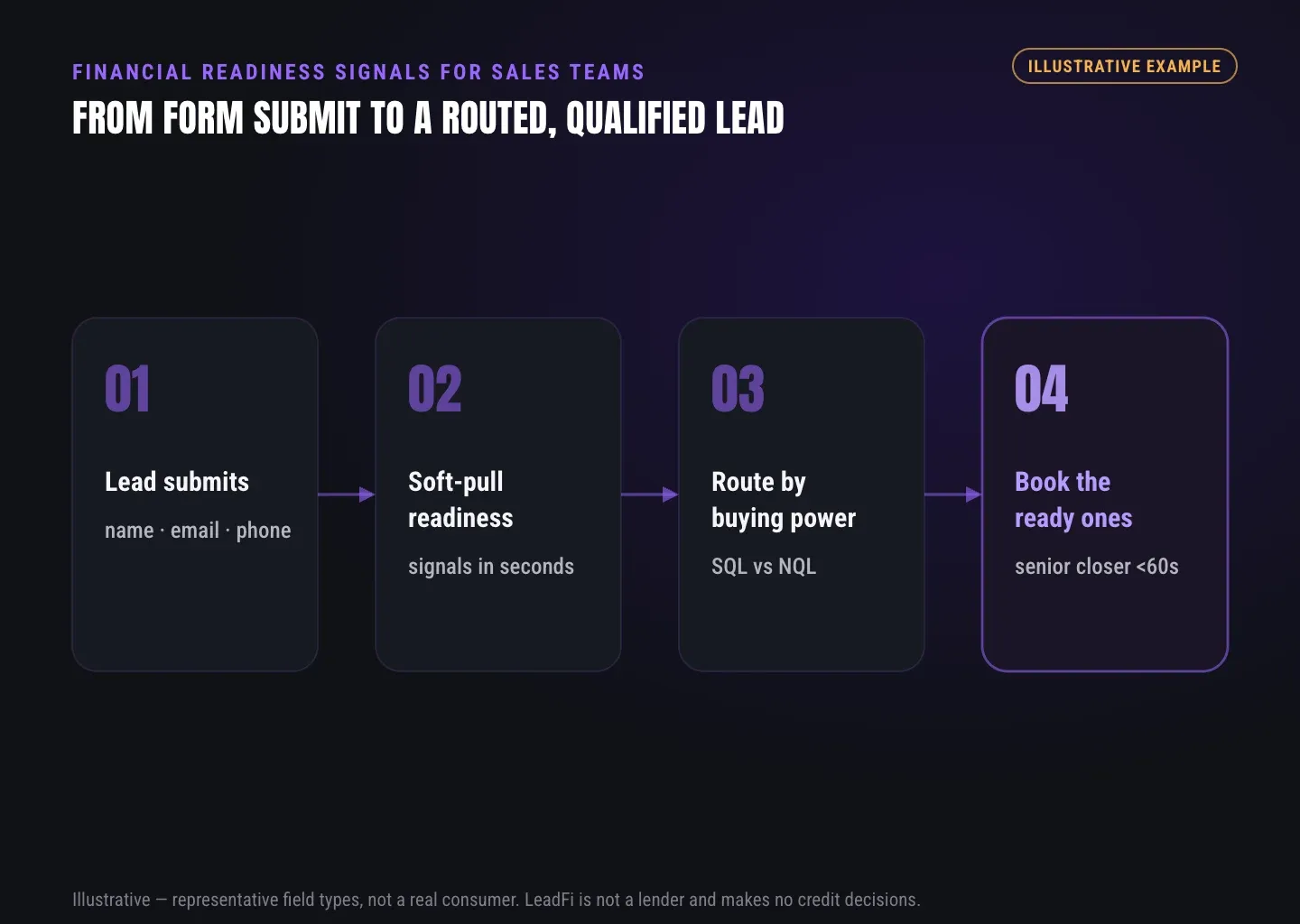
Most tools stop at capturing a name and email. That's why LeadFi adds a layer behind the form: after the lead submits, it can use name, email, and phone to surface readiness data, then route.
Readiness vs raw lead volume
Raw volume tells you how many people raised a hand. Readiness tells you which hands can pay. For a $5,000 offer, those are very different numbers — and as a result, your closers spend time where it converts.
Signal, not a decision
A readiness signal describes buying power for routing. It is not a loan approval or a consumer denial. LeadFi classifies and routes; your team still owns the human call.
Permissioned data, not scraping
LeadFi uses permissioned readiness signals that fit your consent and disclosures. It does not scrape or guess from clicks. Because of that, the read is grounded in real data, not vibes.
Operational, not moral
Financial readiness is about the next talk, not a person's value. Treat it as fit for a program tier. In practice, that framing keeps your team respectful and your copy honest.
INTELLIGENCE LAYER
The signals LeadFi surfaces (VantageScore 4.0, available credit, income, DTI)
The exact signals depend on your workflow, consent, and setup. Below are the common ones and how a sales team reads each. First, note the guardrail: these are readiness reads, never underwriting decisions.
For lead resellers, LeadFi can tag each lead with a readiness label instead of showing a raw score. That way a partner ships prequalified leads, not a consumer's private numbers.
VantageScore 4.0
VantageScore 4.0 is a credit-score signal, available in some workflows. Paired with consent and disclosures, it helps gauge general credit standing for routing. Use it as one input, not the whole picture.
Available credit
Available credit shows room to fund a buy now. For a $3,000–$10,000 offer, that headroom often matters more than a raw score. As a result, it becomes a strong buying-power signal for high-ticket teams.
Income and DTI
Income and debt-to-income (DTI) together show room to carry a payment. DTI compares monthly debt to monthly income. A lower ratio usually signals more room, so it helps you tier who reaches a closer first.
Funding pre-approval signals
These are signals, not a promise of funding. Instead, they hint whether a financing path could fit a lead. For funding, mortgage, and auto teams, that hint shapes which offer or calendar comes next.
Age and current address
Age and current address are identity-related signals that support matching and routing. LeadFi's identity matching aims for a high-confidence match before any soft-pull prescreening. In fact, many workflows can start from name, email, and phone — without an address up front.
Optional net-worth context
Where available, optional net-worth or asset context adds depth for premium offers — think liquid assets, brokerage, or retirement signals. Use these only when your consent and disclosures cover them.
INTELLIGENCE LAYER
Turning signals into qualification tiers
Signals only pay off when they trigger action. That's why LeadFi maps readiness to routing rules you define: you choose the cutoffs, and the engine scores each lead in near real-time.
SQL means Sales-Qualified Lead — ready enough for a closer. NQL means Non-Qualified Lead — not ready yet, but not thrown away. Each path has its own next step, so no lead is wasted and no closer is buried.
Set thresholds you control
You define what "ready" means for your offer. For example, a younger, thin-credit audience needs different cutoffs than a mortgage list, so LeadFi lets you tune thresholds per campaign. Each funnel gets its own logic.
Route SQLs for speed-to-lead
SQLs should reach a closer while momentum is high. To that end, LeadFi can trigger a redirect to a closer calendar, tag the CRM record, and notify the rep. As a result, ready buyers get a fast, warm handoff.
Route NQLs to a real path
NQLs go to a low-ticket offer, a payment plan, or a financing path — not the trash. This is how you use demand that isn't closer-ready today. Over time, some of those leads warm into SQLs.
Write outcomes into your CRM
LeadFi can push qualification status into CRM fields, tags, stages, and workflows. So SQL/NQL status lives where your team already works — no separate dashboard to babysit.
Feed signals to ad platforms
Where permitted and set up right, LeadFi can send SQL-quality signals back to Meta, Google, TikTok, Hyros, and your ops stack. As a result, campaigns learn from financially qualified demand, not just booked calls. Still, LeadFi guarantees no platform performance.
See which of the leads you already have can actually afford to buy.
INTELLIGENCE LAYER
How readiness routing compares to common setups
Here is a plain side-by-side. It compares a common form-plus-calendar setup with the same stack once LeadFi adds readiness routing behind it.
| Element | Capture-only setup | With LeadFi readiness routing |
|---|---|---|
| Lead context before the call | Name, email, phone only | Financial-readiness signals added after submit |
| SQL vs NQL split | Manual, or found mid-call | Applied automatically by your rules |
| Speed-to-lead for ready buyers | Same queue as everyone | Fast-tracked to a closer or calendar |
| NQL handling | Often ignored or dead | Low-ticket, payment plan, or financing path |
| CRM record | Basic contact fields | Qualification status, tags, stages |
| Ad feedback | Optimizes for all leads | Can optimize for financially qualified leads |
LeadFi complements your forms, funnels, calendars, and CRM. It does not replace them. Instead, it makes the stack you already run smarter after each submit.
GUIDE
Compliance, consent, and disclosures
Financial data deserves a clear, honest setup. That's why LeadFi treats compliance-aware setup as onboarding help, not a blocker — a value-add before you go live.
The core idea is simple: prospects should hear one consistent story. For example, your form, your SMS consent, and your rep script should match. When you ask financial questions, explain why — they help route someone to the right program.
Consent and disclosures come first
LeadFi is built for permissioned workflows, which means consent and disclosures that fit your setup. LeadFi does not support "check anyone's credit" or "no consent needed" framing — ever.
No-credit-impact positioning, when accurate
Soft-pull prescreening can be a soft pull with no impact on the consumer's credit score. However, use that line only when it's true for your path, and confirm the detail with product and your counsel per workflow.
Compliance-aware setup as onboarding
LeadFi can help you align privacy policy language, consent, and TCPA-aware practices before launch. Still, this is guidance, not legal advice. Your advisors sign off on the final language.
What LeadFi does not do
LeadFi does not approve or deny consumers and guarantees nothing. Rather, it classifies and routes leads using permissioned signals. Clients should review their use case with counsel.
| Element | Capture-only setup | With LeadFi readiness routing |
|---|---|---|
| Lead context before the call | Name, email, phone only | Financial-readiness signals added after submit |
| SQL vs NQL split | Manual, or found mid-call | Applied automatically by your rules |
| Speed-to-lead for ready buyers | Same queue as everyone | Fast-tracked to a closer or calendar |
| NQL handling | Often ignored or dead | Low-ticket, payment plan, or financing path |
| CRM record | Basic contact fields | Qualification status, tags, stages |
| Ad feedback | Optimizes for all leads | Can optimize for financially qualified leads |
Key takeaways
The short version
- A financial-readiness signal reads buying power after a lead submits — it informs routing, never approving or denying a consumer.
- LeadFi can surface VantageScore 4.0, available credit, income, debt, DTI, funding pre-approval signals, age, and current address, subject to consent and disclosures.
- You set thresholds; LeadFi tags each lead SQL or NQL and triggers the next step in near real-time.
- SQLs fast-track to a closer for speed-to-lead; NQLs route to low-ticket, payment-plan, or financing paths — no lead is wasted.
- LeadFi sits behind your existing form, funnel, calendar, and CRM and supports compliance-aware setup as onboarding help, not legal advice.
Quick answers
Fast answers before you dig in
What a readiness signal is
A financial-readiness signal is a data point that shows how ready a lead is to buy at your price — for example available credit, income, or debt-to-income. LeadFi reads these signals after submission and turns them into SQL or NQL routing. It never approves or denies anyone; it informs your next step.
The signals LeadFi surfaces
LeadFi can surface financial-readiness signals such as VantageScore 4.0, available credit, income, debt, and debt-to-income (DTI). Where consent and disclosures support it, it may also surface funding pre-approval signals, current address, age, and optional net-worth context. These feed routing and rep prep — not consumer approval.
Turning signals into qualification tiers
LeadFi turns readiness signals into tiers — usually a Sales-Qualified Lead (SQL) path and a Non-Qualified Lead (NQL) path. SQLs route to a closer or calendar fast for speed-to-lead. NQLs route to a low-ticket offer, a payment plan, or a financing path. You set the thresholds; LeadFi applies them after submission.
How readiness routing compares to common setups
Most stacks capture leads and book calls but never read buying power before a rep engages. Readiness data for sales adds that layer after submit. A readiness-routing flow uses the same tools but splits SQL from NQL automatically and fast-tracks ready buyers.
Compliance, consent, and disclosures
LeadFi supports compliance-aware workflows and helps teams align form disclosures, consent language, and CRM notes before launch. It does not provide legal advice, does not guarantee compliance, and does not approve or deny consumers. Your counsel reviews customer-facing language and data practices for your use case.
FAQ
Common questions
What are financial readiness signals?
How is a readiness signal different from a credit decision?
What buying power signals can LeadFi surface?
Do I need a customer's address to use readiness data for sales?
How does SQL and NQL routing work?
Does LeadFi replace my CRM, form, or calendar?
Is LeadFi compliant, and does it give legal advice?
Sources
References
- CFPB — What is a credit inquiry? (hard vs. soft) (opens in a new tab)Federal regulator confirms a soft inquiry, unlike a hard inquiry, does not affect the consumer's credit score.
- VantageScore — VantageScore 4.0 credit scoring model (opens in a new tab)Official page describing VantageScore 4.0, the tri-bureau, trended-data model used to assess credit risk.
- CFPB — Who can request to see my credit report? (opens in a new tab)Federal regulator explains the FCRA rules governing who may obtain a credit report.
Know who is ready before your next sales call.
Financial-readiness signals only pay off when they drive action. To that end, LeadFi reads buying power after submit, then sends each lead to the right path — fast for SQLs, a real path for NQLs.