
PREQUALIFY LEADS BEFORE THE SALES CALL
Pre-Qualify Leads Before the Sales Call: A Practical Guide
Most sales teams book the call first and learn buying power last. That order wastes closer time and burns pipeline. When you prequalify leads before the sales call, you flip it: you learn readiness first, then decide who earns a live conversation.
Watch a contact get pre-qualified.
This is exactly what your CRM gets back.
Your opt-in form
Soft pull · no impact to their credit
This is not a real soft pull. It's an example of the data points that land in your CRM contact record when a lead fills out your form.
LEADFI DEMO
Watch the demo, then start free or book a call.
GUIDE
What pre-qualification surfaces before a call
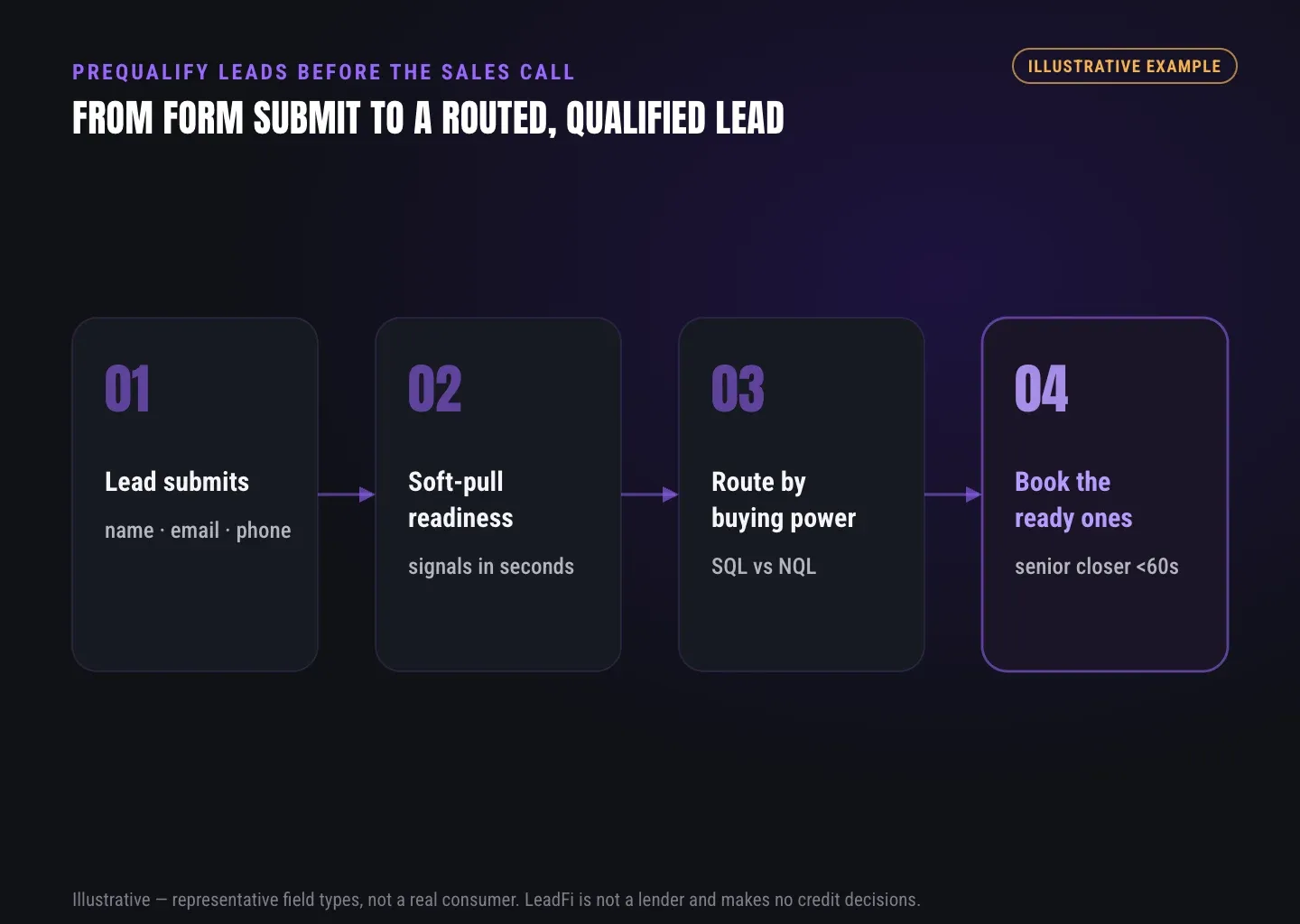
Lead prequalification surfaces buying power before a rep spends time. After a lead submits, LeadFi reads permissioned financial-readiness signals — VantageScore 4.0, available credit, income, debt, and debt-to-income. Then it labels each lead a Qualified Lead (SQL) or a Non-Qualified Lead (NQL) and routes the next step. This is readiness for routing, not a consumer approval or denial.
Readiness is an operational label. For example, a prospect can be a great fit and still not be ready to buy a $5,000 offer today. That gap is exactly what prequalification closes.
Here is the core idea: most tools stop at capturing a lead. LeadFi adds a readiness layer after submit. As a result, you know who to prioritize before the phone rings.
Buying-power signals, not vanity metrics
LeadFi can surface signals like VantageScore 4.0, available credit, income, debt, and debt-to-income. Each one maps to real buying power for high-ticket offers. For a financing-backed sale, a strong debt-to-income ratio often matters more than a raw score.
SQL vs NQL as a clear label
An SQL is a Qualified Lead, ready enough to earn a live call. An NQL is a Non-Qualified Lead, better served by a low-ticket offer, a payment plan, or a financing path. LeadFi applies your rules plus readiness signals to score each one.
Readiness, defined once
Throughout this guide, "readiness" means one thing: financial fit for your offer, based on permissioned signals. We reuse the word so the meaning stays stable. It never means LeadFi decided the person's worth.
Rep prep before the call
When a lead does earn a call, the rep starts warmer. LeadFi can write permitted readiness context into the CRM record. As a result, the closer opens with the right offer tier instead of guessing for ten minutes.
INTELLIGENCE LAYER
Soft pull from name, email, and phone
A soft pull reads financial-readiness signals from identity-related information — often just name, email, and phone. It is built for soft-pull prescreening, so it does not affect the consumer's credit score, and it never approves or denies anyone. LeadFi's identity matching is designed to confirm a high-confidence match before any prescreening runs, always inside your consent and disclosure setup.
First, let's clear up the "credit check without address" question. The value is not a trick to skip an address. Instead, the value is thin-input prequalification: you start from name, email, and phone, then match confidently before any readiness signal is read.
That said, some workflows can run without collecting address and date of birth up front, which cuts form friction. Still, the exact fields depend on your workflow and your disclosures — so confirm the path that fits your case with counsel.
Thin-input prescreening, explained
Thin-input means LeadFi can start from a short set of identity signals. For many workflows, name, email, and phone are enough to begin. That is why you can often prequalify inbound leads without a long financial questionnaire.
Identity match comes first
Before any soft pull runs, LeadFi is designed to establish a high-confidence identity match. Identity matching helps line up the right person with the right signals. Because of that, the readiness data stays tied to the correct lead.
No credit-score impact from the soft pull
The soft pull is prescreening: it reads readiness signals without affecting the consumer's credit score. It is not a hard inquiry and not an underwriting decision. LeadFi does not approve or deny anyone — it classifies and routes.
Consent and disclosures stay in place
None of this skips consent. LeadFi supports compliance-aware workflows, and your team designs the disclosures with counsel. In practice, your form language, SMS consent, and CRM notes should all tell one consistent story.
ROUTING
Prioritizing reps' time
To protect rep time, route financially qualified leads to speed-to-lead paths and send lower-readiness leads elsewhere. LeadFi can send SQLs straight to a closer calendar and route NQLs to a low-ticket offer, a payment plan, or a financing path. The result is fewer wasted sales calls and faster contact with the buyers most ready to move.
Sales time is your most costly resource on a high-ticket floor. Every call with an NQL is a call a closer did not spend on an SQL. Therefore, prequalification reallocates that time on purpose.
Speed matters too. When an SQL lands, LeadFi can trigger the next step right away. As a result, ready buyers reach a closer in minutes, not the next morning.
SQLs to a closer, fast
An SQL should not wait in a queue. LeadFi can route Qualified Leads straight to a closer calendar or a priority alert. First it classifies, then it fires the trigger — so the fastest lead gets the fastest human.
NQLs to a low-ticket or payment path
An NQL is not a dead lead. LeadFi can route Non-Qualified Leads to a low-ticket offer, a payment plan, or a financing path you define. Instead of a wasted call, that prospect enters a track built for their readiness.
CRM actions, not vague "integration"
LeadFi writes real outcomes into your CRM: fields, tags, pipeline stages, and workflow triggers, not a vague sync. For example, an SQL tag can start a same-day call task while an NQL tag starts an email sequence.
Ad and CRM signal loops
Where permitted and correctly set up, qualified-lead signals can feed back into Meta, Google, TikTok, Hyros, and your ops stack. This helps campaigns learn from financially qualified demand, not just raw form fills. However, LeadFi does not guarantee platform performance, and you should confirm platform and data-provider terms with counsel.
Reprocess an existing backlog
You can also run older leads through the same logic. For instance, reprocessing a backlog can surface SQLs that slipped past a busy team. Those leads then re-enter routing like any fresh submission.
| Approach | When readiness is known | Closer time on NQLs | Speed-to-lead for SQLs | Form length |
|---|---|---|---|---|
| Book first, qualify on the call | During the live call | High — spent before you know fit | Same for everyone | Often long, to "pre-screen" manually |
| Prequalify with LeadFi | After submit, before the call | Low — NQLs route elsewhere | Fast — SQLs jump the queue | Short — enrich after submit |
GUIDE
Keeping forms short
Short forms convert better, and thin-input prescreening lets you keep them short. Because LeadFi can often start from name, email, and phone, you avoid long financial questionnaires that scare prospects off. You collect fewer fields up front, then enrich readiness after submit — so form length drops without losing qualification depth.
Every extra field costs conversions, and high-ticket buyers abandon long forms fast. The fix is not to interrogate the lead. Instead, enrich after they submit.
Here is the trade most teams miss: you can ask for less and still learn more. First capture the basics, then let readiness signals fill in the picture behind the scenes.
Fewer fields, less abandonment
A three-field form beats a twelve-field form on completion almost every time. LeadFi lets you keep capture lean because the readiness work happens after submit. So you get the lead and the signals without the friction.
Enrich after submit, not during
The lead submits name, email, and phone. Then LeadFi runs the match and prescreen behind the form. The prospect never sits through a financial questionnaire, yet your team still gets readiness context.
Explain why you ask what you ask
When you do collect a financial field, say why in plain words. For example, a short line about routing to the right program builds trust. Treat qualification as operational readiness for the next step, not a judgment of the person.
One consistent story across touchpoints
Your form, your SMS, and your CRM notes should match. Align the disclosures so the prospect hears the same thing everywhere. In short, this is a compliance-aware habit your counsel should review before launch.
See which of the leads you already have can actually afford to buy.
GUIDE
Where LeadFi sits in your stack
LeadFi sits behind your existing tools, not on top of them. It receives a lead after capture through a webhook, API, Zapier, Make, native workflow, or MCP, enriches it with readiness signals, and returns SQL/NQL routing plus CRM updates. It complements your form, funnel, calendar, and CRM instead of replacing them.
The stack flow is simple. First, capture happens in your form or funnel, then the handoff sends the lead to LeadFi. Next, enrichment and classification run. Then LeadFi acts: CRM updates, redirects, calendar paths, and permitted ad signals.
You keep the tools you like. For example, ClickFunnels, Typeform, Jotform, GoHighLevel, HubSpot, and custom forms can all feed LeadFi. Meanwhile, your CRM stays the home base where qualification status lives.
Who this is for
LeadFi fits high-ticket and credit-adjacent teams selling roughly $1,000–$10,000+ offers. That includes coaches, consultants, course creators, agencies, funding companies, mortgage and lending shops, real estate, insurance, and auto loans. If sales time is costly and buying power varies, prequalification pays off.
Integration paths
You can connect through webhook, API, Zapier, Make, a native workflow, or MCP. Actual connectors depend on your setup, so confirm the path during onboarding.
Complement, not rip-and-replace
LeadFi does not replace your calendar or CRM. Calendly handles scheduling; LeadFi decides who reaches which calendar. Likewise, your funnel builds the pages while LeadFi adds the readiness layer after submit.
RELATED READING
Related guides
Explore a practical guide to qualifying a live event audience and practical insights on reducing sales call no shows for related context.
Key takeaways
The short version
- Prequalify leads before the sales call by learning financial readiness first, then deciding who earns a live conversation.
- LeadFi reads permissioned signals — VantageScore 4.0, available credit, income, debt, and DTI — to label each lead SQL or NQL, never to approve or deny anyone.
- Soft-pull prescreening starts from name, email, and phone, does not affect the consumer's credit score, and runs inside your consent and disclosure setup.
- Route SQLs to a closer calendar fast and send NQLs to a low-ticket offer, a payment plan, or a financing path to cut wasted sales calls.
- LeadFi sits behind your form, funnel, calendar, and CRM via webhook, API, Zapier, Make, native workflow, or MCP — it complements your stack, not replaces it.
Quick answers
Fast answers before you dig in
What does pre-qualification surface before a sales call?
Lead prequalification surfaces buying power before a rep spends time. After a lead submits, LeadFi reads permissioned financial-readiness signals — VantageScore 4.0, available credit, income, debt, and debt-to-income — then labels each lead SQL or NQL and routes the next step. This is readiness for routing, not a consumer approval or denial.
How does a soft pull from name, email, and phone work?
A soft pull reads financial-readiness signals from identity-related information — often just name, email, and phone. It is built for soft-pull prescreening, so it does not affect the consumer's credit score and never approves or denies anyone. Identity matching confirms a high-confidence match first, always inside your consent and disclosure setup.
How does prequalification protect rep time?
Route financially qualified leads to speed-to-lead paths and send lower-readiness leads elsewhere. LeadFi sends SQLs straight to a closer calendar and routes NQLs to a low-ticket offer, a payment plan, or a financing path — fewer wasted sales calls and faster contact with the most ready buyers.
Can I keep forms short and still qualify leads?
Yes. Thin-input prescreening lets you keep forms short. LeadFi can often start from name, email, and phone, so you avoid long financial questionnaires and enrich readiness after submit — dropping form length without losing qualification depth.
FAQ
Common questions
How do I prequalify leads before the sales call without a long form?
Does a soft pull hurt the consumer's credit score?
Is a "soft credit check without address" a way to skip compliance?
What is the difference between an SQL and an NQL here?
Which financial-readiness signals can LeadFi surface?
Will LeadFi work with my current CRM and calendar?
Can LeadFi improve my ad performance?
Sources
References
- CFPB — What is a credit inquiry? (hard vs. soft) (opens in a new tab)Federal regulator confirms a soft inquiry, unlike a hard inquiry, does not affect the consumer's credit score.
- VantageScore — VantageScore 4.0 credit scoring model (opens in a new tab)Official page describing VantageScore 4.0, the tri-bureau, trended-data model used to assess credit risk.
- Experian — What Is a Soft Inquiry? (opens in a new tab)Major credit bureau explains soft inquiries are informational and have no impact on credit scores.
Know who is ready before your next sales call.
Prequalification works best when it runs quietly behind the tools you already trust. LeadFi supports compliance-aware workflows, does not provide legal advice, and does not approve or deny consumers.