
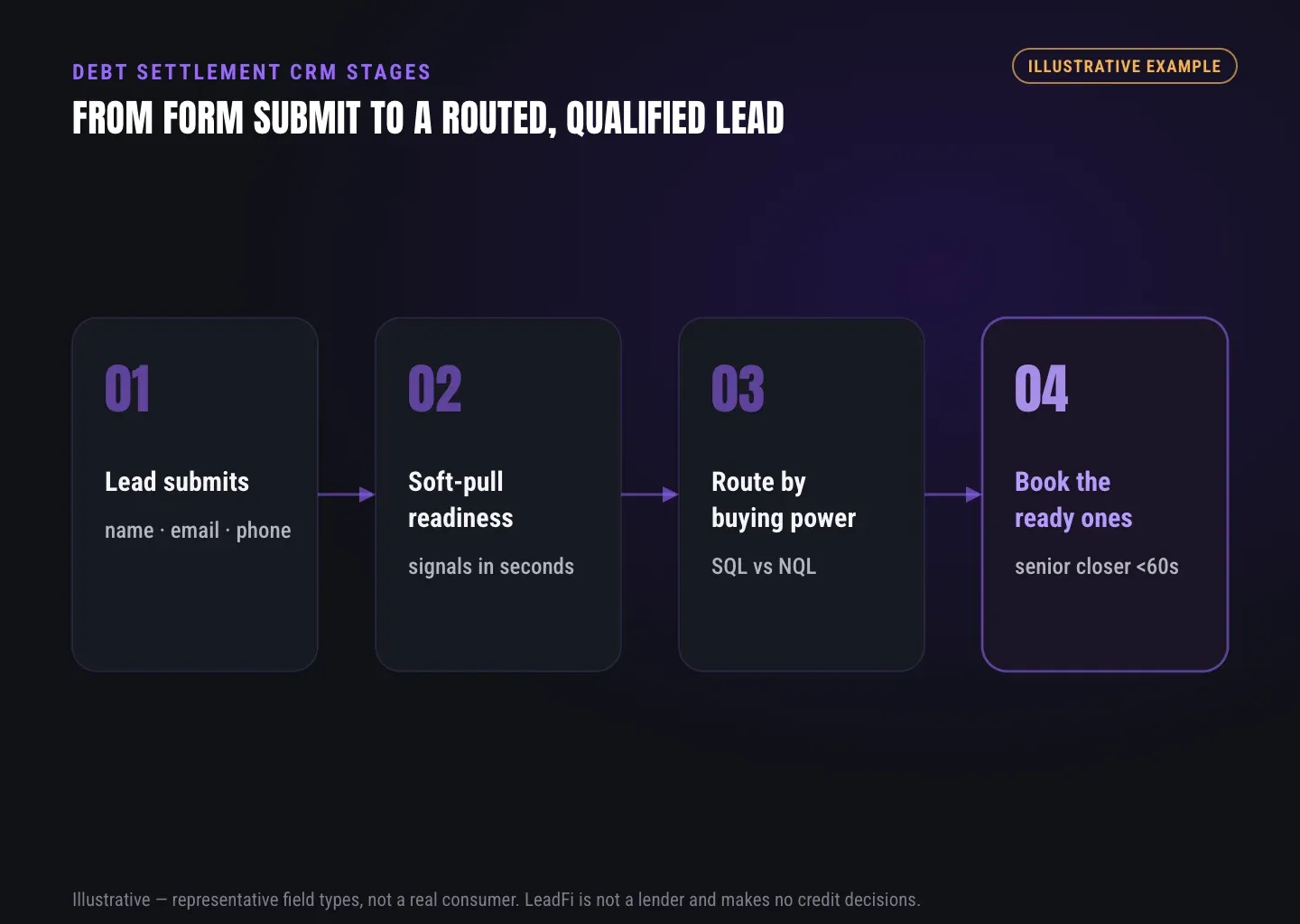
DEBT SETTLEMENT CRM STAGES
Debt Settlement CRM Setup: Stages From Inquiry to First Cleared Deposit
A debt settlement CRM should show the last completed milestone, the next owner, and where progress has stopped—not merely whether a file is open or closed. LeadFi adds financial-readiness routing behind the existing intake process.
Watch a contact get pre-qualified.
This is exactly what your CRM gets back.
Your opt-in form
Soft pull · no impact to their credit
This is not a real soft pull. It's an example of the data points that land in your CRM contact record when a lead fills out your form.
LEADFI DEMO
Watch the demo, then start free or book a call.
GUIDE
Why one lead status hides where debt settlement files stall
A single status such as “open lead” provides a count but does not identify the next task. One file may need its first conversation, another may have an unsigned agreement, and another may be waiting at the dedicated-account stage.
Quick answer: A debt settlement CRM needs milestone-based stages. Each stage should represent a confirmed event, identify the next owner or queue, and remain separate from temporary tasks and exception reasons.
Open status hides the next action
“Open” describes a record, not its workflow position. A useful stage states what happened and makes the next owner visible without requiring staff to read every note.
Mixed stages blur team ownership
Intake, review, agreement follow-up, and client-services teams may own different steps. Each stage should therefore have one clear owner or queue. Calls, texts, emails, and notes remain activities; they should not advance the stage unless the defined milestone occurs.
Readiness is a route, not enrollment
In this workflow, financially qualified means the file meets the company’s written routing rule for its first conversation or review. Not financially qualified means the file goes to the fuller budget review. Neither label is an affordability or enrollment decision, and neither route is a decline.
For SQL vs NQL reporting, SQL is the financially qualified route and NQL is the not financially qualified route in this specific workflow. A missing result must be recorded separately as “no result.”
This page describes a routing input, not a credit decision, approval, or eligibility determination.
The readiness band is taken only from the intake form the lead submitted with the company’s consent and disclosures. It routes the file to a conversation, owner, or review. Enrollment, the monthly deposit, and any cancellation stay with the program’s written policy and the client’s own disclosed budget and decision.
For field placement, see practical insights on financial readiness signals in your crm and debt consolidation lead qualification; this page does not re-teach that setup.
CRM comparison: broad statuses versus milestone stages
A milestone pipeline separates process progress from the readiness route. Managers can then review stage volume, queue age, ownership, and handoffs without treating the route as an enrollment outcome.
GUIDE
Defining debt settlement CRM stages from first inquiry to first cleared deposit
A useful stage answers three questions: What happened, when did it happen, and who acts next? Write entry and exit rules before adding automations or reports.
Quick answer: The reporting window begins with inquiry received and ends with first deposit cleared. Between those points, separate contact, review, agreement, dedicated-account, and first-draft milestones.
Stages 1–5: inquiry and review
- Inquiry received: The authorised intake form creates the record. Preserve the intake route, received time, assigned queue, and readiness route or “no result.”
- First contact pending: An owner has been assigned, but the first live conversation has not occurred.
- First conversation complete: The defined first conversation occurred. The next step is the company’s standard review or fuller budget review under its written routing rule.
- Budget review complete: The company completed its review of client-disclosed information. This milestone does not determine enrollment or a monthly deposit.
- Program review complete: The company completed its written review process. Enrollment still follows its written criteria and the client’s decision.
Stages 6–11: agreement through first cleared deposit
- Agreement sent: The approved agreement was sent through the normal process. A readiness route must not trigger agreement delivery by itself.
- Agreement signed: The agreement is complete. Sent, viewed, and signed are distinct events.
- Dedicated account pending: The agreement step is complete, but the dedicated-account milestone remains open.
- Dedicated account opened: Record only the completed stage and its timestamp.
- First draft pending: Setup milestones are complete, but the first draft has not cleared. A confirmed returned draft belongs in a separate exception path.
- First deposit cleared: This closes the reporting window for this pipeline model. Record it only as a process event.
For another workflow-oriented perspective, review a closer look at iso broker crm readiness band, while keeping this debt settlement stage model governed by its own written process.
Tasks and reason codes
Temporary work—such as a callback request, missing document, or manager question—usually belongs in a task. A reason code explains why a file remains at its current stage. For example, “client requested review time” can sit beneath “agreement sent.”
Every major stage should have an entry timestamp, one current owner or queue, and an auditable change history. One main process stage should apply to each file at a time.
Route fields and automation limits
CRM users should see only the readiness band or route, route reason, and “no result” value. Do not create staff-facing fields that record the underlying score, income, debt, or available-credit figures.
The readiness band must not enroll or decline a client, set or change a deposit, send a program agreement, alter program length or terms, or control the settlement approach. Automations may assign an owner, place a file in a queue, or create a review task. Payment options follow one written policy applied to every buyer.
GUIDE
The stall points only settlement has: unsigned agreements, unopened dedicated accounts and returned first drafts
A signed agreement is not the end of the operating workflow. Debt settlement software should retain the later milestones needed to identify the next handoff through the first cleared deposit.
Quick answer: Keep an agreement sent but unsigned, a signed agreement with the dedicated-account stage still pending, a pending first draft, and a confirmed returned first draft as distinct stages or exceptions.
Unsigned agreements and corrections
An agreement that was sent but not signed requires different follow-up from one that was never sent. Show the send time, owner, and approved follow-up task. If a correction is needed, retain the main agreement stage and use a task or reason code for the correction.
Dedicated account pending
Use this stage only after the agreement is signed and before the dedicated-account milestone is confirmed. Name it only as a process stage, without adding assumptions about the account or tying it to fees, revenue, or compensation.
Pending and returned first drafts
A pending draft and a confirmed returned draft require distinct operating paths. The returned-draft event may assign the company’s standard review task, but it must not change the deposit or program terms.
No readiness result
A file without a readiness result is not an NQL. Store and report “no result” as a separate group, then send the file through the company’s documented manual intake path using information the client discloses.
The result should come only from the current authorised intake workflow. Do not rerun readiness checks on old inquiries, enrolled clients, cancelled files, or existing customers for reporting or analysis.
Safe stage automation
Each stage needs a verifiable entry event and a clear exit event. Age-based thresholds may create a review task, but they must not make a decision about the client. Safe automations assign an owner, queue, or review task; they do not enroll, decline, set deposits, or send agreements based on the readiness route.
See which of the leads you already have can actually afford to buy.
ROUTING
Reading stage reports by intake route before changing the process
Stage reports work best when they compare files that entered during the same reporting window. Segment by the original intake route, then identify the first milestone where stage movement or queue age differs.
Quick answer: Report inquiry cohort, original intake route, current stage, stage-entry date, stage age, current owner, readiness route, route reason, exception reason, and next task due. Keep SQL, NQL, and “no result” separate without treating them as enrollment outcomes.
Use cohorts, stage age and ownership
Choose a fixed inquiry period and report how many files entered each milestone. Stage age reveals where a queue is waiting, while owner history shows where handoffs slow. Review the earliest gap before changing later stages.
Keep readiness routes separate
Read financially qualified, not financially qualified, and “no result” as operating routes for the first conversation or review. They do not judge client worth, indicate affordability, or determine program fit.
For adjacent retention-workflow context, see practical insights on debt settlement client attrition without using readiness routes to predict or promise consumer outcomes.
Review record quality first
Before changing a process, sample records to confirm that stage-entry events, timestamps, and ownership updates were recorded correctly. Missing data can create an apparent stall that does not reflect the actual workflow.
Use aggregate feedback loops carefully
Teams may compare aggregate movement by intake route to find form, mapping, or handoff problems. Do not use readiness bands, high-debt indicators, or financial-distress groups to target, exclude, or create advertising audiences.
Where platform rules allow, suitable first-party process events may be sent to measurement tools. This does not guarantee advertising or platform performance.
How LeadFi complements the current CRM
LeadFi sits behind the existing authorised intake form and returns the readiness band or route through an API, webhook, Zapier, Make, or a supported workflow. The CRM can then assign the appropriate first owner, queue, or review task.
LeadFi does not replace the debt settlement CRM. It adds financial-readiness routing while the existing system remains responsible for stages, tasks, records, and the company’s written program process. LeadFi supports compliance-aware setup, but it does not provide legal advice or replace review by counsel.
Related reading: practical insights on financial readiness signals in your crm, a closer look at iso broker crm readiness band, practical insights on debt settlement client attrition.
| CRM design | What it records | What managers can see | Main limitation |
|---|---|---|---|
| One open status | Every active inquiry in one group | Total open volume | No clear stall point or next owner |
| Sales-only pipeline | Contact and agreement activity | Intake progress | Limited visibility after agreement signature |
| Milestone pipeline | Confirmed events through first cleared deposit | Stage volume, age, movement, and handoffs | Requires clear entry and exit rules |
| Milestones plus readiness route | Process stage and first-review route | Operational progress plus SQL, NQL, and no-result reporting | Route must remain separate from enrollment |
| Milestones plus intake cohort | Process stage, route, and original intake source | Where each intake path slows | Requires stable source names and timestamps |
Key takeaways
The short version
- Use milestone stages instead of one broad open status.
- Keep SQL, NQL, and no result as separate first-review routes.
- Show staff only the readiness band, route, and route reason.
- Limit automation to owners, queues, and review tasks.
- Keep enrollment, deposits, and terms under written program policy.
Quick answers
Fast answers before you dig in
What stages should a debt settlement CRM include?
Track inquiry received, first contact pending, first conversation complete, budget review complete, program review complete, agreement sent, agreement signed, dedicated account pending, dedicated account opened, first draft pending, returned-draft exceptions, and first deposit cleared.
How should a debt settlement CRM use SQL vs NQL routing?
Use SQL and NQL only to route the first conversation or review. SQL is the financially qualified route under the company’s written rule; NQL goes to the fuller budget review. Neither decides affordability, enrollment, deposits, or terms.
What should the CRM store from LeadFi?
Store the readiness band or route, route reason, and a separate “no result” value. Do not place the underlying financial values in fields visible to sales, enrollment, or client-services teams.
Does LeadFi replace debt settlement software?
No. LeadFi adds financial-readiness routing behind an authorised intake workflow. The existing debt settlement CRM remains responsible for stages, tasks, records, and the company’s written process.
FAQ
Common questions
What stages should a debt settlement CRM include?
How is a debt settlement CRM different from a general sales CRM?
Should a debt settlement CRM use SQL and NQL routing?
Can LeadFi decide who enters a debt settlement program?
What LeadFi data should a debt settlement CRM store?
How should debt settlement software report a returned first draft?
Sources
References
- CFPB — What is a credit inquiry? (hard vs. soft) (opens in a new tab)Federal regulator confirms a soft inquiry, unlike a hard inquiry, does not affect the consumer's credit score.
- VantageScore — VantageScore 4.0 credit scoring model (opens in a new tab)Official page describing VantageScore 4.0, the tri-bureau, trended-data model used to assess credit risk.
- CFPB — Who can request to see my credit report? (opens in a new tab)Federal regulator explains the FCRA rules governing who may obtain a credit report.
Know who is ready before your next sales call.
LeadFi can sit behind your current authorised intake form and return a readiness band or route to your CRM through an API, webhook, Zapier, Make, or a supported workflow.