
FINANCIAL READINESS SIGNALS IN YOUR CRM
CRM Financial Readiness Signals: Write Buying Power Back Into Your CRM
Most CRMs show who submitted a form, booked a call, replied, or changed stages. They rarely show whether a lead is financially fit for a high-ticket offer. CRM financial readiness signals close that gap by adding buying-power context to the contact record.
Watch a contact get pre-qualified.
This is exactly what your CRM gets back.
Your opt-in form
Soft pull · no impact to their credit
This is not a real soft pull. It's an example of the data points that land in your CRM contact record when a lead fills out your form.
LEADFI DEMO
Watch the demo, then start free or book a call.
INTELLIGENCE LAYER
CRM signals turn qualification data into action
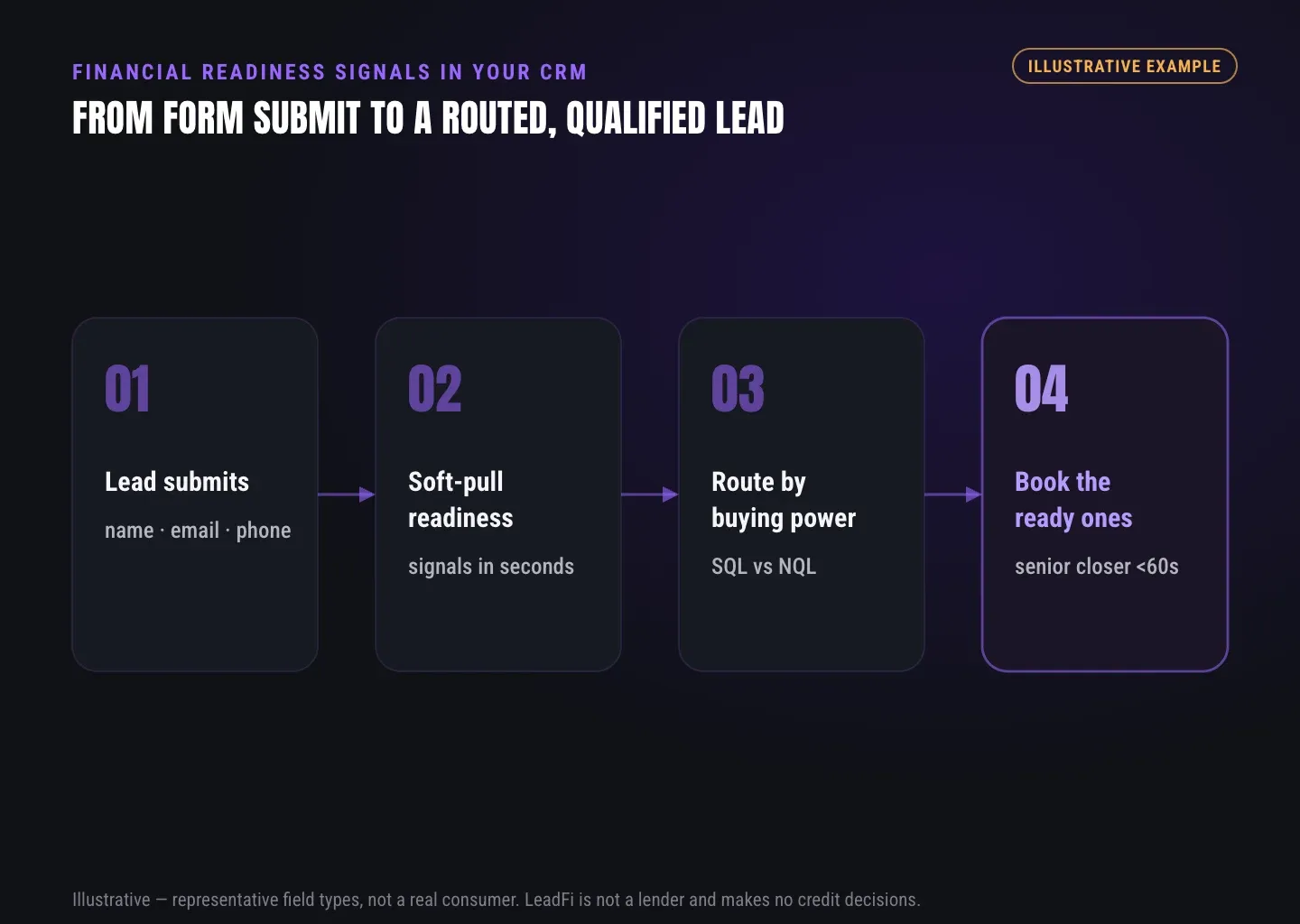
Quick answer: CRM financial readiness signals turn qualification results into fields, routes, and sales actions. Once the status reaches the CRM, teams can prioritize SQLs, route NQLs, alert reps, start nurture, and measure qualified demand.
An SQL, or Sales-Qualified Lead, is someone who is financially fit to buy your offer. An NQL, or Non-Qualified Lead, is someone who is not financially fit to buy your offer. These labels support routing; LeadFi does not approve or deny consumers.
CRM records become the action layer
A readiness result is most useful inside the system sales already uses. An SQL value can trigger a priority task, closer alert, rapid-response queue, or high-ticket calendar path. An NQL value can start nurture, present a lower-ticket offer, or open another relevant route.
Form answers are not buying-power proof
Application forms often ask about budget, income, available funds, or financing needs. Those answers can inform a conversation, but they remain self-reported.
Depending on configuration, consent and disclosures, and data availability, LeadFi workflows may add signals such as VantageScore 4.0, available credit, income, debt, debt-to-income ratio, or funding pre-approval signals. Optional asset or net-worth-style context may also be available in applicable setups. These are readiness inputs for routing and rep preparation, not guarantees of funding or consumer decisions.
Readiness creates a shared definition
Marketing may call every booked appointment qualified, while sales may care whether the person is financially fit for the offer. A controlled readiness field separates buying power from intent while preserving source, campaign, and pipeline data.
This is especially useful for businesses selling offers around $1,000–$10,000 or more, where each sales call carries a meaningful labor cost.
CRM fields should stay simple
Start with a small field map:
| CRM field | Example value | Main use |
|---|---|---|
leadfi_status |
SQL, NQL, review |
Primary workflow branch |
leadfi_readiness_tier |
high, medium, low |
Priority or offer path |
leadfi_match_status |
matched, not_matched |
Data-quality handling |
leadfi_checked_at |
ISO timestamp | Freshness and audit trail |
leadfi_route |
closer, nurture, alternate_offer |
Defined next action |
leadfi_source_id |
Internal event ID | Deduplication and support |
leadfi_reason_code |
Configured category | Controlled rep context |
Store only what the workflow needs. Many teams can act on a status, route, timestamp, and controlled reason code without exposing detailed financial values broadly.
Signal history supports better analysis
Timestamped events let RevOps compare readiness with booked calls, show rates, response times, and sales outcomes. Marketing can then evaluate cost per SQL alongside cost per lead rather than treating every form submission as equal.
GUIDE
GoHighLevel, HubSpot, Close, Pipedrive, and Keap write-backs
Quick answer: LeadFi can complement an existing CRM by returning configured readiness results after capture. The common flow is form submission, identity matching, qualification, CRM write-back, and an SQL, NQL, or review branch.
The CRM remains the system for contacts, pipelines, tasks, messages, and reporting. LeadFi adds a financial-readiness layer that helps determine what should happen next. Supported objects and actions vary by account, plan, and integration path and should be confirmed before launch.
GoHighLevel lead scoring gains buying-power context
GoHighLevel lead scoring commonly reflects forms, replies, appointments, and stage changes. Those activities indicate engagement, not necessarily financial fit. A separate LeadFi readiness field or tag can support assignment, alerts, calendar access, nurture, and reporting.
HubSpot properties hold the readiness result
A configured workflow can map status, readiness tier, event time, and route into HubSpot contact properties. HubSpot workflows can then use those properties to assign an owner, create a task, update a list, or initiate another approved action.
Close and Pipedrive fields guide rep priority
Close can place the readiness result near sales activity through custom fields and filtered views. Pipedrive can use mapped custom fields, labels, activities, or pipeline rules. In either system, an SQL can enter a fast-response queue while an NQL follows a separate path.
Keap tags start the next sequence
Keap commonly uses contact fields and tags to initiate automation. A controlled readiness value can map to a sales sequence, nurture campaign, lower-ticket offer, or another configured experience.
CRM choice matters less than field design
The core pattern is consistent: identify the record, write the result, timestamp the event, and trigger one defined action. Duplicate tags, unclear values, missing timestamps, and conflicting rules make routing difficult to trust regardless of the CRM brand.
RevOps should own the field map and change process. Sales can own response rules, while marketing owns approved feedback events. One named operator should control threshold changes so teams do not create conflicting branches.
INTEGRATIONS
Webhook, API, Zapier, Make, and native integration options
Quick answer: Use a webhook for direct event handoffs, an API for deeper control, or Zapier and Make for low-code workflows. A native connection can reduce connector layers when available. The right path depends on volume, speed, monitoring, and system complexity.
Thin-input identity matching starts the flow
LeadFi can work from name, email, and phone. Its patent-pending identity matching is designed to establish a high-confidence match before soft-pull prescreening and, where applicable, deeper bureau-backed credit-report workflows.
Identity-related information and identity signals, such as current address or age, may support a configured workflow. Exact inputs depend on the setup, match requirements, consent and disclosures, and data availability.
Webhooks and APIs support direct connections
A webhook fits event-driven funnels that need to send a submission and receive a configured result. An API offers more control over field mapping, authentication, retries, rate limits, deduplication, and response handling. API implementations should have a clear technical owner and monitoring plan.
Zapier and Make support low-code workflows
Zapier works well for small field maps and straightforward branches. For example, one path can update the contact and alert a closer when the result is SQL, while another adds an NQL value and begins nurture.
Make can support richer branching or updates across several tools. Teams should use clear module names, log event IDs, and keep the central SQL/NQL classification in one controlled layer.
Error handling protects the funnel
A missing match, duplicate record, timeout, or malformed payload should not automatically classify a lead as NQL. Use a neutral review or unmatched state, retry rules, and an event ID that prevents duplicate contacts, tasks, and alerts.
Data access should follow job needs
A setter may need only the contact details, readiness status, route, and next action. Managers may need aggregate reports, while a small operations group may require additional context. Keep sensitive details out of broad notes, exports, chat alerts, and advertising payloads.
Compliance-aware setup belongs before launch
LeadFi supports compliance-aware workflows and can help teams consider privacy policy language, consent language, TCPA-aware practices, and FCRA-aware workflow choices. This onboarding support does not remove consent and disclosures or replace legal review. LeadFi does not provide legal advice or guarantee compliance, and clients should review their use case with counsel.
See which of the leads you already have can actually afford to buy.
ROUTING
CRM write-backs should drive lead routing
Quick answer: Start with one trusted readiness field and map every value to a clear next step. SQLs should reach the appropriate sales path quickly. NQLs should enter nurture, a lower-ticket offer, an alternate service, or another relevant experience.
SQLs should enter the fast lane
An SQL is someone who is financially fit to buy your offer. That result can trigger immediate ownership, a priority task, a rep alert, or access to the appropriate closer calendar. Fast action matters because the lead has expressed intent and met the configured readiness rule.
NQLs need a defined value path
An NQL is someone who is not financially fit to buy your offer. The CRM can route that person to education, nurture, a lower-ticket product, or another suitable path rather than consuming the same high-cost sales capacity.
For a structured routing model, use LeadFi’s Lead Routing Decision Framework (SQL/NQL by financial readiness).
Review states stop bad assumptions
Not every submission produces a complete result. The identity match may require more information, or an integration may fail. A separate review or unmatched state keeps system uncertainty distinct from SQL and NQL classifications.
Ad signals should use approved quality events
When the platform, policy, and client setup allow it, a configured SQL-quality event can feed back into Meta, Google, TikTok, Hyros, or related operations tools. This lets media teams compare qualified demand with raw lead volume. It does not guarantee advertising performance.
RevOps should measure the full path
Useful metrics include lead-to-SQL rate, SQL response time, SQL booking rate, show rate, and sales outcomes. NQL-path reporting should track nurture engagement, alternate-offer performance, and later progression. Threshold changes should be versioned and tested against business results.
Routing rules need one source of truth
Do not recreate the qualification rule independently in the CRM, funnel, scheduler, and advertising stack. Keep the readiness classification in one controlled layer, pass the result to each system, and document which tool owns each action.
Related reading: a practical guide to financial readiness signals for sales teams, a practical guide to pre-screen leads by financial readiness, a practical guide to a financial readiness layer for Clearbit enrichment.
| CRM | LeadFi’s role | Common write-back pattern | Possible action |
|---|---|---|---|
| GoHighLevel | Add financial readiness to contact automation | Custom field, tag, or webhook result | Assign, notify, route, or nurture |
| HubSpot | Add readiness to contact and workflow logic | Contact property and workflow trigger | Set owner, create task, or update list |
| Close | Add readiness to sales records and views | Custom field and lead-status logic | Prioritize a queue or create follow-up |
| Pipedrive | Add readiness to pipeline choices | Custom field, label, or activity | Change path or assign an activity |
| Keap | Add readiness to tag-led automation | Contact field and tag mapping | Start a sales or nurture sequence |
These are common workflow patterns, not guarantees about current vendor features. Confirm supported objects, triggers, and actions for the applicable account and integration.
Key takeaways
The short version
- Write one controlled SQL, NQL, or review status into the CRM.
- Route SQLs quickly and send NQLs to a defined alternate path.
- Use name, email, and phone for applicable thin-input workflows.
- Keep sensitive financial detail limited to roles that need it.
- Feed approved quality events back to reporting and media tools.
Quick answers
Fast answers before you dig in
What are CRM financial readiness signals?
CRM financial readiness signals are permissioned data points or derived statuses that add buying-power context to a lead record and drive sales, nurture, reporting, or alternate-offer routes.
How should SQL and NQL statuses be used in a CRM?
An SQL should enter the appropriate high-priority sales route, while an NQL should enter nurture, a lower-ticket offer, or another suitable path. Incomplete results should use a separate review state.
Can LeadFi work from thin lead-form inputs?
LeadFi can work from name, email, and phone for configured, permissioned workflows. Exact inputs and returned signals depend on identity matching, consent and disclosures, data availability, and the use case.
Which CRM fields should teams create first?
Start with readiness status, match status, route, timestamp, event ID, and an optional controlled reason code. Add detailed financial fields only when the workflow and access model require them.
FAQ
Common questions
What are CRM financial readiness signals?
How do CRM financial readiness signals differ from lead scoring?
Can LeadFi support GoHighLevel lead scoring?
Does a soft pull affect a consumer’s credit score?
Can LeadFi work without asking for an address upfront?
Which financial readiness signals should reach the CRM?
Can CRM financial readiness signals feed advertising platforms?
Sources
References
- CFPB — What is a credit inquiry? (hard vs. soft) (opens in a new tab)Federal regulator confirms a soft inquiry, unlike a hard inquiry, does not affect the consumer's credit score.
- VantageScore — VantageScore 4.0 credit scoring model (opens in a new tab)Official page describing VantageScore 4.0, the tri-bureau, trended-data model used to assess credit risk.
- CFPB — Who can request to see my credit report? (opens in a new tab)Federal regulator explains the FCRA rules governing who may obtain a credit report.
Know who is ready before your next sales call.
Keep your CRM as the place where sales works. LeadFi can add a financial-readiness layer behind your forms, funnels, calendars, and CRM so fields, alerts, sales queues, nurture, alternate offers, and approved quality-event feedback respond to buying power—not form activity alone.