
ISO BROKER CRM READINESS BAND
Where a Readiness Band Belongs in an ISO Broker CRM
An ISO broker CRM can track an applicant from intake through document collection, submission, closing, and renewal. A financial-readiness band belongs in only one part of that lifecycle: the broker’s internal pre-submission sales stage.
Watch a contact get pre-qualified.
This is exactly what your CRM gets back.
Your opt-in form
Soft pull · no impact to their credit
This is not a real soft pull. It's an example of the data points that land in your CRM contact record when a lead fills out your form.
LEADFI DEMO
Watch the demo, then start free or book a call.
GUIDE
What an ISO broker CRM tracks from application to renewal
An ISO broker CRM may hold application details, document requests, call tasks, submissions, contracts, closed transactions, and renewal activity. Because one system supports several stages, an intake-only route can spread into records where it does not belong.
This page describes a routing input, not a credit decision, approval, or eligibility determination.
Intake starts with the broker’s own applicant
The readiness band is written only for the person who submitted the broker’s own application with its disclosures and their authorisation. It applies only to that intake—not to purchased, aged, or cold-call lists, and not to another person named on the application who did not personally submit and authorise it.
Pre-submission sales records guide the first response
Before submission, the broker may manage call ownership, contact attempts, and document collection. The readiness band has one limited role here: setting first-call order and determining which internal rep makes that first call.
Submission and later records serve different purposes
Submission records support a funder’s independent review. Closing, funded, servicing, commission, and renewal records support later work. An earlier sales-routing label should not enter those records or be used to explain an outcome it did not determine.
INTELLIGENCE LAYER
The one stage where a readiness band belongs
The readiness band belongs only on the broker-owned intake record in the internal pre-submission sales stage. It lives there solely to control first-call order and which internal rep calls first.
Define the two first-call routes
In this workflow, financially qualified means the file meets the broker’s own first-call routing rules: call order and which rep calls first. Not financially qualified means a later or different first call.
Neither label says whether any funder will approve or fund the file, or what amount or terms may be offered. For this ISO broker CRM workflow, SQL is the financially qualified route and NQL is the not financially qualified route.
An intake without a returned result remains a separate no result group; it is not classified as not financially qualified. The generic field map, unmatched handling, and role-based access are covered in a closer look at financial readiness signals in your crm rather than repeated here.
Keep the applicant’s full application path open
A later or different first call does not remove the applicant’s ability to complete the broker’s standard application process. The band orders the broker’s calls; it does not decide whether the file is submitted.
Let every funder conduct its own review
Every submitted file is reviewed by the funder under its own criteria. The readiness band does not determine whether a file is submitted, which funder receives it, or what amount or terms are offered.
GUIDE
Keep the band off submissions, partner views, and later records
The readiness band must remain inside the broker’s own pre-submission sales stage. These containment choices are the broker’s workflow controls and should be confirmed with its counsel.
Exclude the route from funder handoffs
The readiness band is never attached to a funder submission, copied into submission notes, included in an outbound payload, or shown in a funder portal. An allowlist for outbound fields helps keep the broker-only route out of the handoff.
Keep outside views separate
The route should not appear in any view, export, alert, report, or integration available to a funder, syndicator, sub-ISO, referral partner, or other outside party. It remains an internal first-call instruction for the broker’s own team.
Do not carry the band into funded or renewal workflows
The readiness band belongs to the intake that produced it. It is not copied into offer, contract, funded, servicing, syndication, commission, renewal, or reactivation records. It is also not reused to schedule or prioritize renewal outreach.
WORKFLOW DESIGN
Test containment before the workflow goes live
Containment should be tested from the recipient’s perspective before launch and after material workflow changes.
Test a complete funder handoff
Move a test intake through the normal submission process. Inspect the payload, generated documents, portal surfaces, email templates, notes, and automation logs. The readiness route should remain on the original broker-owned intake and nowhere else.
Inspect an outside-user view
Use a test account that matches an outside user’s actual access. Confirm that pages, searches, reports, exports, alerts, and API responses contain no readiness route or marker.
Create a clean later-stage record
Create test funded and renewal records through the normal workflow. Confirm that the intake band is not copied, does not create a later task, and does not affect call timing. Save the test result with the workflow version so the checks can be repeated after changes.
See which of the leads you already have can actually afford to buy.
HOW LEADFI FITS
How LeadFi fits behind an ISO broker CRM
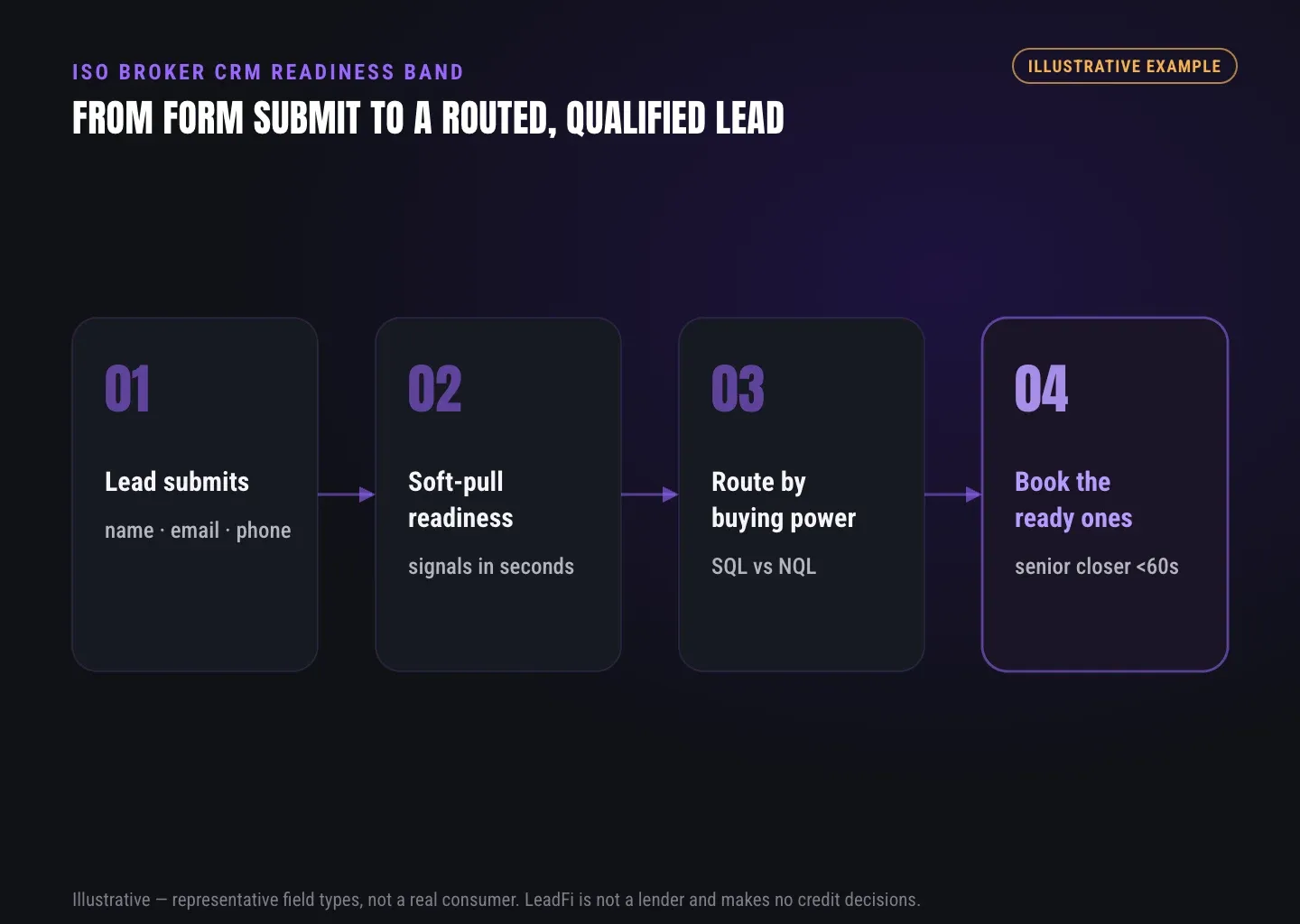
LeadFi is a financial-readiness engine for high-ticket and credit-adjacent sales teams. In this use case, it receives an authorised inbound intake after submission and returns a controlled readiness route for the broker’s first-call workflow.
LeadFi returns one controlled internal route
A configured soft-pull workflow can support financial-readiness qualification. The resulting action remains narrow: SQL versus NQL routing for call order and first-rep assignment. People working this flow see the readiness band or route—not the underlying financial values.
The route connects to the existing stack
LeadFi can connect through a webhook, API, Zapier, Make, or another supported workflow. The broker’s CRM continues to manage applications, tasks, documents, submissions, and later records. LeadFi does not replace that system or send the route to funders and partners.
Setup remains compliance-aware
LeadFi supports compliance-aware workflows, including planning around consent and disclosures, internal field scope, and test paths. LeadFi does not provide legal advice or guarantee compliance, and clients should review their use case with counsel.
LeadFi does not approve or deny consumers. It is not a lender, funder, ISO, broker, or underwriter, and the readiness route does not predict the result of a funder’s review.
INTELLIGENCE LAYER
Put the readiness band in one place—and keep it there
The clean ISO broker CRM design is narrow: one authorised inbound intake, one internal pre-submission sales stage, and one controlled route for first-call order and first-rep assignment.
The band never travels to a funder, partner, later deal record, or renewal workflow. Every applicant who wants to proceed retains the broker’s standard application path, and every funder reviews each submitted file under its own criteria.
Related reading: a closer look at financial readiness signals in your crm, practical insights on pre-screen leads by financial readiness, a practical guide to lead qualification checklist.
| CRM location | Readiness band | Correct use |
|---|---|---|
| Broker-owned intake record | Yes | Set first-call order and assign the first internal rep |
| Internal pre-submission sales queue | Yes | Create broker-only first-call tasks |
| General contact record | No | Avoid carrying the route across unrelated records |
| Funder submission or portal | No | Keep the route outside the funder’s independent review |
| Sub-ISO or partner view | No | Prevent outside access to the broker-only route |
| Offer, contract, or funded record | No | Keep the route separate from outcomes and later operations |
| Syndication or commission record | No | Keep the route outside partner and finance records |
| Renewal or reactivation record | No | Do not copy, refresh, or reuse the intake route |
Key takeaways
The short version
- Keep the band on the broker-owned pre-submission intake only.
- Use it solely for call order and first-rep assignment.
- SQL and NQL routes do not predict funder outcomes.
- Exclude the route from funder, partner, funded, and renewal records.
- Test every payload, shared view, export, and later-stage record.
Quick answers
Fast answers before you dig in
Where should a readiness band live in an ISO broker CRM?
Only on the broker-owned intake record in the internal pre-submission sales stage, where it can set first-call order and determine which internal rep calls first.
What do SQL and NQL mean in this ISO broker CRM workflow?
SQL is the financially qualified first-call route; NQL is the not financially qualified first-call route. Neither label predicts or determines a funder’s decision, amount, or terms.
Can the readiness band be sent to a funder?
No. It remains in the broker’s internal pre-submission sales stage and is excluded from funder submissions, portals, notes, payloads, and partner views.
Does LeadFi replace an ISO broker CRM?
No. LeadFi adds a financial-readiness routing layer behind the existing authorised intake and CRM workflow.
FAQ
Common questions
Where should a readiness band live in an ISO broker CRM?
What does financially qualified mean in this ISO broker CRM workflow?
What does not financially qualified mean here?
Can an ISO broker CRM send the readiness band to a funder?
Can a sub-ISO or referral partner see the readiness band?
Can an ISO broker CRM reuse the band for renewal calls?
Does LeadFi replace a merchant cash advance or ISO broker CRM?
Sources
References
- CFPB — What is a credit inquiry? (hard vs. soft) (opens in a new tab)Federal regulator confirms a soft inquiry, unlike a hard inquiry, does not affect the consumer's credit score.
- VantageScore — VantageScore 4.0 credit scoring model (opens in a new tab)Official page describing VantageScore 4.0, the tri-bureau, trended-data model used to assess credit risk.
- Experian — What Is a Soft Inquiry? (opens in a new tab)Major credit bureau explains soft inquiries are informational and have no impact on credit scores.
Know who is ready before your next sales call.
See how LeadFi can sit behind your current authorised inbound application and return a contained SQL or NQL route for first-call order and first-rep assignment. Book a scoped demo assessment to review the intake stage, CRM connection, route containment, and pre-launch test plan.