
LEAD QUALIFICATION CHECKLIST
Lead Qualification Checklist: A Repeatable Review for High-Ticket Teams
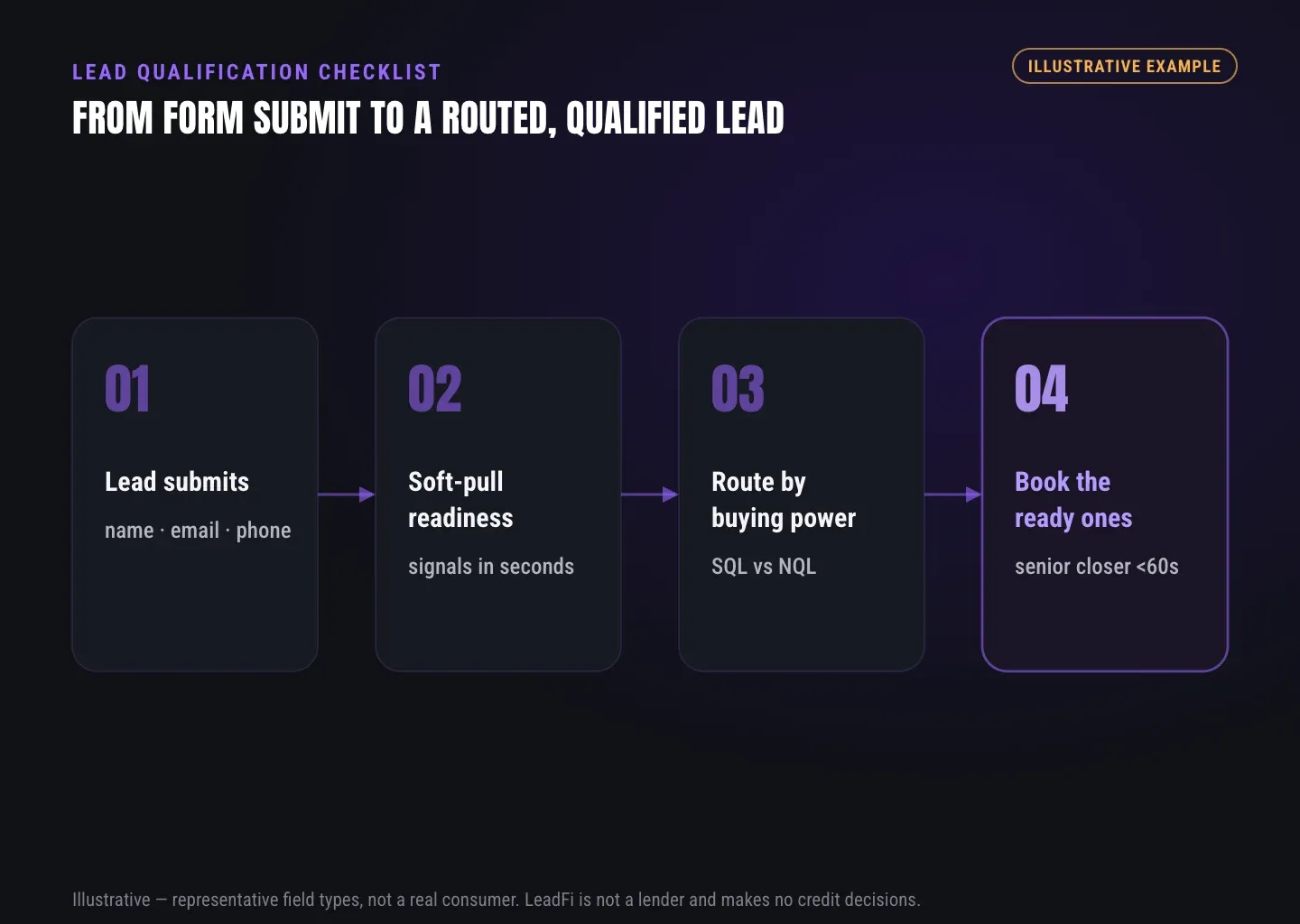
A lead qualification checklist gives sales, marketing, and RevOps a consistent way to review existing inbound leads before sales follow-up. It turns contact details, form answers, source data, offer fit, intent, and financial-readiness signals into a clear owner, route, and next action.
Watch a contact get pre-qualified.
This is exactly what your CRM gets back.
Your opt-in form
Soft pull · no impact to their credit
This is not a real soft pull. It's an example of the data points that land in your CRM contact record when a lead fills out your form.
LEADFI DEMO
Watch the demo, then start free or book a call.
GUIDE
Set the purpose of a lead qualification checklist
Start by defining what the review should change. A practical operating question is: “Should this inbound lead go to a closer, setter, nurture sequence, alternate offer, or manual review?” This prevents teams from collecting fields that never affect routing or rep preparation.
Define the operating question
Keep the checklist focused on qualifying existing inbound leads before sales follow-up. Separate four dimensions:
- Record quality: Is the contact and source information complete and usable?
- Offer fit: Does the stated need, location, role, timing, or service requirement match?
- Intent: What action has the lead taken, and how recently?
- Financial readiness: What permissioned context supports the planned sales route?
This structure is also useful when evaluating practical insights on ai lead qualification, because automation should apply documented team rules rather than hide the evidence behind an unexplained score.
Set SQL and NQL definitions
An SQL is a Sales-Qualified Lead that meets the team’s current rules for direct sales follow-up. An NQL is a Non-Qualified Lead for that specific route. NQL describes the next path, not the person: timing, fit, or readiness may change later.
Document the required evidence, rule version, route reason, and fallback for missing or conflicting data. Manual review is often better than forcing an unclear record into a binary result.
Assign ownership
Name one business owner for the checklist. RevOps may maintain the rules while marketing, sales, operations, and compliance advisors review their respective inputs. Shared definitions keep campaign reporting, CRM stages, and sales notes aligned.
For more detail on cross-team criteria and handoffs, see a closer look at marketing lead qualification.
Tie every result to an action
Each result should trigger a defined workflow:
- SQL: Assign a setter or closer, update the CRM, and prioritize prompt follow-up.
- NQL: Start nurture, present a lower-ticket or alternate offer, or schedule a later review.
- Manual review: Send incomplete or conflicting records to a named queue.
- Data issue: Repair duplicates, missing fields, or source mapping before evaluating fit.
The checklist is complete only when it identifies the owner and next action.
GUIDE
List the evidence to review
A repeatable review requires traceable evidence rather than impressions such as “seems interested.” Record what each item shows, where it came from, and when it was captured.
Check identity and contact data
Begin with name, email, and phone. Confirm that each value is present, usable, and consistent across the form, calendar, and CRM. LeadFi can work from name, email, and phone in configured thin-input workflows.
LeadFi’s patent-pending identity matching is designed to establish a high-confidence match using identity-related information and identity signals before soft-pull prescreening and, where applicable, deeper bureau-backed credit-report workflows. Availability and workflow requirements vary by configuration, consent and disclosures.
Review source, fit, and intent
Capture the first known source, recent source, campaign, page, form version, and submission time where supported. Then review offer-specific evidence such as need, role, location, timeline, service area, company profile, or program selection.
Keep engagement separate from readiness. A booking or reply can indicate urgency, but it does not establish buying power. Likewise, financial readiness does not prove interest or trust.
Separate stated facts from system signals
Label form-reported budget, income, or access to funds as self-reported. Store system-based readiness signals in separate fields with their source and capture time. This distinction helps representatives understand what each field means and prevents assumptions from becoming facts.
Create an intake audit trail
A practical intake audit should record:
- Lead and CRM record identifiers
- Contact and identity-match status
- Capture point, source, campaign, and form version
- Offer-fit and intent evidence
- Consent and disclosures record for the configured workflow
- Readiness status where enabled
- SQL, NQL, alternate, or manual-review route
- Route reason and active rule version
- Assigned owner and assignment time
- CRM task, alert, redirect, or nurture action
Poor data and poor fit are not the same. A complete checklist identifies whether the team needs to repair the record, review it manually, or route it elsewhere.
INTELLIGENCE LAYER
Include financial readiness as context
High-ticket teams can add financial readiness as one context layer beside record quality, offer fit, and intent. The goal is to prepare representatives and determine the appropriate sales path—not to approve or deny consumers.
Define readiness for the offer
Readiness criteria should reflect the offer price, audience, sales process, and available next steps. A $1,500 entry offer may use a different route from a $10,000 consulting engagement. Every rule should map to an operational action such as closer assignment, nurture, an alternate offer, or manual review.
Use thin-input soft-pull prescreening where appropriate
LeadFi can use name, email, and phone in many configured workflows, reducing the need to request extensive identity-related information at the initial form step. The value is not avoiding fields as a tactic; it is adding financial-readiness context while momentum is high.
The workflow still requires suitable consent and disclosures, appropriate data handling, and clear customer language. LeadFi supports compliance-aware setup before launch and helps teams consider privacy policy language, consent language, TCPA-aware practices, and FCRA-aware workflow guidance. LeadFi does not provide legal advice, and clients should review their use case with counsel.
Select actionable readiness signals
Depending on configuration and availability, readiness context may include:
- VantageScore 4.0
- Available credit
- Income
- Debt and debt-to-income ratio
- Current address and age as identity-related signals
- Optional net-worth-style, liquid asset, retirement, brokerage, or real-estate context
Use only signals that improve routing, rep preparation, or offer selection. Decide which detailed values need restricted access and whether sales representatives need a concise route label instead.
Route SQLs and NQLs
When an inbound lead meets the team’s SQL rules, LeadFi can help update a CRM field, change a stage, assign an owner, trigger an alert, or direct the lead to the intended calendar. This supports speed-to-lead for financially qualified leads without guaranteeing a sales outcome.
NQLs should enter a useful next path, such as nurture, a lower-ticket offer, a custom page, or a later review. LeadFi can connect through webhook, API, Zapier, Make, or native workflows. Where platform rules and the configured setup allow, teams may also send qualified-lead signals to Meta, Google, TikTok, Hyros, or operations systems for optimization; platform performance is not guaranteed.
See which of the leads you already have can actually afford to buy.
GUIDE
Revisit the checklist as the offer changes
A lead qualification checklist should change with the offer, audience, funnel, sales capacity, and CRM workflow. Assign a recurring review owner before launch, then trigger additional reviews after material changes.
Set a review cadence
Monthly reviews work for many active funnels, while stable offers may use a quarterly cadence. Fast-changing campaigns may need a short weekly operational check. The right schedule depends on lead volume and how frequently pricing, forms, routing, or sales capacity changes.
Audit handoff consistency
Sample records from every major source and route. Follow each record from submission through fields, tags, stages, redirects, alerts, owners, and nurture enrollment. A correct SQL tag is not enough if the record remains in an unassigned queue.
Useful audit categories include data, matching, rules, handoffs, ownership, timing, display, and overrides. Each issue should receive an owner and due date.
Compare rules with outcomes
Confirm that SQLs reached the intended sales team and NQLs entered the correct alternate path. Review missing records, routing errors, assignment delays, and manual overrides. Use an appropriate sample, acknowledge data limits, and avoid treating one sale as proof that an entire rule set works.
Version every material change
Give each checklist version an identifier and activation time, then store it on reviewed CRM records. Versioning helps RevOps understand historical results after criteria change and prevents current definitions from being applied retroactively.
GUIDE
Lead qualification checklist template
Use this compact template as a team-owned review aid for existing inbound leads. Remove fields that do not affect routing, rep preparation, reporting, or a documented operational need.
Record and source review
- Lead has a unique CRM or source-system ID.
- Name, email, and phone are present and usable.
- Identity-match status is recorded where applicable.
- Channel, campaign, page, form, and capture time are known.
- Duplicate records have been linked or merged.
- Missing or inconsistent data enters a defined review path.
Fit, intent, and financial context
- Offer need and relevant fit criteria are documented.
- Stated timing and recent engagement are visible.
- Each result points to a field, event, or identified source.
- Financial readiness has a defined sales-routing purpose.
- Consent and disclosures fit the configured workflow.
- Readiness status, signal time, and rule version are stored.
- Reps see only the context needed for follow-up.
Routing and handoff review
- The record has one valid SQL, NQL, alternate, or manual-review route.
- A named person, team, or queue owns the next action.
- CRM fields, tags, stages, tasks, and alerts update correctly.
- The lead reaches the intended calendar, nurture sequence, or offer.
- Route reason and handoff time are visible.
Feedback and audit review
- Later sales outcomes return to the CRM.
- Qualified demand can be compared by source and campaign.
- Any allowed platform events follow the configured setup.
- Manual overrides include a reason.
- The next audit has a date and owner.
- Rule changes have a version, owner, and activation time.
Related reading: practical insights on buying power data for lead qualification, practical insights on ai lead qualification, a closer look at marketing lead qualification.
| Evidence type | What it can show | Main limitation | Checklist use |
|---|---|---|---|
| Contact data | How to identify and reach the lead | May contain errors or duplicates | Validate the record and support matching |
| Form answers | Need, timing, goals, and stated budget | Self-reported and potentially incomplete | Assess offer fit and prepare the rep |
| Source data | Which campaign, page, or form captured the lead | Tracking and naming may vary | Compare qualified demand by source |
| Engagement data | Bookings, replies, visits, and recent activity | Interest does not establish buying power | Set urgency and follow-up timing |
| Financial-readiness signals | Buying-power context where configured | Requires suitable setup, consent and disclosures | Support routing and rep preparation |
| CRM history | Prior ownership, calls, outcomes, and stages | Value depends on data quality | Prevent duplicate or conflicting follow-up |
| Human notes | Context from prior conversations | May reflect opinion or become stale | Add context without replacing documented rules |
Key takeaways
The short version
- Review existing inbound leads before sales follow-up.
- Separate record quality, fit, intent, and financial readiness.
- Give every SQL, NQL, and exception a defined route.
- Store route reasons, owners, times, and rule versions in the CRM.
- Use soft-pull prescreening only with suitable consent and disclosures.
Quick answers
Fast answers before you dig in
What is a lead qualification checklist?
A lead qualification checklist is a team-owned review aid that verifies contact data, offer fit, intent, financial context, ownership, and the next action for an existing inbound lead before sales follow-up.
What should a lead qualification checklist include?
Include record quality, source data, offer-fit evidence, intent, financial readiness where useful, SQL or NQL status, route reason, owner, CRM action, review time, and rule version.
How does LeadFi support lead qualification?
LeadFi adds permissioned financial-readiness context after inbound submission, supports thin-input soft-pull prescreening, classifies SQL versus NQL routes, and sends results into CRM and workflow systems.
Is the checklist used to approve or deny consumers?
No. The checklist supports team-owned sales routing and rep preparation. LeadFi does not approve or deny consumers.
FAQ
Common questions
What should a lead qualification checklist include?
How is a lead qualification checklist different from lead scoring?
How does financial-readiness qualification fit the checklist?
Can LeadFi support soft-pull prescreening from name, email, and phone?
How should SQL vs NQL routing work after review?
How often should teams review a lead qualification checklist?
Can the checklist support CRM and paid-media feedback?
Sources
References
- CFPB — What is a credit inquiry? (hard vs. soft) (opens in a new tab)Federal regulator confirms a soft inquiry, unlike a hard inquiry, does not affect the consumer's credit score.
- VantageScore — VantageScore 4.0 credit scoring model (opens in a new tab)Official page describing VantageScore 4.0, the tri-bureau, trended-data model used to assess credit risk.
- CFPB — Who can request to see my credit report? (opens in a new tab)Federal regulator explains the FCRA rules governing who may obtain a credit report.
Know who is ready before your next sales call.
LeadFi can sit behind your existing form, funnel, calendar, or CRM to add financial-readiness context, support SQL vs NQL routing, and send each existing inbound lead toward a defined next step. LeadFi supports compliance-aware setup before launch.