
REVENUE PER LEAD ACROSS OFFERS
Revenue Per Lead When Leads Buy Different Offers
Revenue per lead shows how much tied revenue each unique inbound lead produces, on average, during a defined period. For high-ticket businesses with multiple offers, a flagship-only calculation can miss revenue from a lower-ticket product that better fits a buyer's financial capability.
Watch a contact get pre-qualified.
This is exactly what your CRM gets back.
Your opt-in form
Soft pull · no impact to their credit
This is not a real soft pull. It's an example of the data points that land in your CRM contact record when a lead fills out your form.
LEADFI DEMO
Watch the demo, then start free or book a call.
GUIDE
Why flagship-only revenue per lead undervalues the pool
Flagship conversion is not total lead value
A flagship-only report assigns zero revenue to every lead who does not buy the main offer. That is incomplete when the same inbound pool can buy a smaller product that fits a different level of buying power.
Keep each offer in a separate revenue field, then calculate a blended result. This preserves visibility into the flagship while measuring the pool's full tracked value.
Zero revenue can hide a routing gap
A lead who does not buy the flagship may have encountered an offer mismatch rather than a lack of demand. Routing an NQL to a lower-ticket offer or another product that fits the buyer's financial capability gives that lead an appropriate path while keeping the flagship calendar focused on SQLs.
Booked calls are not revenue per lead
Booked calls measure calendar demand. Revenue per lead measures revenue tied to the inbound cohort. A source can create many bookings but little collected revenue, while another can produce fewer bookings and more revenue across multiple offers.
That distinction matters when campaign teams optimize for lead quality rather than form-fill volume. Financially qualified lead events may be returned to Meta, Google, TikTok, Hyros, or operations systems where the setup permits, without promising platform performance.
Average revenue can hide the offer mix
Two campaigns can have the same blended revenue per lead but very different economics. One may depend on a few flagship sales; another may produce a broader mix of flagship and lower-ticket sales. Track the blended average and its component offers together.
Cohort timing changes the answer
Set a fixed revenue window based on your own sales cycle and apply it consistently. Do not compare a mature cohort with a newer cohort that has had less time to buy. Build the baseline from your own data rather than adopting an industry benchmark.
Example: One lead, two valid paths
Consider a hypothetical coaching business with 1,000 inbound leads. The flagship produces $180,000 in collected revenue during the chosen window, while a smaller product adds $30,000 from the same cohort.
- Flagship revenue per lead: $180
- Lower-ticket revenue per lead: $30
- Blended revenue per lead: $210
This hypothetical example shows additional tracked revenue, not proof that the smaller route caused incremental profit.
GUIDE
Counting flagship and lower-ticket revenue from one lead pool
Use the same formula for every cohort:
Revenue per lead = Total tied revenue ÷ Unique inbound leads
The formula is simple; the operating rules determine whether the result is useful.
Define one clean lead denominator
Count each unique inbound lead once, based on a consistent cohort-entry event such as an application or qualified inquiry. Do not count every form submission, booking, or CRM update as a new lead. Apply one documented deduplication rule using stable identifiers such as email and phone.
Use one revenue basis
Choose booked, collected, or recognized revenue and label it clearly. A cash-based view can use collected revenue after refunds and chargebacks. An accounting view should follow the business's normal recognition policy. Do not mix these bases in one metric.
Keep offer revenue in separate fields
Useful CRM fields include flagship_revenue, lower_ticket_revenue, and total_attributed_revenue.
Blended revenue per lead = (Flagship revenue + lower-ticket revenue) ÷ Unique inbound leads
Calculate each offer's revenue per lead separately as well. That split reveals what changed when the blended figure moves.
Credit refunds to the original cohort
Reduce the original lead cohort's revenue when a refund or chargeback occurs. The finance report can still record when cash moved, but the cohort view should connect the adjustment to the lead and offer that produced it.
Track a no-result group
A record may lack a readiness result because identity matching did not return a result, required input was missing, or the configured workflow did not run. Report these records separately as no result. Never classify a missing result as not financially qualified.
Preserve source and campaign data
Retain source, campaign, ad set, landing page, cohort, readiness status, route, product purchased, and tied revenue. Establish minimum sample rules from your own volume; small segments can fluctuate too much to guide spending reliably.
Comparison: Three revenue views
Use blended revenue per lead to measure total tracked pool value, then use offer-, readiness-, and source-level views to explain what drove it. No single view replaces the others.
Example: Build a cohort ledger
Assume a hypothetical agency receives 2,000 unique inbound leads in April. During its fixed window, the cohort generates $240,000 in flagship revenue and $40,000 from a smaller offer.
- Flagship RPL: $240,000 ÷ 2,000 = $120
- Lower-ticket RPL: $40,000 ÷ 2,000 = $20
- Blended RPL: $280,000 ÷ 2,000 = $140
The CRM should preserve the route, offer, collected revenue, refunds, and variable costs associated with each lead.
INTELLIGENCE LAYER
Splitting lead value by readiness band
Financial-readiness qualification can explain why leads from the same cohort should take different sales paths. Keep SQL, NQL, and no-result records distinct when comparing revenue per lead.
This page describes a routing input, not a credit decision, approval, or eligibility determination.
Readiness bands connect value to action
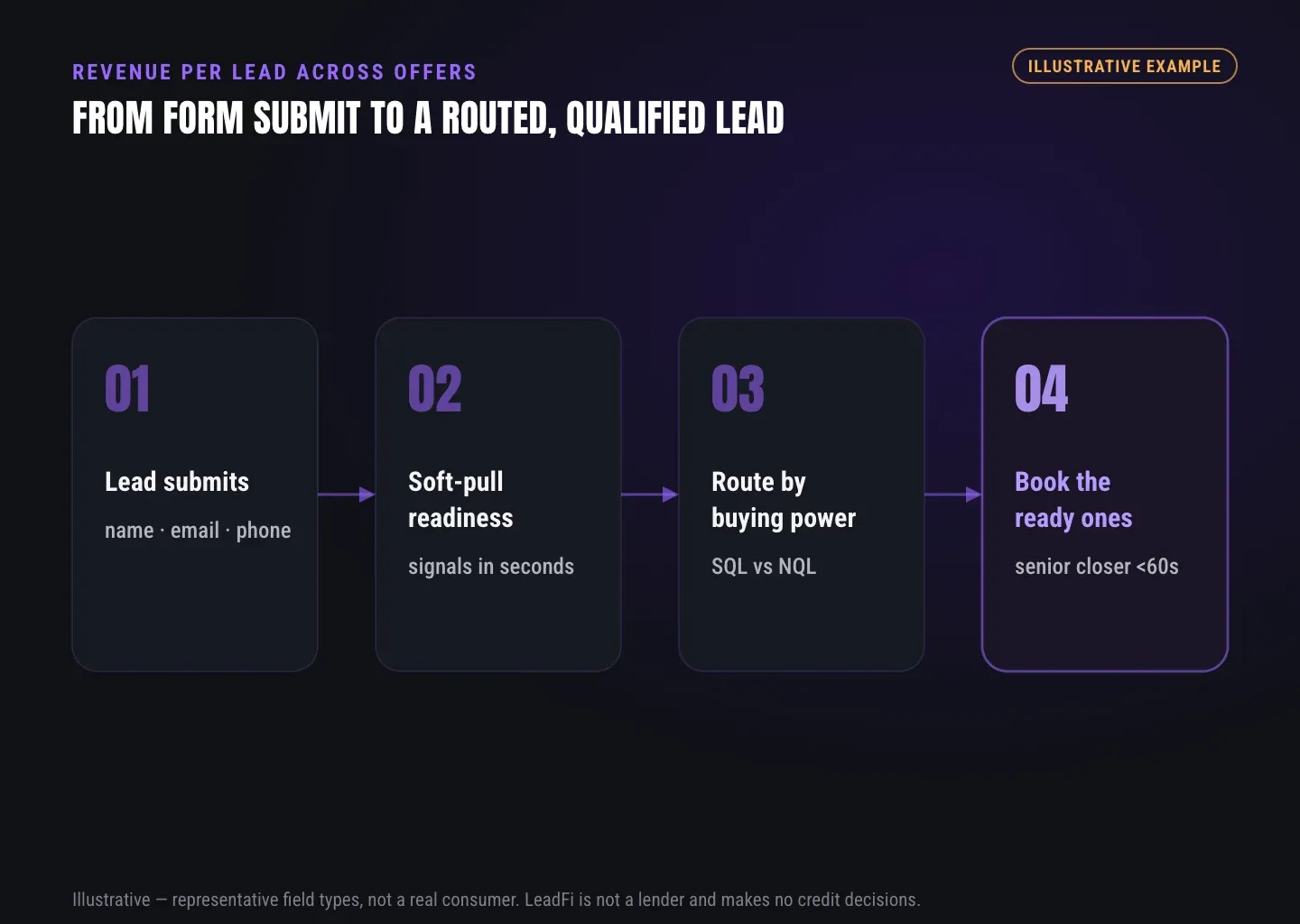
An SQL can move to a priority call task, flagship calendar, or faster sales alert. An NQL can move to a lower-ticket product or another offer that fits the buyer's financial capability. A no-result record needs a separate path, such as requesting missing intake details or continuing through the business's standard process.
LeadFi does not approve or deny consumers.
Soft pulls add financial context
Where configured with suitable authorisation, consent and disclosures, a soft-pull workflow can surface financial-readiness signals without affecting the consumer's credit score. Depending on the supported workflow, signals can include VantageScore 4.0, available credit, income, debt, debt-to-income ratio, address, age, and optional asset context.
These signals support routing and rep preparation. They are not instructions to extend credit or reasons to decline a person.
Thin inputs can reduce form friction
LeadFi can work from name, email, and phone in supported workflows. Its patent-pending identity matching is designed to use identity-related information and identity signals to establish a high-confidence match before a soft pull and, where applicable, deeper bureau-backed workflows.
Some configurations may not require address and date of birth at the first intake step. That does not remove authorisation, consent and disclosures requirements. The objective is buying-power-aware qualification, not avoiding a particular field.
CRM fields make bands measurable
Write readiness status, result time, offer route, no-result reason, product purchased, and tied revenue into the CRM. LeadFi can connect through webhook, API, Zapier, Make, or a supported native workflow so the existing stack remains the reporting spine.
Ad signals close the learning loop
Where the business's setup permits, financially qualified lead events can be sent to Meta, Google, TikTok, Hyros, and operations tools. Pair those events with eventual offer and revenue outcomes. This provides a richer optimization signal than a form fill alone, but it does not guarantee campaign results.
Example: Route before the calendar
A hypothetical consulting firm sells an $8,000 implementation package. Its own intake form collects name, email, and phone with the required authorisation, consent and disclosures. SQLs receive the senior closer calendar, while NQLs see a $1,500 planning product that fits their financial capability.
Example: Route after a booking
A course business may allow every applicant to book before the readiness result returns. The result can then assign an SQL to the flagship sales path and an NQL to a rep responsible for a smaller product, subject to the business's stated booking rules.
Example: Compare campaigns by buying power
Suppose two hypothetical campaigns each create 500 inbound leads. Campaign A produces more bookings, while Campaign B produces more SQLs and more collected revenue. The team can compare both using its own mature cohorts; neither outcome should be treated as a universal benchmark or promised result.
GUIDE
Setting a cost-per-lead ceiling from lead value
Revenue per lead can inform a cost-per-lead ceiling, but revenue is not profit. Account for variable delivery costs, commissions, payment fees, refunds, sales labor, and the margin the business needs.
Start with contribution per lead
Contribution per lead = Revenue per lead − Variable cost per lead
Calculate contribution for each offer and for the blended cohort. This prevents a revenue-heavy but low-margin offer from making the allowable acquisition cost look stronger than it is.
Use a conservative ceiling formula
Maximum CPL = Contribution per lead − Required profit and overhead reserve per lead
Alternatively, multiply contribution per lead by the business's chosen acquisition-cost percentage. Derive the percentage from your own unit economics rather than a general industry figure.
Base the ceiling on mature cohorts
Apply the same complete revenue window to each source and cohort. A partial cohort can understate revenue because recent leads have not had enough time to buy, refund, or complete payment.
Set ceilings by source and band
Source-level and readiness-level reporting can reveal different offer mixes. Establish each baseline from the business's own tied revenue and costs. Do not treat early differences as stable until the cohort has sufficient volume and time.
Add a sales-capacity constraint
Track sales minutes or sales cost per lead beside revenue. Routing NQLs to a fitting lower-ticket path can reserve flagship sales capacity for SQLs while preserving visibility into the other route's revenue and costs.
Recalculate after offer or funnel changes
Prices, commissions, delivery expenses, payment terms, refund policies, and offer paths can all change the ceiling. Recalculate on a defined schedule and whenever the operating model changes materially.
Example: From revenue to a CPL ceiling
Assume a hypothetical funnel produces $220 in blended revenue per lead and incurs $90 in variable costs per lead. Contribution is $130. If the business reserves $60 per lead for profit and overhead, the planning ceiling is $70.
This is a hypothetical calculation, not a benchmark or profitability promise.
Example: Flagship-only versus blended ceiling
Consider a hypothetical business with $150 in flagship revenue per lead. A smaller route adds $25 in revenue but only $10 in contribution per lead after its variable costs. The blended model may support $10 more acquisition cost, provided the business verifies that the smaller route adds rather than shifts revenue.
See which of the leads you already have can actually afford to buy.
GUIDE
LeadFi capabilities behind the metric
Revenue reporting explains what happened. LeadFi helps high-ticket and credit-adjacent teams act on financial readiness after an existing inbound lead submits a form and before the final revenue outcome is known.
Real-time readiness after submission
LeadFi can receive name, email, and phone from the business's existing intake workflow and return supported readiness results under the configured rules. Real-time delivery can help the team prioritize speed-to-lead for SQLs while interest is high.
SQL and NQL routing
SQLs can move toward the flagship sales path. NQLs can move toward a lower-ticket offer or another product that fits the buyer's financial capability. No-result records remain separate instead of being treated as a negative result.
CRM and calendar actions
LeadFi can pass fields, tags, stages, redirects, sales alerts, and workflow triggers into supported CRM, calendar, funnel, and operations setups through webhook, API, Zapier, Make, or native connections.
Revenue feedback by offer
When the CRM later receives purchase, refund, cost, and collected-revenue data, the business can compare actual results with the initial readiness route. Keep flagship, lower-ticket, and blended revenue per lead visible rather than relying on one opaque average.
Compliance-aware launch support
LeadFi supports compliance-aware workflows and can help teams consider privacy policy language, consent language, TCPA-aware practices, and FCRA-aware workflow choices. LeadFi does not provide legal advice or guarantee compliance. Clients should review their use case with counsel.
ROUTING
Measure the whole lead pool, then route it well
A useful revenue per lead model counts all tied revenue from a defined inbound cohort without hiding the offer mix. It also keeps SQLs, NQLs, and no-result records distinct, uses a consistent revenue basis, and compares only equally mature cohorts.
LeadFi can sit behind an existing form, funnel, calendar, or CRM and return financial-readiness results to supported workflows. Teams can then connect readiness, routing, offer revenue, source data, and variable costs in one operating model.
Related reading: a practical guide to what is lead qualification, a closer look at ai lead qualification, practical insights on lead qualification checklist.
| Revenue view | Numerator | Denominator | What it shows | Main limitation |
|---|---|---|---|---|
| Flagship-only RPL | Flagship revenue | All unique inbound leads | Main-offer yield from the pool | Excludes lower-ticket revenue |
| Lower-ticket RPL | Lower-ticket revenue | All unique inbound leads | Revenue from the alternate offer path | Does not show flagship value |
| Blended RPL | Flagship plus lower-ticket revenue | All unique inbound leads | Total tracked revenue from the pool | Can hide the offer mix |
| Band-level RPL | Revenue from one readiness band | Leads in that band | Value within a routed segment | Requires consistent tagging and enough data |
| Source-level RPL | Revenue from one source | Leads from that source | Economic value by source | Can mislead when cohorts are incomplete |
Key takeaways
The short version
- Revenue per lead equals tied cohort revenue divided by unique inbound leads.
- Report flagship, lower-ticket, and blended revenue per lead separately.
- Keep SQL, NQL, and no-result records in distinct groups.
- Set CPL ceilings from contribution, mature cohorts, and required margin.
- LeadFi routes existing inbound leads using permissioned financial-readiness signals.
Quick answers
Fast answers before you dig in
What is revenue per lead?
Revenue per lead is total tied revenue from a defined cohort divided by its unique inbound leads. State the revenue basis and attribution window.
What is the revenue per lead formula?
Revenue per lead = total tied revenue ÷ unique inbound leads.
Should lower-ticket sales count toward revenue per lead?
Yes, when they come from the same inbound cohort and fall within the stated attribution window. Report them separately and in the blended total.
How should no-result records be classified?
Keep them in a separate no-result group. A missing readiness result is not evidence that a lead is not financially qualified.
How does LeadFi support revenue per lead analysis?
LeadFi supplies financial-readiness routing inputs for existing inbound leads, while the CRM records routes, purchases, costs, and revenue by offer.
FAQ
Common questions
What is revenue per lead?
What is the revenue per lead formula?
How do I calculate average revenue per lead across different offers?
Should lower-ticket sales count toward revenue per lead?
How does financial readiness affect revenue per lead?
Can LeadFi work from name, email, and phone?
Does LeadFi use a soft pull to approve leads?
How should a business set a CPL ceiling from revenue per lead?
Sources
References
- CFPB — What is a credit inquiry? (hard vs. soft) (opens in a new tab)Federal regulator confirms a soft inquiry, unlike a hard inquiry, does not affect the consumer's credit score.
- VantageScore — VantageScore 4.0 credit scoring model (opens in a new tab)Official page describing VantageScore 4.0, the tri-bureau, trended-data model used to assess credit risk.
- CFPB — Who can request to see my credit report? (opens in a new tab)Federal regulator explains the FCRA rules governing who may obtain a credit report.
Know who is ready before your next sales call.
See how LeadFi can work behind your current form, CRM, funnel, or calendar to qualify and route existing inbound leads using financial-readiness signals.