
READINESS LAYER ALONGSIDE CREDIT REPAIR SOFTWARE
Credit Repair Software and LeadFi: Where a Readiness Layer Fits
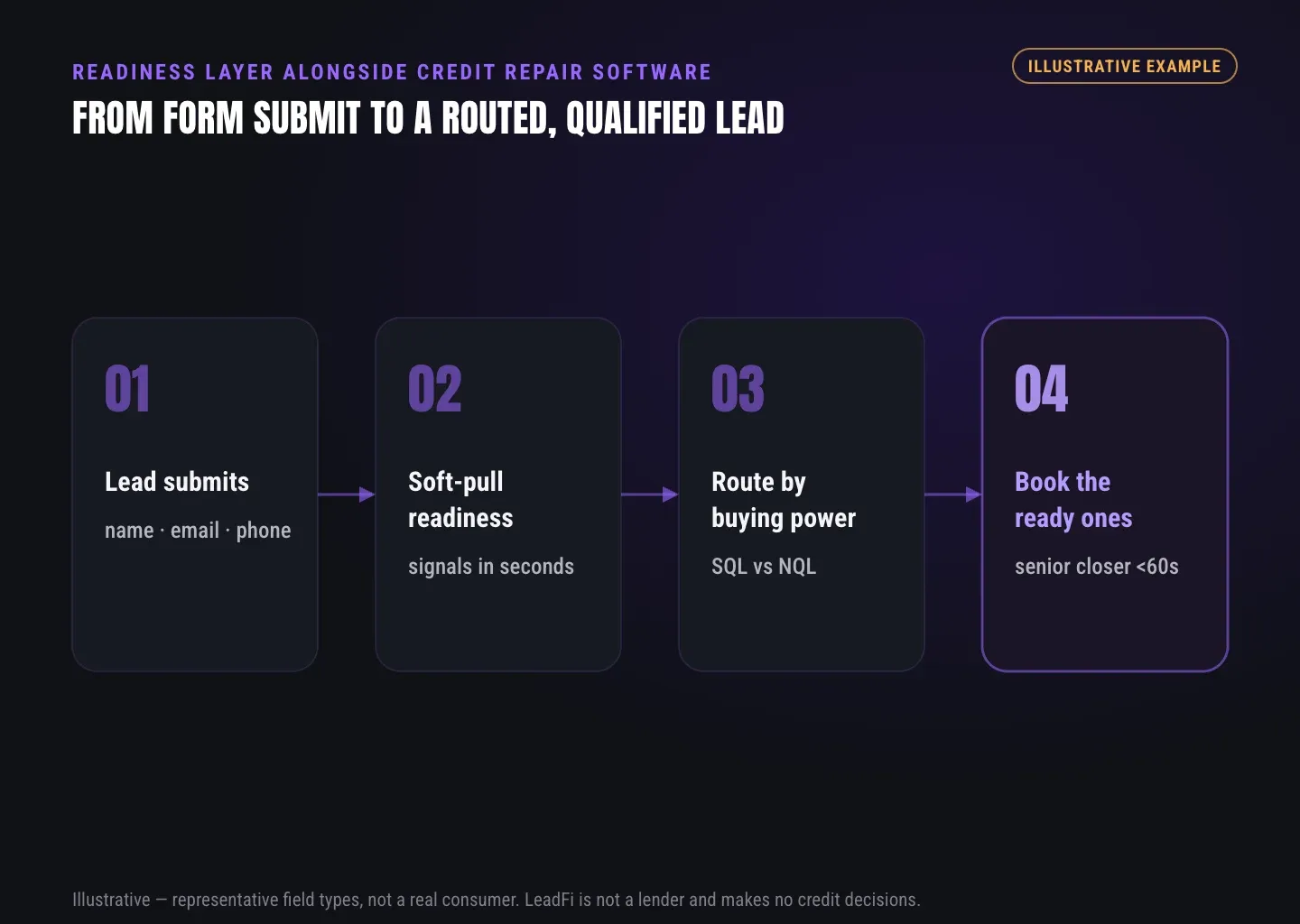
Credit repair software often manages a credit repair company’s intake, records, appointments, billing, and service workflow. LeadFi handles a separate job: it qualifies a client’s existing inbound leads by financial readiness before the sales call.
Watch a contact get pre-qualified.
This is exactly what your CRM gets back.
Your opt-in form
Soft pull · no impact to their credit
This is not a real soft pull. It's an example of the data points that land in your CRM contact record when a lead fills out your form.
LEADFI DEMO
Watch the demo, then start free or book a call.
GUIDE
Credit repair platforms manage intake and client work
Credit repair software can create prospect records, store intake answers, schedule consultations, assign owners, send reminders, and support client work after a sale. The available features depend on the vendor and plan.
Lead capture starts the record
A form, application, or booking event usually creates the initial record. The operator’s software can preserve source, campaign, contact, appointment, and pipeline context.
CRM fields organize the inquiry
The CRM remains the primary workspace for stages, notes, ownership, tasks, and service activity. LeadFi complements that system rather than replacing it.
Calendars and automations manage follow-up
A calendar confirms interest and availability, but it does not necessarily establish financial fit for a high-ticket offer. Likewise, form answers may be self-reported and insufficient for consistent routing.
Client tools support post-sale work
Once a prospect becomes a client, the credit repair platform can continue managing billing, messages, files, and service operations. LeadFi performs no credit repair and does not enter the consumer’s credit-improvement process.
Operators evaluating related vertical workflows can also review a practical guide to business funding broker lead qualification and practical insights on credit card stacking lead qualification.
INTELLIGENCE LAYER
Financial readiness adds qualification before the consultation
LeadFi adds a financial-readiness layer between inbound capture and costly sales activity. Depending on the reviewed configuration, that layer may include thin-input soft-pull prescreening and other identity-related signals. It is designed for qualification and routing—not consumer approval or denial.
Readiness adds buying-power context
A readiness workflow helps the operator determine whether an existing inbound lead fits the sales path for a specific offer. The goal is to reduce wasted calls and help financially qualified leads receive prompt attention.
Soft-pull prescreening requires an appropriate setup
Soft-pull prescreening may support relevant readiness workflows without affecting the consumer’s credit score when correctly configured. It does not remove consent and disclosures obligations. LeadFi supports compliance-aware setup, and clients should review their use case with counsel.
For more implementation context, see a practical guide to soft credit pull software for lead generation. LeadFi itself does not source leads, sell consumer lists, or replace the operator’s acquisition channels.
SQL and NQL labels drive the next workflow
An SQL, or Sales-Qualified Lead, is someone who is financially fit to buy your offer. An NQL, or Non-Qualified Lead, is someone who is not financially fit to buy your offer. These are operator-defined routing categories within the sales workflow, not consumer approvals or denials.
SQLs can move toward faster outreach or the appropriate sales queue. NQLs can move to nurture, education, a lower-ticket option, manual review, or another suitable path chosen by the operator.
Qualified-lead feedback supports better optimization
Subject to the approved configuration and applicable platform rules, teams can use readiness classifications in CRM, analytics, and paid-media workflows. This helps operators compare qualified demand with raw form volume without guaranteeing campaign performance.
WORKFLOW DESIGN
Workflow roles separate capture, qualification, routing, and management
A clean implementation gives each system a defined role. Credit repair software owns intake and client management, while LeadFi supports pre-call financial-readiness qualification and routing.
Capture stays in the existing stack
The operator’s current form, funnel, calendar, or CRM continues capturing inbound inquiries. LeadFi is not a lead supplier and does not replace those acquisition tools.
Qualification follows submission
After an intake event, the configured readiness workflow can evaluate the lead under the operator’s reviewed rules. LeadFi’s patent-pending identity matching is designed to establish a high-confidence match before applicable prescreening or deeper bureau-backed workflows.
Routing follows classification
The operator defines what should happen for SQL, NQL, and exception states. LeadFi supports real-time routing, but the specific available actions and information depend on the reviewed implementation.
The CRM remains the operating record
Connections may use a webhook, API, Zapier, Make, or a native workflow. The implementation should expose only the approved status and operational context needed by sales representatives.
Fallbacks handle exceptions
Incomplete, delayed, duplicate, or unmatched events should enter a review queue rather than being treated as SQLs or NQLs by default. Named owners, clear status values, and manual overrides reduce routing errors.
See which of the leads you already have can actually afford to buy.
ROUTING
Setup covers intake, routing rules, and CRM actions
A practical launch begins with one funnel or offer. Map the intake event, define the routing categories, choose the CRM actions, and test every branch before expanding.
Map the intake trigger
Identify the event that starts qualification, such as a completed form, application, or booking. Confirm which system receives the record first and which team owns the handoff.
Define SQL and NQL paths
Document the offer-specific definition of financial fit and the next action for each category. SQLs should receive a clear sales action, while NQLs should receive an appropriate alternate path rather than a dead end.
Keep CRM actions clear
Use concise operational labels such as priority outreach, nurture, alternate offer, or manual review. Avoid exposing unnecessary complexity to representatives.
Test the complete workflow
Test SQL, NQL, exception, duplicate, missing-owner, opt-out, and failed-handoff scenarios. Confirm that communication preferences remain respected and that no routing loop creates repeated alerts.
Use compliance-aware onboarding
LeadFi helps teams consider privacy and consent language, consent and disclosures, and TCPA-aware workflow choices before launch. LeadFi does not provide legal advice, guarantee compliance, or approve or deny consumers. Clients should review their use case with counsel.
Related reading: a practical guide to business funding broker lead qualification, practical insights on credit card stacking lead qualification, a practical guide to soft credit pull software for lead generation.
| Workflow need | Credit repair software | LeadFi readiness layer |
|---|---|---|
| Primary role | Manages intake, CRM records, appointments, and client work | Qualifies existing inbound leads by financial readiness before sales calls |
| Lead acquisition | Receives inquiries from the operator’s channels | Does not source leads or supply consumer lists |
| Credit repair activity | May support the operator’s service workflow | Performs no credit repair |
| Qualification | Often uses forms, notes, stages, and operator rules | Supports financial-readiness qualification and relevant prescreening workflows |
| Routing | Assigns records, owners, tasks, and sequences | Supports SQL, NQL, and exception paths under the configured workflow |
| CRM role | Stores the main sales and client record | Sits alongside the CRM as a qualification and routing layer |
| NQL handling | Runs automations configured by the operator | Supports nurture, manual review, lower-ticket, or alternate paths |
| Consumer decisions | Depends on the operator’s service process | Does not approve or deny consumers |
| Compliance support | Varies by vendor and operator | Supports compliance-aware setup but does not provide legal advice |
Key takeaways
The short version
- LeadFi performs no credit repair.
- Existing inbound leads are qualified before sales calls.
- SQLs and NQLs receive distinct operator-defined routes.
- Credit repair software remains the primary CRM and service platform.
- Launch requires reviewed consent, disclosures, routing, and fallbacks.
Quick answers
Fast answers before you dig in
Where does LeadFi fit alongside credit repair software?
Credit repair software manages intake and client operations. LeadFi qualifies the operator’s existing inbound leads by financial readiness before the sales call and supports SQL, NQL, or exception routing.
Is LeadFi credit repair software?
No. LeadFi is not credit repair software and performs no credit repair. It is a financial-readiness lead qualification platform for high-ticket, lead-driven businesses.
What is SQL vs NQL routing?
An SQL is someone who is financially fit to buy your offer. An NQL is someone who is not financially fit to buy your offer. The labels guide the operator’s sales workflow and are not consumer approvals or denials.
Does LeadFi replace a credit repair CRM?
No. The CRM remains the system for intake, sales records, and client work. LeadFi adds a readiness layer that supports qualification and routing before the sales call.
FAQ
Common questions
Is LeadFi credit repair software?
Can LeadFi replace credit repair software or a credit repair CRM?
How can LeadFi work with credit repair business software?
Does LeadFi support soft-pull prescreening?
What do SQL and NQL mean in this credit repair software workflow?
What happens to NQLs after qualification?
Does LeadFi guarantee compliance or advertising results?
Sources
References
- CFPB — What is a credit inquiry? (hard vs. soft) (opens in a new tab)Federal regulator confirms a soft inquiry, unlike a hard inquiry, does not affect the consumer's credit score.
- VantageScore — VantageScore 4.0 credit scoring model (opens in a new tab)Official page describing VantageScore 4.0, the tri-bureau, trended-data model used to assess credit risk.
- CFPB — Who can request to see my credit report? (opens in a new tab)Federal regulator explains the FCRA rules governing who may obtain a credit report.
Know who is ready before your next sales call.
Keep your credit repair software at the center of intake and client operations while adding financial-readiness qualification before costly sales calls.