
LEADFI WITH ISOFTPULL
iSoftPull Comparison: Where a Readiness Layer Fits
This iSoftPull comparison explains how distinct layers can coexist in a credit-adjacent or high-ticket sales stack. iSoftPull can perform its bureau-pull function, while LeadFi converts permissioned financial-readiness signals into SQL vs NQL routing, CRM actions, redirects, and rep context.
Watch a contact get pre-qualified.
This is exactly what your CRM gets back.
Your opt-in form
Soft pull · no impact to their credit
This is not a real soft pull. It's an example of the data points that land in your CRM contact record when a lead fills out your form.
LEADFI DEMO
Watch the demo, then start free or book a call.
GUIDE
Stack roles: What each layer owns
A useful iSoftPull comparison starts with responsibilities rather than a winner-versus-loser contest. Accessing bureau-related data and turning readiness signals into sales actions are separate jobs.
iSoftPull handles the bureau-pull layer
iSoftPull fits the bureau-pull role in a configured credit-related flow. Buyers should verify its current inputs, outputs, pricing, integrations, and bureau options directly with the vendor rather than infer unconfirmed feature parity.
LeadFi handles financial-readiness routing
LeadFi sits behind forms, funnels, calendars, and CRMs. In many configured flows, it can begin with name, email, and phone. Its patent-pending identity matching is designed to establish a high-confidence match before soft-pull prescreening and, where applicable, deeper bureau-backed workflows.
LeadFi can apply client-defined readiness rules and return a route while lead intent is high. Depending on configuration, signals may include VantageScore 4.0, available credit, income, debt, debt-to-income ratio, funding pre-approval signals, age, current address, and optional asset context.
SQL and NQL labels guide the next step
An SQL, or Sales-Qualified Lead, is someone who is financially fit to buy your offer. An NQL, or Non-Qualified Lead, is someone who is not financially fit to buy your offer.
These operational labels can trigger different calendars, owners, CRM stages, pages, nurture programs, or lower-ticket offers. They are used for routing and rep preparation; LeadFi does not approve or deny consumers.
CRM actions make the signal useful
LeadFi can return readiness status and suitable context to CRM fields, tags, stages, lists, and workflow triggers. Connections may use a webhook, API, Zapier, Make, or a supported native workflow.
For example, an SQL can trigger a closer alert and priority booking path. An NQL can enter nurture or see another suitable offer instead of consuming the same sales path.
Compliance-aware setup supports launch
Soft-pull and bureau-backed workflows should align with the funnel's consent and disclosures, privacy language, data use, and access controls. LeadFi helps teams consider privacy and consent language, TCPA-aware practices, and FCRA-aware workflow choices before launch.
LeadFi supports compliance-aware workflows but does not provide legal advice or guarantee compliance. Clients should review their use case with counsel.
ROUTING
Bureau pulls versus routing and CRM actions
A bureau pull returns data for a configured workflow. A readiness layer turns selected signals into a business response: who receives priority, what a rep sees, which calendar opens, and where other leads go.
Readiness signals add buying-power context
Subject to the configured workflow, consent and disclosures, LeadFi may surface signals such as VantageScore 4.0, available credit, income, debt, debt-to-income ratio, funding pre-approval signals, age, address, and optional asset context. These signals support qualification, routing, and rep preparation—not consumer approval or denial.
Rules turn data into a route
The business defines the financial profile that fits its offer and sales motion. LeadFi applies those rules to available signals and returns an SQL or NQL classification with a client-defined next step.
Calendars reflect the lead’s route
Instead of sending every applicant to one calendar, a team can prioritize an SQL for the appropriate setter, closer, or booking path. An NQL can receive nurture, a lower-ticket offer, or another relevant journey.
CRM records carry the context
The readiness result can update CRM ownership, stages, tasks, alerts, and follow-up workflows. Teams should expose only the information appropriate to each user's role and the configured use case.
Qualified signals can inform marketing
Where allowed and supported, LeadFi can feed qualified-lead events into Meta, Google, TikTok, Hyros, and operational reporting. Teams should validate current platform policies and avoid transmitting restricted financial details. Platform or campaign performance is not guaranteed.
Speed-to-lead protects strong intent
An SQL result can trigger a priority task or sales alert soon after submission. NQLs do not need to be discarded; they can move into a path aligned with their readiness and the offers available.
| Stack responsibility | iSoftPull layer | LeadFi layer |
|---|---|---|
| Core role | Bureau pulls in a configured credit-related flow | Financial-readiness qualification and routing |
| Primary output | Bureau-related data for the configured use | SQL/NQL status and client-defined next steps |
| Lead intake | Verify current requirements directly with iSoftPull | Can begin with name, email, and phone in many flows |
| Identity process | Not verified for this comparison | Patent-pending matching designed to establish a high-confidence match |
| Readiness rules | Not verified for this comparison | Applies client-defined rules to available signals |
| CRM actions | Verify current capabilities directly with iSoftPull | Can return fields, tags, stages, lists, and workflow triggers |
| Calendar routing | Not verified for this comparison | Can support distinct booking paths when integrated |
| NQL handling | Not verified for this comparison | Can support nurture, lower-ticket offers, or other suitable paths |
| Marketing feedback | Not verified for this comparison | Can return approved qualified-lead events where allowed and supported |
| Consumer decisions | Depends on the client's configured use | Does not approve or deny consumers |
| Stack relationship | Can retain the bureau-pull role | Can serve as the readiness and action layer |
INTELLIGENCE LAYER
Running both in one prescreen stack
Using both roles does not require two separate customer journeys or imply a direct product integration. A planned workflow can preserve one system's bureau function while LeadFi handles financial-readiness classification and downstream actions.
Capture starts with the current form
LeadFi can sit behind supported forms, funnels, booking experiences, and CRM workflows. In many configurations, name, email, and phone can begin thin-input prescreening without requesting address or date of birth up front. Input requirements still depend on the workflow and data source.
Identity matching comes before prescreening
Thin-input prescreening does not make identity verification optional. LeadFi uses identity-related information and identity signals—such as current address or age when available—to support its patent-pending matching process and seek a high-confidence match.
Handoffs connect the layers
Submitted data can move through a webhook, API, Zapier, Make, or supported native workflow. The exact order should reflect system ownership, consent and disclosures, data availability, and routing rules.
CRM fields store useful outcomes
Useful CRM fields may include readiness status, SQL/NQL, assigned route, owner, campaign source, and qualification time. These fields can activate alerts, tasks, stages, lists, calendars, and nurture workflows.
Redirects shape the live journey
When supported by the funnel, an SQL can reach a priority calendar immediately after submission. An NQL can reach a lower-ticket page, nurture confirmation, or another client-defined next step.
Signal loops inform marketing
A stable qualified-lead event can help teams compare campaigns by lead quality rather than form volume alone. Any feedback loop should use approved event definitions, data minimization, suitable consent, and current platform-policy review.
A practical prescreen stack map
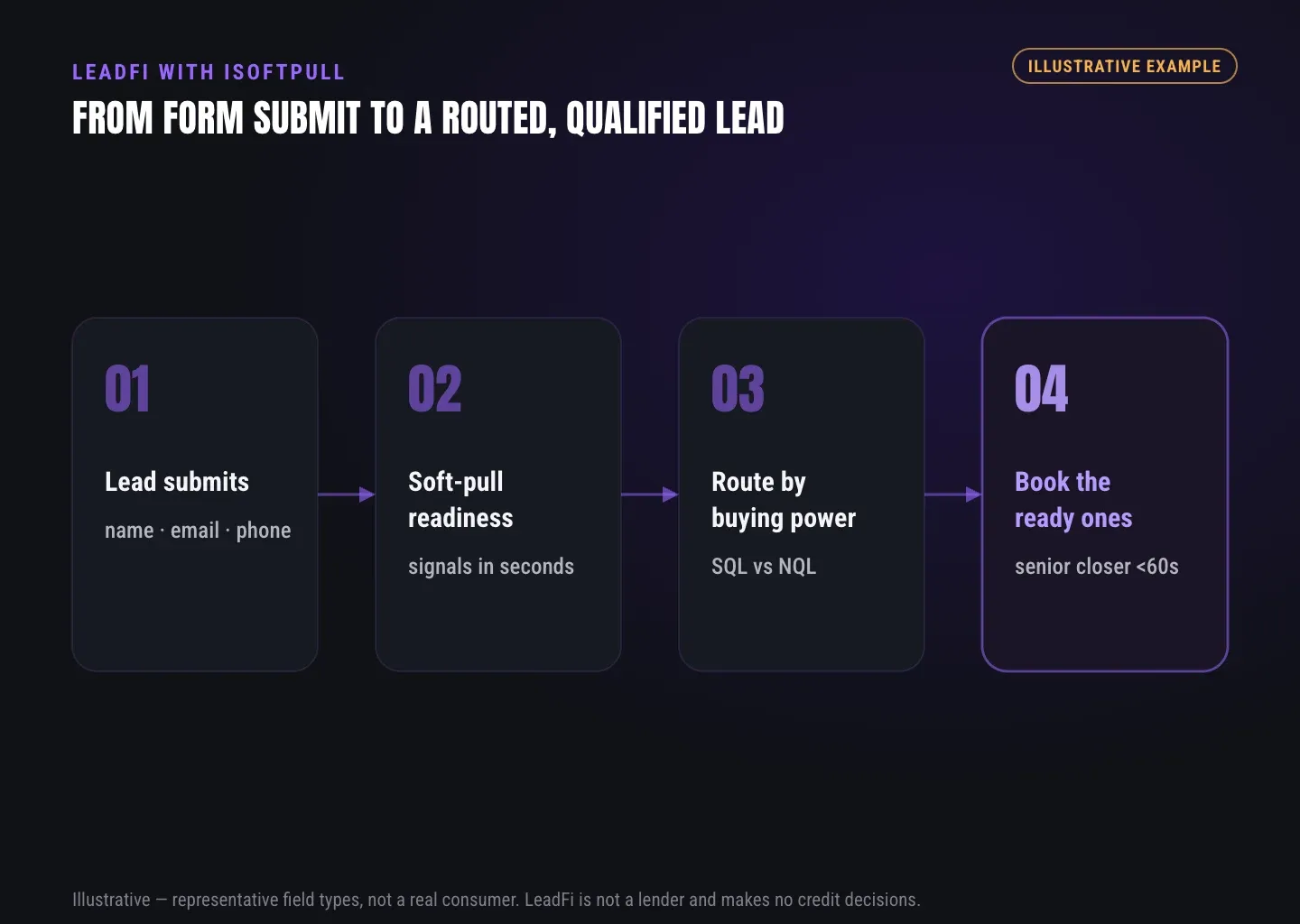
- Capture: Receive name, email, phone, and other required form data.
- Disclose: Present consent and disclosures aligned with the configured use.
- Handoff: Send data through the planned integration path.
- Match: Use identity-related information and signals to seek a high-confidence match.
- Prescreen: Run the configured soft-pull or bureau-backed step where applicable.
- Classify: Apply readiness rules and return SQL or NQL.
- Record: Store the status, source, route, and suitable context in the CRM.
- Route: Open the appropriate calendar, page, offer, or nurture flow.
- Notify: Alert the assigned rep with relevant preparation context.
- Optimize: Return approved qualified-lead events to supported systems where allowed.
See which of the leads you already have can actually afford to buy.
GUIDE
How to decide what you actually need
Start with the missing job. If the need is limited to a bureau pull, evaluate that layer using information verified directly with the provider. If the team already receives data but cannot convert it into timely sales actions, a readiness and routing layer may be the gap.
Choose bureau access for a bureau need
Confirm the provider's current bureau coverage, required inputs, outputs, integrations, support, and pricing. This article does not make unverified iSoftPull feature or price claims.
Choose LeadFi for routing needs
LeadFi may fit when a high-ticket or credit-adjacent team needs buying-power-aware qualification, SQL/NQL routing, closer alerts, CRM updates, dynamic calendars, redirects, and additional paths for NQLs.
Choose both roles for a connected prescreen stack
Some teams need bureau pulls from one stack with high-ticket routing and CRM actions from another. This complement model lets each layer retain a clear responsibility without positioning LeadFi as an iSoftPull replacement.
Choose by sales cost and offer value
Financial-readiness qualification is especially relevant when sales calls are expensive and offers commonly cost $1,000–$10,000 or more. Potential use cases include coaching, consulting, agencies, business funding, mortgage, lending, real estate, insurance, and auto finance.
Choose by required workflow depth
A simple implementation may return one SQL/NQL field. A more developed workflow may include owner assignment, stage changes, alerts, redirects, nurture, offer tiers, and approved marketing events. List every required action before choosing the stack.
Choose with compliance in the design
A soft credit check without address should not be presented as a way to bypass sound setup. The practical value is reduced form friction combined with buying-power-aware routing. Each workflow still needs appropriate consent and disclosures, identity controls, privacy choices, and legal review.
Decision checklist
- Do you need a bureau pull, or is that function already covered?
- Can the current process identify who is financially fit for the offer?
- Can it route SQLs and NQLs into distinct next steps?
- Can it prioritize financially qualified leads while intent is high?
- Does the CRM receive actionable fields, stages, tags, and owner rules?
- Is there a nurture, lower-ticket, or other suitable path for NQLs?
- Can the workflow seek a high-confidence identity match from available inputs?
- Do consent and disclosures align with the intended data flow?
- Can qualified outcomes be measured without exposing restricted data?
- Does each system have one clearly defined responsibility?
Related reading: practical insights on soft credit pull vs data enrichment, a closer look at soft pull prequalification tools, a practical guide to sql vs nql lead routing by financial readiness.
Key takeaways
The short version
- LeadFi complements rather than replaces iSoftPull.
- Bureau pulls and readiness routing are distinct stack jobs.
- LeadFi classifies and routes SQLs and NQLs.
- Thin-input flows can begin with name, email, and phone.
- Consent, disclosures, privacy, and platform rules still apply.
Quick answers
Fast answers before you dig in
What is the main conclusion of this iSoftPull comparison?
iSoftPull and LeadFi can occupy distinct roles in one planned stack: the bureau-pull function remains in one layer, while LeadFi handles financial-readiness qualification, SQL/NQL routing, CRM actions, and next-step logic.
Does LeadFi replace iSoftPull?
No. LeadFi is positioned as a complementary readiness and action layer, not as an iSoftPull replacement.
What do SQL and NQL mean in LeadFi?
An SQL is someone who is financially fit to buy your offer. An NQL is someone who is not financially fit to buy your offer.
Can LeadFi begin with thin lead inputs?
In many configured flows, LeadFi can begin with name, email, and phone, then use patent-pending identity matching designed to establish a high-confidence match before prescreening.
What actions can follow a readiness result?
A result can update CRM fields, assign an owner, alert a closer, open a calendar or page, start nurture, present a lower-ticket offer, or create an approved qualified-lead event.
FAQ
Common questions
Is this an iSoftPull comparison or a replacement page?
Does LeadFi replace iSoftPull?
Can iSoftPull and LeadFi run in the same prescreen stack?
How does LeadFi support SQL vs NQL routing?
Which financial-readiness signals can LeadFi use?
Can LeadFi support a soft credit check without address?
What should buyers verify during an iSoftPull comparison?
Sources
References
- CFPB — What is a credit inquiry? (hard vs. soft) (opens in a new tab)Federal regulator confirms a soft inquiry, unlike a hard inquiry, does not affect the consumer's credit score.
- VantageScore — VantageScore 4.0 credit scoring model (opens in a new tab)Official page describing VantageScore 4.0, the tri-bureau, trended-data model used to assess credit risk.
- Experian — What Is a Soft Inquiry? (opens in a new tab)Major credit bureau explains soft inquiries are informational and have no impact on credit scores.
Know who is ready before your next sales call.
Keep the bureau-pull role that fits your workflow and add a buying-power-aware action layer behind your form, funnel, calendar, or CRM. Book a soft LeadFi assessment to map thin-input prescreening, SQL vs NQL routing, CRM handoffs, and appropriate NQL paths.