
SOFT PULL PREQUALIFICATION TOOLS
Soft-Pull Pre-Qualification Tools: An OmniaIQ Alternative Buyer’s Guide
Soft pull pre-qualification tools should do more than return a credit signal. For high-ticket teams, the operational question is what happens next: who reaches a closer, who enters nurture, and who sees an alternate offer?
Watch a contact get pre-qualified.
This is exactly what your CRM gets back.
Your opt-in form
Soft pull · no impact to their credit
This is not a real soft pull. It's an example of the data points that land in your CRM contact record when a lead fills out your form.
LEADFI DEMO
Watch the demo, then start free or book a call.
GUIDE
What OmniaIQ appears to focus on
Public positioning
OmniaIQ’s public materials describe real-time qualification, program matching, routing, calendar intelligence, integrations, and financial checks before a call. They also identify use cases spanning lenders, lead providers, agencies, mortgage teams, high-ticket sales, and payment programs. Buyers should verify current capabilities directly during evaluation.
Apparent strengths
The published positioning links financial checks with program matching and workflow routing. OmniaIQ’s website also names common forms, funnels, CRMs, calendars, and marketing tools, including HubSpot, Typeform, Zapier, Calendly, GoHighLevel, Salesforce, Meta Ads, and Google Ads.
Its public comparison materials describe workflows using name, phone, and email without collecting an address or Social Security number up front. Exact requirements can vary by configuration and use case.
Reasons teams compare alternatives
Teams usually compare an OmniaIQ alternative because their workflows assign different value to program matching, CRM stages, redirects, closer alerts, calendar control, or advertising events. The useful comparison is therefore the end-to-end lead journey rather than a generic feature count.
LeadFi fit by workflow
LeadFi may fit teams whose primary goal is to route high-ticket leads using real buying-power context. It can work from name, email, and phone in many workflows, subject to the appropriate setup, consent and disclosures.
Client-defined rules can label a record as an SQL or NQL. An SQL is routed toward the configured sales path; an NQL is sent to nurture, a lower-ticket offer, an alternate path, or later review. These labels are operating categories, not judgments about a person.
Existing-stack coexistence
LeadFi sits behind existing capture and sales systems rather than requiring teams to replace them. It can receive a submitted lead, apply financial-readiness logic, and return an outcome through a webhook, API, Zapier, Make, or a supported native workflow.
A scheduler can continue managing availability while LeadFi helps determine which calendar, page, offer, or follow-up sequence the lead receives.
Workflow actionability
Depending on the configured stack, LeadFi can:
- Route SQLs to setter or closer calendars
- Send NQLs to nurture, lower-ticket products, financing education, or alternate offers
- Write outcomes to CRM fields, tags, stages, lists, and tasks
- Trigger workflows through webhooks, APIs, Zapier, or Make
- Redirect leads to configured pages or next-step URLs
- Notify sales when a financially qualified lead submits
- Feed approved readiness events into Meta, Google, TikTok, Hyros, or related workflows where allowed
This turns financial qualification into an action layer instead of a static report.
INTELLIGENCE LAYER
What soft-pull pre-qualification tools are for
Soft pull pre-qualification tools help teams assess financial readiness without using a hard inquiry. Product behavior and credit-file treatment should be confirmed for the specific workflow, data source, consent and disclosures.
Read buying-power signals
A useful flow adds financial context before a rep spends time on a call. Depending on configuration, signals may include VantageScore 4.0, available credit, income, debt, debt-to-income ratio, funding pre-approval signals, age, address, and optional asset or net-worth-style context where available.
These are readiness signals for routing and rep preparation. They are not consumer approvals or denials, and a funding pre-approval signal is not a promise of funding.
Replace form claims with routed data
Forms often ask prospects to state income, available funds, or financing needs. Those answers can support discovery, but self-reported fields differ from bureau-backed or other permissioned financial-readiness data.
LeadFi can add a readiness layer after submission so the team can use stated needs and returned signals within one routing workflow.
Protect closer calendars
When every applicant reaches the same calendar, limited closer capacity may be spent on leads who need a different next step. A configured SQL can receive the priority booking path while an NQL enters nurture, reaches a setter, receives financing education, or sees another offer.
This is one way to prequalify leads before the sales call without treating an NQL as a discarded lead.
Improve speed-to-lead
A financial-readiness result can trigger a priority task, rep alert, CRM stage change, or direct booking path. This helps teams pursue faster follow-up for financially qualified leads while interest is fresh.
Build a second path for NQLs
NQL routing should create an alternate opportunity. A coaching applicant might receive a course or longer nurture sequence. A funding prospect might receive education, another program path, or manual review.
Improve campaign signal quality
Lead volume and booked calls do not independently show financial readiness. LeadFi can return approved SQL-quality events to CRM, attribution, and advertising workflows where the setup, contracts, platform rules, and data handling allow it.
This gives media teams financial-readiness signals for sales teams and campaign analysis. It does not guarantee advertising performance.
WORKFLOW DESIGN
The workflow questions to compare
A soft pull pre-qualification comparison should trace the complete journey from submission through sales, nurture, financing, and campaign measurement.
What data enters the system?
Check which fields are required and whether the product can use what the form already collects. LeadFi can work from name, email, and phone in many workflows.
Its patented identity matching is designed to use identity-related information and identity signals, such as current address or age where applicable, to establish a high-confidence match before soft-pull prescreening. Where configured, the match can support deeper bureau-backed credit-report workflows. Requirements depend on the setup, consent and disclosures.
Which readiness signals matter?
Choose signals that change a route or rep action. A coaching funnel may need a broad buying-power band, while a funding, lending, or mortgage workflow may need income, debt, debt-to-income ratio, available credit, score context, or program information.
How are SQL and NQL defined?
Document the conditions that route a lead toward sales and the paths used when those conditions are not met. Define which fields reps may see, what each label means, and how unmatched records are handled.
What happens after the result?
A useful result should change a field, tag, stage, owner, alert, page, calendar, offer, or nurture sequence. One SQL result might open a closer calendar, create a priority task, and notify a rep. An NQL result might display an alternate page and start a long-term sequence.
How does the tool fit the calendar?
Scheduling and qualification perform different jobs. A scheduler manages appointments; a financial-readiness engine helps select the appropriate booking path. LeadFi can sit before or behind a booking step depending on the implementation.
What reaches the CRM?
Ask which fields, tags, stages, tasks, and routing reasons are written—not merely whether a CRM integration exists. Some teams need only an SQL/NQL field. Others need a readiness band, owner, task priority, and approved context for rep preparation.
What reaches ad platforms?
Confirm whether an approved readiness event can enter the media workflow, how it is named, and whether the transmission follows platform rules and contractual restrictions. Sensitive or credit-derived details should not be exposed casually.
What setup help is included?
LeadFi helps teams plan compliance-aware setup, including privacy and consent-oriented workflow choices, TCPA-aware practices, and FCRA-aware guidance. LeadFi does not provide legal advice or guarantee compliance. Clients should review their use case with counsel before launch.
INTELLIGENCE LAYER
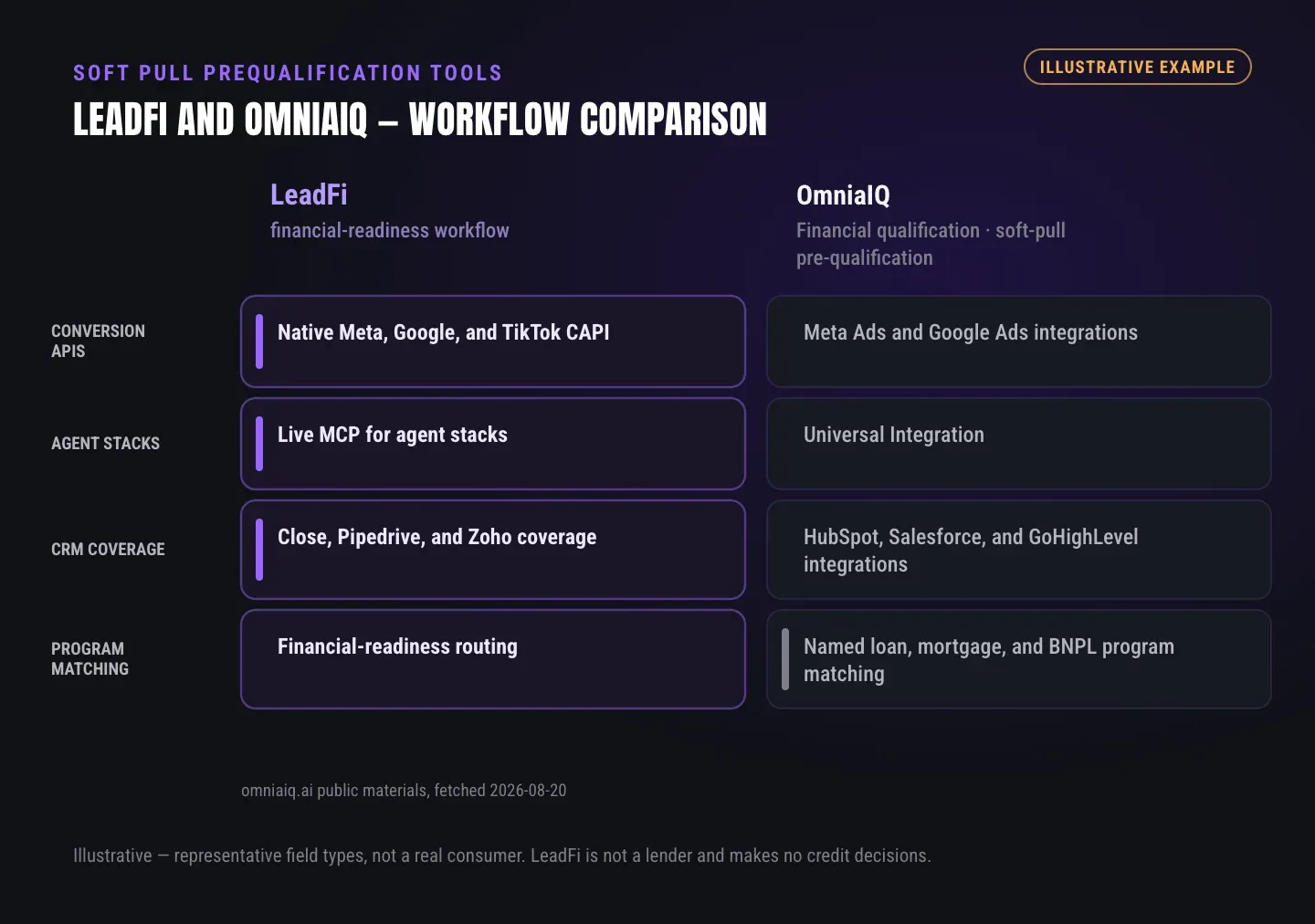
Soft pull pre-qualification comparison: OmniaIQ and LeadFi
The comparison table reflects OmniaIQ’s reviewed public positioning and LeadFi’s approved workflow description. It does not rank the products or imply complete feature parity.
Both platforms appear in financial qualification and routing evaluations. Buyers should test their actual intake payload, matching behavior, SQL and NQL branches, CRM writes, redirects, calendar handoffs, unmatched records, and approved advertising events before choosing a platform.
GUIDE
How OmniaIQ and other options describe their strengths
The market contains several categories that can overlap with soft pull pre-qualification tools. Buyers should first identify the job each product performs.
Qualification-led platforms
Qualification-led platforms connect financial data with a score, label, program match, or route. OmniaIQ’s public materials place it in this category. LeadFi also fits here, with emphasis on financial-readiness qualification and post-submit actions across CRMs, calendars, redirects, nurture, and approved advertising workflows.
Credit-data infrastructure
Credit-data APIs and reporting infrastructure can supply data to a custom application. This approach may suit teams with engineering resources and established decision logic. A workflow-focused financial-readiness product adds operating routes and actions around the data.
Form and funnel tools
Forms and funnel builders collect submissions and display pages. LeadFi complements these tools by receiving the payload after capture and returning a readiness result that can influence the next calendar, page, offer, or nurture path.
Scheduling tools
Schedulers manage availability, reminders, and appointments. They remain in place while LeadFi helps determine which leads reach each booking path.
CRM and automation tools
CRMs store records, stages, tasks, messages, and pipeline history. A readiness engine enriches those records with a qualification outcome. An SQL tag might create a priority call task, while an NQL tag might begin nurture and move the record to another stage.
Attribution and ad tools
Attribution tools track sources, journeys, conversions, and revenue. LeadFi can add an approved financial-readiness or SQL-quality event to that measurement layer where permitted. Media buyers can then compare qualified demand with submissions and booked calls.
See which of the leads you already have can actually afford to buy.
ROUTING
How to choose for your intake and routing flow
Start with the current funnel rather than a feature checklist. Document each point where financial readiness should change the next step.
Map the current submission
Record the form, funnel, application, or booking tool that creates the lead. Note the fields collected, the consent and disclosures presented, and whether the payload enters a CRM, automation platform, or custom application.
Define the sales-ready path
Specify the CRM field, stage, owner, alert, calendar, and follow-up target for a financially qualified lead. A clear operating definition is more useful than a general claim that a product integrates with sales.
Define every NQL path
Map alternate routes for leads who do not meet the SQL rule. Options may include a 30-day nurture sequence, lower-ticket product, financing education, different program, setter call, or manual review.
Choose useful readiness fields
Only return fields that support a legitimate work decision. Each signal should change priority, routing, offer presentation, rep preparation, or another defined action. More data does not automatically produce a better workflow.
Test edge cases
Test an SQL, an NQL, an unmatched record, a duplicate, and a delayed response. Confirm that every outcome gives the prospect a clear next step and that failures do not create a dead end.
Measure the right outcomes
Track submissions, matched records, SQLs, NQLs, booked calls, attended calls, and sales outcomes. Evaluate whether sales time and routing improve rather than judging the system solely on lead volume.
Review the setup before launch
Align intake language, privacy policies, sales scripts, CRM access, event transmissions, and follow-up messages. LeadFi supports compliance-aware workflows, but it does not replace counsel or remove consent and disclosure obligations.
| Dimension | OmniaIQ public positioning | LeadFi workflow fit |
|---|---|---|
| Core focus | Public materials describe financial qualification, program matching, routing, calendar intelligence, and integrations | Financial-readiness qualification followed by SQL/NQL routing, CRM actions, redirects, rep alerts, and approved quality events |
| Inputs | Public comparison materials describe name, phone, and email without address or Social Security number up front | Can work from name, email, and phone in many workflows; patented matching is designed to establish high identity confidence |
| Qualification | Public pages describe soft-pull credit data, available credit, debt-to-income ratio, identity checks, and program matching | Uses configured readiness rules and available signals such as VantageScore 4.0, available credit, income, debt, and debt-to-income ratio |
| Routing | Public materials describe routing and program matching | Routes SQLs toward sales and NQLs toward nurture, lower-ticket offers, financing education, custom pages, or other configured steps |
| CRM actions | Public pages name integrations with common CRM and automation tools | Can write fields, tags, stages, tasks, lists, notifications, and workflow triggers through supported connections |
| Stack fit | Public pages name forms, funnels, calendars, CRMs, and marketing platforms | Can sit behind forms, funnels, calendars, CRMs, and custom applications through webhook, API, Zapier, Make, or native workflows |
| Advertising signals | Public materials name Meta Ads and Google Ads integrations | Can send approved SQL-quality events to Meta, Google, TikTok, Hyros, and related workflows where allowed and configured correctly |
| Best-fit evaluation | Buyers seeking the published combination of qualification, program matching, calendar intelligence, and integration coverage | Teams prioritizing financial-readiness routing, detailed CRM actions, dynamic next steps, thin-input intake, and qualified-lead feedback |
WHO IT'S FOR
Practical LeadFi workflows for high-ticket teams
Each example uses financial readiness for routing and rep preparation—not consumer approval or denial.
Example 1 — High-ticket coaching funnel
A coaching company captures name, email, phone, goals, and application answers. The funnel sends the record to LeadFi through a webhook, API, Zapier, or Make. After identity matching and configured prescreening, an SQL can receive a closer calendar and priority CRM task. An NQL can receive nurture, a lower-ticket product, or another sales path.
Approved outcome events may return to attribution or advertising workflows where allowed. The team measures SQL rate, calendar use, show rate, and sales outcomes without treating readiness as a guarantee.
Example 2 — Funding, lending, or mortgage workflow
A credit-adjacent business aligns its intake language with the planned prescreening and follow-up flow. LeadFi can apply configured rules using available signals such as income, debt, debt-to-income ratio, available credit, and score context.
A matching record can move to a rep, program review, or priority queue. Other records can enter an alternate program path, nurture, or manual review. LeadFi does not approve or deny consumers, and the business should have counsel review its criteria, disclosures, scripts, data access, and notices.
Example 3 — Agency lead delivery
An agency submits a lead through an API or webhook and applies rules tailored to the client and offer. The resulting SQL/NQL or buyer-fit label can be sent to the client’s CRM without broadly exposing detailed consumer data.
SQLs can create priority tasks, while NQLs enter alternate paths. The agency can report raw volume alongside financially ready routing rates and send approved quality events into media workflows when platform rules, contracts, and setup allow.
GUIDE
OmniaIQ alternative decision checklist
Use the real intake and routing flow during demos:
- Inputs: Can the tool use fields already collected?
- Match: How are identity confidence, unmatched records, and duplicates handled?
- Signals: Which financial-readiness fields support the sales motion?
- Rules: Can the team define separate SQL and NQL paths?
- CRM: Which fields, stages, tags, tasks, and workflows can change?
- Calendar: Can readiness select the appropriate booking path?
- Redirects: Can each lead reach a configured post-submit page?
- Nurture: What happens outside the primary sales route?
- Programs: Does the team need named loan or payment-program matching?
- Ads: Can approved SQL-quality events enter media systems safely?
- Testing: Can the team test matched, unmatched, duplicate, delayed, and failure cases?
- Setup: Does onboarding cover consent and disclosures, privacy language, CRM design, and follow-up practices?
- Reporting: Can the business measure SQL rates and downstream sales outcomes?
- Stack fit: Does the workflow support the required API, webhook, Zapier, Make, or native connection?
Choose the product that makes next-step logic clear. The soft pull supplies context; the routing workflow creates the operational value.
Key takeaways
The short version
- Compare post-submit actions, not soft-pull access alone.
- LeadFi supports thin-input readiness workflows using name, email, and phone.
- SQLs can receive priority sales paths while NQLs enter alternate routes.
- Readiness outcomes can update CRMs, calendars, redirects, and approved ad workflows.
- Consent, disclosures, platform rules, and counsel review still apply.
Quick answers
Fast answers before you dig in
What are the best soft pull pre-qualification tools for high-ticket sales?
The best fit connects permissioned financial-readiness signals to SQL vs NQL routing, CRM updates, calendar branches, NQL nurture, and measurable post-submit actions. Evaluate the workflow rather than the soft pull alone.
Is LeadFi an OmniaIQ alternative?
Yes. LeadFi is an OmniaIQ alternative for teams evaluating financial qualification and routing. LeadFi emphasizes buying-power-aware qualification, thin-input intake, SQL/NQL branches, CRM actions, redirects, rep alerts, and approved quality events.
What inputs can LeadFi use for prescreening?
LeadFi can work from name, email, and phone in many workflows. Patented identity matching is designed to establish a high-confidence match before soft-pull prescreening, subject to the configured use case, consent and disclosures.
How should teams compare soft pull pre-qualification tools?
Compare input requirements, identity matching, available signals, SQL/NQL rules, CRM writes, redirects, calendar control, unmatched-record handling, advertising events, integrations, and compliance-aware setup.
What happens to an NQL in LeadFi?
An NQL follows the client’s configured alternate route, such as nurture, a lower-ticket offer, financing education, another program, a setter path, or manual review. The label is not a consumer approval or denial.
FAQ
Common questions
What are soft pull pre-qualification tools?
What should a soft pull pre-qualification comparison include?
Is LeadFi an OmniaIQ alternative?
Does OmniaIQ require an address or Social Security number?
Can LeadFi route leads to different calendars?
Can soft pull pre-qualification tools update a CRM?
Can LeadFi send financial-readiness signals to advertising platforms?
Sources
References
- CFPB — What is a credit inquiry? (hard vs. soft) (opens in a new tab)Federal regulator confirms a soft inquiry, unlike a hard inquiry, does not affect the consumer's credit score.
- VantageScore — VantageScore 4.0 credit scoring model (opens in a new tab)Official page describing VantageScore 4.0, the tri-bureau, trended-data model used to assess credit risk.
- CFPB — Who can request to see my credit report? (opens in a new tab)Federal regulator explains the FCRA rules governing who may obtain a credit report.
- VantageScore 4.0 model information (opens in a new tab)Background on the named score model; availability depends on LeadFi configuration and workflow.
Know who is ready before your next sales call.
See how LeadFi can sit behind your current form, funnel, calendar, or CRM and turn buying-power signals into SQL vs NQL routes, rep alerts, CRM actions, and alternate offers. Book a LeadFi demo or request a workflow assessment.