
LEADFI WITH CALENDLY
Calendly Lead Qualification: Add Financial Readiness Behind Your Booking Flow
Calendly is a scheduler. It helps prospects select an available time and helps teams manage bookings. LeadFi complements that scheduling layer with Calendly lead qualification based on financial readiness.
Watch a contact get pre-qualified.
This is exactly what your CRM gets back.
Your opt-in form
Soft pull · no impact to their credit
This is not a real soft pull. It's an example of the data points that land in your CRM contact record when a lead fills out your form.
LEADFI DEMO
Watch the demo, then start free or book a call.
INTELLIGENCE LAYER
Booking data shows intent, not full financial readiness
Booking data supports scheduling
Calendly manages booking actions within the availability and event rules a team configures. It gives prospects a straightforward way to select a time and creates the corresponding meeting event.
That information confirms scheduling intent. It does not, by itself, answer the operator's separate question: which sales path fits this lead's financial readiness for a particular offer?
Form answers provide stated context
A booking or application form can collect goals, timing, budget, business type, and other answers. These details can help a rep prepare, but they remain prospect-provided statements.
LeadFi adds another layer using permissioned financial-readiness signals. Depending on the configured workflow and available data, these may include VantageScore 4.0, available credit, income, debt, debt-to-income ratio, funding pre-approval signals, age, address, or optional asset context.
Readiness signals support routing
LeadFi applies the business's configured criteria and returns a status or routing result. An SQL is someone who is financially fit to buy your offer. An NQL is someone who is not financially fit to buy your offer.
Those labels should trigger defined actions. An SQL might enter a priority sales path, while an NQL might receive nurture, a lower-ticket product, a financing path, or another appropriate offer. LeadFi does not approve or deny consumers.
Comparison: scheduling and readiness layers
The useful distinction is between complementary workflow roles. Calendly remains the scheduler. LeadFi supplies financial-readiness context that the surrounding funnel, automation, or CRM can use when choosing a booking or follow-up path.
The exact handoff can use an API, webhook, Zapier, Make, or another supported workflow. Teams should confirm the implementation available for their stack rather than assume a native or endorsed Calendly connection.
Example: a coaching application
Hypothetical scenario: A coaching company offers a $7,500 program. Its application collects name, email, phone, goals, and suitable consent and disclosures before displaying a scheduler.
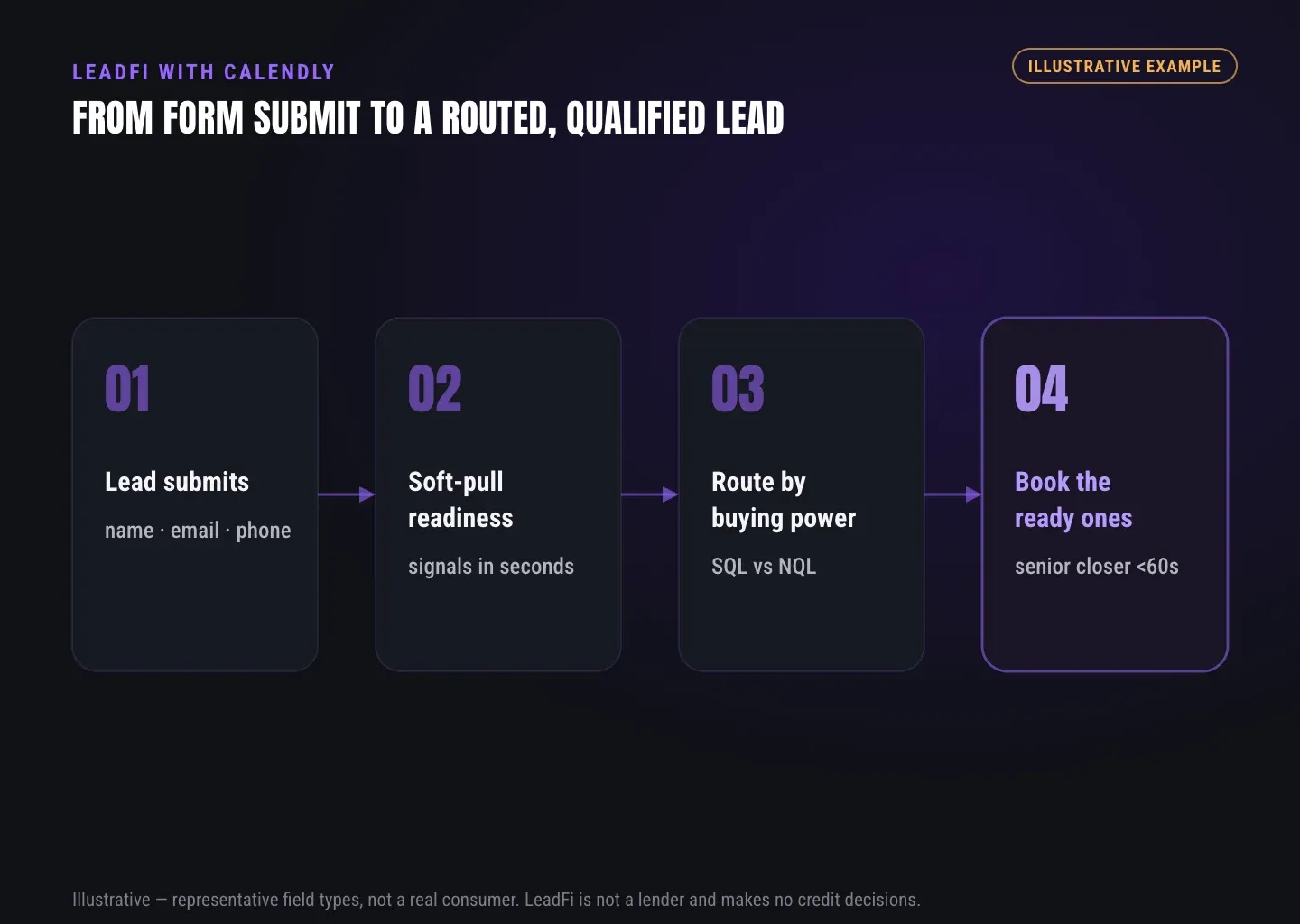
LeadFi processes the submission under the company's configured rules. An SQL receives the closer calendar, an NQL receives a workshop or nurture path, and an unmatched record moves to a neutral review route. Calendly then schedules meetings for leads sent to a booking path.
INTELLIGENCE LAYER
Readiness checks fit between submit and booking
Thin inputs can reduce form friction
For many workflows, LeadFi can start with name, email, and phone. Some configurations may not require an address and date of birth up front, although input requirements depend on the use case, data coverage, setup, consent and disclosures.
The purpose is not to avoid necessary information. It is to keep the initial form focused while adding buying-power-aware qualification behind the submission.
Identity matching comes first
LeadFi's patent-pending identity matching is designed to establish a high-confidence match before soft-pull prescreening and, where applicable, deeper bureau-backed credit-report workflows. It uses identity-related information and identity signals, such as current address or age when available.
A confident match is not assured for every submission. Typos, shared contact details, incomplete records, and unavailable data can produce an unmatched result. The workflow should use a neutral fallback rather than inventing an SQL or NQL classification.
Soft-pull prescreening informs readiness
Where applicable, soft-pull prescreening can surface financial-readiness signals without affecting the consumer's credit score. Availability varies by workflow, eligibility, setup, consent and disclosures, and data coverage.
The operator must decide which signals matter for the specific offer and what each outcome should trigger. A funding company, agency, and course creator may require different rules even when they use the same scheduler.
Handoff sequence: capture, qualify, and route
A qualify-before-booking workflow commonly follows six steps:
- Capture: Collect name, email, phone, and relevant application answers.
- Disclose: Present language aligned with the planned data use and follow-up.
- Match: Use identity-related information and identity signals to seek a high-confidence match.
- Qualify: Apply the configured financial-readiness criteria.
- Route: Return SQL, NQL, unmatched, pending, or error status.
- Record: Store the outcome in the CRM and trigger the appropriate next step.
The page can then display the selected Calendly link or an alternate destination. The surrounding funnel or automation executes that redirect; Calendly performs the scheduling step.
Failure cases need defined fallbacks
If the scheduler appears before the result returns, a lead may enter the general booking path before qualification can affect routing. Operators can use a short processing screen, a default route, or post-booking qualification, depending on the desired customer experience.
Other failure cases include incomplete identity data, timeouts, duplicate submissions, disconnected CRM records, and criteria that do not match the actual offer. Each case needs an owner, logged status, and predetermined fallback before launch.
ROUTING
Ready bookers can follow a priority sales path
SQLs can reach the right calendar
An SQL is someone who is financially fit to buy your offer. The workflow can send that lead to a closer calendar, priority queue, setter, or another high-touch step while momentum is high.
The CRM can also alert the assigned rep and record the offer profile, source, route, and processing status. The objective is to prioritize financially qualified leads for speed-to-lead rather than treating every booking as equally ready.
NQLs can enter another value path
An NQL is someone who is not financially fit to buy your offer. That classification can trigger nurture, a low-ticket product, a financing path, educational content, or another suitable offer.
Financial readiness describes fit for the configured offer and workflow. It should not be presented as a judgment of personal worth or as a consumer approval or denial.
Reps can receive useful context
A CRM record might show an SQL/NQL status, assigned route, matched offer tier, and approved preparation notes. Teams should limit access to sensitive financial fields according to role and operational need.
A short routing label may be more actionable than exposing every underlying signal. Data minimization, retention, security, and access rules should be addressed during implementation.
Ad systems can receive quality signals
Where allowed and properly configured, financially qualified lead events can feed back into Meta, Google, TikTok, Hyros, CRM, or attribution workflows. This gives media and operations teams a quality signal beyond form fills and scheduled calls.
Platform performance is not guaranteed. Each destination has its own data, event, and policy requirements, so teams should confirm the approved signal and setup before launch.
Route design starts with operator decisions
Before building the automation, define the decision for every outcome:
- SQL: Which closer, calendar, offer, or priority queue receives the lead?
- NQL: Which nurture, lower-ticket offer, financing path, or custom page fits?
- Unmatched: What neutral path applies when matching confidence is insufficient?
- Timeout: How long should the page wait before using a fallback?
- Error: Which operator receives the failed record?
- CRM: Which owner, stage, task, and field should each status create?
- Signal feedback: Which permitted event can enter an advertising or attribution workflow?
LeadFi returns configured readiness and routing information. The operator remains responsible for defining the offer criteria and customer-facing experience.
| Workflow need | Calendly role | LeadFi role |
|---|---|---|
| Scheduling | Provides the scheduler and configured meeting availability | Supplies a routing result that the surrounding workflow can use to select a booking path |
| Submitted context | Records booking details and configured form responses | Uses supported identity-related information and workflow context for readiness processing |
| Financial readiness | Remains the scheduling layer within the combined flow | Returns configured readiness signals and SQL/NQL, unmatched, pending, or error status |
| CRM workflow | Contributes booking events through the team's configured stack | Can send status and routing fields through an API, webhook, Zapier, Make, or supported workflow |
| Next-step execution | Schedules a meeting when the lead reaches a Calendly path | Helps the funnel or CRM determine whether the next step is a calendar, nurture sequence, offer, or review route |
See which of the leads you already have can actually afford to buy.
GUIDE
Setup connects the form, redirect, scheduler, and CRM
Form fields start the workflow
For many LeadFi configurations, the initial inputs can be name, email, and phone. The form may also collect goals, timing, business type, and the requested offer when those answers affect routing or rep preparation.
Keep each field tied to an operational decision. More fields do not automatically create better qualification, and fewer fields do not remove consent and disclosure obligations.
Redirects control the next screen
After processing, the surrounding funnel can choose a destination based on the returned status. An SQL might see a closer's Calendly link, while an NQL might see a lower-ticket offer or nurture page.
If the team prefers one public scheduler, qualification can occur after booking instead. The CRM can then prioritize SQL appointments and place NQL records into a different follow-up sequence. This reduces pre-booking steps but requires reliable post-booking matching and task ownership.
CRM fields preserve the outcome
Useful example fields include leadfi_status, leadfi_route, leadfi_match_status, leadfi_rule_set, leadfi_processed_at, lead_source, and booking_status. These are illustrative field names rather than required product fields.
Stable labels let sales, RevOps, and media teams distinguish a submitted lead, financially qualified lead, and completed booking. They also make timeout, unmatched, and error records visible instead of leaving them in an unowned queue.
Pre-launch testing checks every route
Test controlled SQL, NQL, unmatched, duplicate, timeout, error, and booking scenarios. Confirm the expected redirect, CRM stage, owner, task, and alert for each one. Also verify that the Calendly event joins the intended CRM contact and that only approved roles can access sensitive fields.
Test the complete experience on mobile and desktop. A correct back-end response can still fail if the browser, funnel, or automation does not execute the redirect as expected.
Compliance-aware setup supports launch
LeadFi supports compliance-aware workflows and can help teams consider privacy policy language, consent language, TCPA-aware practices, and FCRA-aware workflow choices. LeadFi does not provide legal advice or guarantee compliance, and clients should review their use case with counsel.
Implementation should also address data minimization, retention, access controls, security, vendor disclosures, and applicable consumer rights. This preparation is part of a reliable launch rather than a substitute for the team's own legal and operational review.
GUIDE
Capability fit depends on the sales process
High-ticket teams can protect closer time
Calendly lead qualification is most useful when sales calls are expensive and financial readiness materially changes the right next step. Relevant use cases can include coaching, consulting, courses, agencies, business funding, mortgage, lending, real estate, insurance, and auto finance.
A low-ticket-only business may gain less from readiness-based call routing. The operator should first confirm that a different route will create a meaningfully better experience for SQLs, NQLs, and unmatched leads.
RevOps teams own workflow logic
RevOps commonly owns the field map, workflow version, route definitions, exception queues, and CRM reporting. It should document how form submission, the LeadFi result, the redirect, the Calendly booking, and rep follow-up connect.
Changes to qualification criteria should be coordinated across sales, operations, marketing, and compliance stakeholders. Otherwise, a campaign or offer update can silently send leads into the wrong path.
Media teams can optimize for lead quality
Media teams can separate source and campaign fields from readiness status and booking status. Where permitted, that structure supports feedback based on configured SQL quality rather than lead volume alone.
This is an optimization input, not a promise of lower acquisition costs, more bookings, or better platform performance.
Implementation limits require verification
The supplied product facts support API, webhook, Zapier, Make, CRM, and native-workflow handoffs. They do not establish compatibility with every custom stack or confirm a direct Calendly connector for every configuration.
Teams should verify the available connection method, expected latency, field mapping, fallback behavior, data coverage, and signal eligibility during an assessment. A resilient workflow assumes that matching, external services, and automations can sometimes return incomplete, delayed, or failed results.
Related reading: a practical guide to ai lead qualification, practical insights on what is lead qualification, a practical guide to lead validation platform what to look.
Key takeaways
The short version
- Calendly schedules meetings; LeadFi adds financial-readiness routing.
- Many workflows can begin with name, email, and phone.
- SQLs and NQLs should receive predefined, offer-specific paths.
- Unmatched, timeout, and error outcomes need neutral fallbacks.
- CRM and permitted ad signals can connect readiness to operations.
Quick answers
Fast answers before you dig in
How does Calendly lead qualification work with LeadFi?
A form captures the lead before or around booking, LeadFi returns configured financial-readiness and SQL/NQL routing information, and the surrounding workflow displays the appropriate Calendly link or alternate path. Calendly remains the scheduler.
Can a team qualify leads before Calendly booking?
Yes. Place an application before the scheduler, send the permitted submission data to LeadFi, wait for the routing result, and then show the selected calendar, nurture path, or offer.
What happens when LeadFi cannot confidently match a lead?
The workflow should return an unmatched outcome and use a predefined neutral route, such as manual review, a general booking page, or standard nurture, rather than assigning an unsupported SQL/NQL result.
Does LeadFi replace Calendly?
No. LeadFi complements Calendly. Calendly schedules meetings, while LeadFi adds financial-readiness qualification and routing around the booking flow.
FAQ
Common questions
What is Calendly lead qualification?
Can I qualify a lead before Calendly booking?
What does SQL/NQL routing mean?
Can LeadFi support a soft credit check without an address?
Does soft-pull prescreening affect a lead's credit score?
Does LeadFi replace Calendly?
Which financial-readiness signals may be available?
How can Calendly lead qualification connect to a CRM?
Sources
References
- CFPB — What is a credit inquiry? (hard vs. soft) (opens in a new tab)Federal regulator confirms a soft inquiry, unlike a hard inquiry, does not affect the consumer's credit score.
- VantageScore — VantageScore 4.0 credit scoring model (opens in a new tab)Official page describing VantageScore 4.0, the tri-bureau, trended-data model used to assess credit risk.
- CFPB — Who can request to see my credit report? (opens in a new tab)Federal regulator explains the FCRA rules governing who may obtain a credit report.
Know who is ready before your next sales call.
Calendly helps prospects choose a time. LeadFi helps your team choose the appropriate sales or nurture path based on configured financial-readiness criteria.