
LEAD VALIDATION PLATFORM WHAT TO LOOK FOR
Lead Validation Platform Integration: What to Look For
A lead validation platform should do more than confirm that an inbound form is complete. For high-ticket teams, lead validation means qualifying existing inbound leads by financial readiness before sales follow-up, then selecting a useful next step while buyer interest is active.
Watch a contact get pre-qualified.
This is exactly what your CRM gets back.
Your opt-in form
Soft pull · no impact to their credit
This is not a real soft pull. It's an example of the data points that land in your CRM contact record when a lead fills out your form.
LEADFI DEMO
Watch the demo, then start free or book a call.
WORKFLOW DESIGN
Lead validation platforms should help sales teams choose the next step
A lead validation platform should answer one operational question: What should happen next for this inbound lead? Contact completeness and form activity can indicate interest, but they do not necessarily show whether a prospect fits the next high-ticket sales step.
Match confidence before enrichment
LeadFi’s patent-pending identity matching is designed to establish a high-confidence match before soft-pull prescreening and, where applicable, deeper bureau-backed workflows. Many configurations can begin with name, email, and phone. If confidence is insufficient, the lead should enter a review, standard follow-up, or unmatched path rather than receive a forced readiness label.
Current address and age may be used as identity-related information where the configured matching process calls for them. They should not be treated as sales-eligibility criteria, and regulated use cases should be reviewed with counsel.
Buying power beyond form completion
A complete application confirms that required fields were submitted; it does not establish fit for a $3,000, $5,000, or $10,000 service. Depending on the setup, consent and disclosures, LeadFi may surface readiness signals such as VantageScore 4.0, available credit, income, debt, debt-to-income ratio, and optional asset or net-worth-style context where available.
These are inputs for sales routing and rep preparation. They are not a substitute for discovery, business judgment, or the requirements governing a credit-adjacent workflow.
Current readiness for the next step
Financial readiness should be treated as a current workflow status rather than a judgment about a person. One lead may fit a priority sales conversation, while another may be better served by education, nurture, a lower-ticket product, or a later follow-up.
Signal fit for your offer
Choose signals because they change a defined action. A coaching company might use available credit and income in its readiness model, while another high-ticket team may emphasize debt-to-income ratio. Avoid collecting or exposing fields that do not support a documented route or rep need.
Rep context before the call
Useful output can include a readiness tier, route, source campaign, offer path, and assigned owner. Restrict detailed financial context to roles that need it; most representatives need a clear status and next action rather than a large raw data set.
Actionable output after validation
The platform should write results into systems the team already uses. Common actions include updating CRM fields, applying tags, changing stages, alerting a setter, selecting a calendar, redirecting to a custom page, or starting nurture.
Teams that benefit from readiness validation
Common users include high-ticket coaching, consulting, course, agency, business funding, mortgage, real estate, insurance, and auto-lending teams. The fit is strongest when sales calls are costly, multiple offer paths exist, or raw lead volume does not reveal buying power.
Example: High-ticket consulting funnel
A consulting firm selling a $7,500 program captures name, email, phone, business type, and stated budget. A webhook sends the submission to LeadFi. Configured readiness rules return an SQL, NQL, or review status. The CRM can prioritize the SQL for a closer while directing the NQL to an educational sequence or entry-level service.
INTELLIGENCE LAYER
Financial-readiness qualification needs clear workflow rules
Financial-readiness qualification combines permissioned financial signals with business rules to choose a sales path. It complements discovery, representative judgment, and the CRM rather than replacing them.
Intake-stage readiness taxonomy
Start with a small set of post-submission labels. SQL, NQL, manual review, unmatched, and error are usually enough for an initial workflow. Add another tier only when it changes what the lead sees or what the team does.
SQL and NQL definitions
An SQL is a Sales-Qualified Lead under the business’s configured financial-readiness and fit rules. An NQL is a Non-Qualified Lead for the primary sales route at that time. NQL should not mean worthless or permanently excluded; it should trigger a defined alternate path.
Readiness versus intent
Intent and readiness answer different questions. A booked call or detailed application can show interest, while financial signals provide separate context about current buying power. Keep both dimensions visible so a single data point does not control the entire workflow.
Signals tied to the offer
Map every signal to a documented action. Available credit, income, debt, and debt-to-income ratio describe different aspects of readiness. Offer-specific rules are generally more useful than applying one scorecard to every campaign and price point.
Soft-pull prescreening with sales context
Where configured, soft-pull prescreening can support buying-power-aware qualification. The workflow must include consent and disclosures suited to the data use and follow-up process. LeadFi connects prescreening with matching, readiness rules, SQL/NQL routing, CRM actions, and feedback loops; it should not be framed as generic soft-check plumbing.
Self-reported data in the model
Form answers such as goals, timeline, location, business type, and product interest can remain valuable. A sound model combines relevant self-reported information with permissioned financial-readiness signals without assuming every field deserves equal weight.
Unmatched or thin results
Create explicit fallback paths for incomplete submissions, uncertain matches, thin results, duplicates, and technical errors. Options include manual review, a request to update information, or ordinary follow-up without a readiness classification.
Workflow-level qualification rules
Rules may differ by offer, campaign, region, funnel, or team. Record the rule version with each result so RevOps can understand why a lead entered a particular route and compare later changes.
Example: Agency application flow
A marketing agency selling a $5,000 service captures business size, ad spend, urgency, name, email, and phone. LeadFi applies the agency’s configured readiness rules after submission. An SQL can trigger a priority CRM task, while an NQL can receive a lower-cost audit or longer nurture sequence.
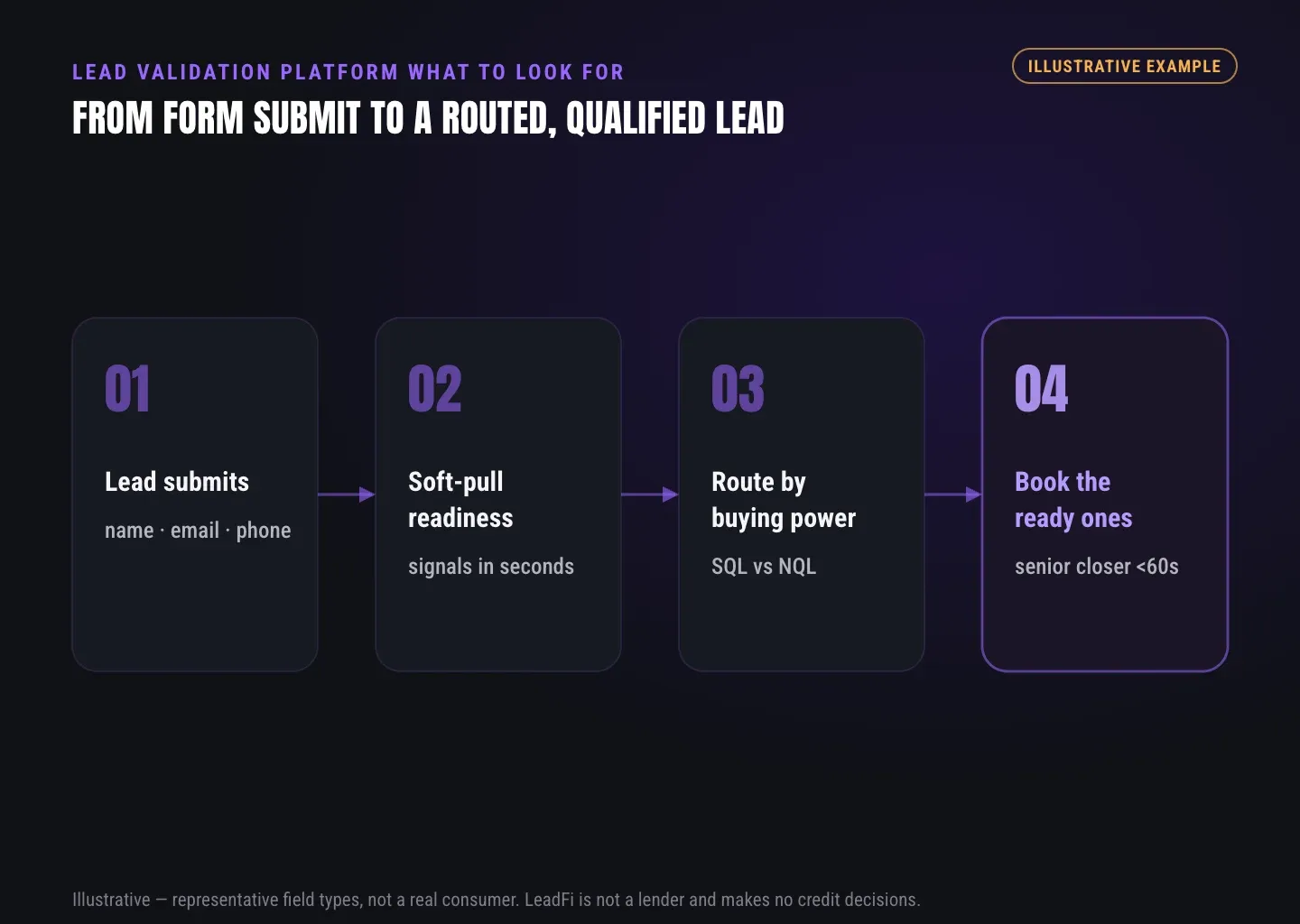
INTELLIGENCE LAYER
Readiness signals should drive sales-routing decisions
Readiness data becomes useful when it changes an actual workflow. Each status should have an owner, destination, expected action, and fallback. The result should reach the CRM, calendar, funnel, or alerting system without forcing salespeople to monitor another isolated dashboard.
SQL routing for fast follow-up
An SQL can enter a priority queue, create an immediate CRM task, notify a setter, or reach a closer calendar. This supports speed-to-lead for financially qualified prospects, although exact timing depends on the connected stack and configuration.
NQL routing with a defined next step
An NQL should move to a useful alternative such as nurture, a lower-ticket product, a custom educational page, a later review, or another suitable offer. This protects sales time without discarding existing demand.
CRM status and route fields
Useful fields include readiness_status, route_name, source, rule_version, assigned_owner, and updated_at. These fields can drive tags, stages, tasks, lists, and workflows while creating a practical operational trail.
Calendar paths based on readiness
Scheduling software controls availability; readiness logic determines which booking path makes sense. A qualified lead might reach a closer calendar, while another lead sees a group session, educational resource, or alternate product page.
Redirects while buyer interest is high
Post-submit redirects can align the customer-facing experience with the internal route. At the same time, the CRM can receive the status and trigger tasks so that the next page and sales record stay synchronized.
Rep alerts with useful context
Alerts should show the status, route, source, offer, and next action. Keep sensitive details in restricted fields and give representatives only the context needed to prepare and follow the assigned process.
Qualified-lead signals for marketing
Where platform rules and the team’s setup allow, financially qualified lead events may flow back into Meta, Google, TikTok, Hyros, or related attribution workflows. The purpose is to optimize around lead quality rather than raw form volume. Results are not assured and depend on data quality, offer, spend, policy, and implementation.
Route quality measurement
Review counts and downstream outcomes by status, campaign, route, owner, offer, and rule version. Useful measures include time to first action, contact rate, completed-call rate, and sales outcomes. Treat observed relationships cautiously because campaign mix, pricing, representative behavior, and seasonality can affect results.
Example: Course creator with two offers
A course creator sells a $1,500 self-serve program and an $8,000 coaching package. SQLs can reach the coaching calendar, while NQLs see the course path or an educational sequence. Both outcomes remain visible in the CRM.
Example: Credit-adjacent inquiry
A credit-adjacent team captures name, email, phone, requested service, and timing under a reviewed workflow. LeadFi returns readiness and routing fields that direct the lead to the appropriate sales or follow-up team. The result is a sales-workflow classification, not a determination of consumer eligibility.
Example: CRM and ad signal loop
A consulting company writes readiness status and rule version into its CRM, prioritizes SQL follow-up, and sends NQLs to a separate sequence. Where allowed and properly configured, an SQL event can also flow to its advertising or attribution stack for campaign analysis.
See which of the leads you already have can actually afford to buy.
WORKFLOW DESIGN
Platform adoption questions should focus on workflow fit
A strong feature list does not guarantee workflow fit. Before adopting a lead validation platform, document the inbound event, required inputs, status taxonomy, route destinations, access rules, test cases, and reporting plan.
Validation scope
Ask the vendor to define validation operationally. Does the product check field format, support matching, add financial-readiness signals, classify leads, or trigger downstream actions? LeadFi’s focus is qualifying existing inbound leads by financial readiness before sales follow-up—not identity verification or fraud screening.
Required platform inputs
Document the smallest supported input set for every workflow. LeadFi can work from name, email, and phone in many configurations, enabling thin-input prescreening where suitable. That does not remove consent and disclosures or mean other identity-related information will never be needed.
Match confidence and fallback paths
Confirm how the platform handles low-confidence, unmatched, duplicated, delayed, and error results. Every uncertain record needs a visible fallback status and a defined next step.
Signals available for routing rules
Request a field-level list for the planned configuration. Possible signals include VantageScore 4.0, available credit, income, debt, debt-to-income ratio, current address, age, and optional asset context where available. Address and age should be handled as identity-related information rather than sales-routing criteria.
Offer-specific readiness rules
Determine whether rules can differ by campaign, price point, product, location, or funnel. Confirm that the system records which rule version generated each result.
Result destinations and integrations
Map every result to an exact CRM field, tag, stage, alert, redirect, calendar, or nurture workflow. LeadFi can connect through webhook, API, Zapier, Make, or native workflows, with actual scope depending on the stack.
Actions for each lead status
Write an action plan for SQL, NQL, manual review, unmatched, and error states. Include the internal owner, customer-facing page, response step, retry logic, and fallback destination.
Sales visibility inside the CRM
Keep the readiness status and next action inside the team’s normal workspace whenever possible. A separate dashboard adds limited value if representatives do not use it during daily follow-up.
Role-based access rights
Define which roles can see a route, summary tier, or detailed financial context. Customer-facing language should clearly explain why information is collected and how it supports the next workflow step.
Pre-launch support
Ask whether onboarding covers route design, CRM field mapping, test records, privacy-policy and consent-language support, TCPA-aware practices, and FCRA-aware workflow guidance. LeadFi supports compliance-aware setup but does not provide legal advice; clients should review regulated use cases with counsel.
Pre-launch testing
Run test submissions for SQL, NQL, manual review, unmatched, duplicate, delay, and error conditions. Check CRM fields, redirects, calendars, alerts, nurture steps, access controls, and retry behavior before live traffic begins.
Success measurement
Choose measures tied to the original business problem, such as route volume, time to first action, contact rate, completed calls, and sales outcomes by status. Avoid assuming that an early correlation proves a signal caused the result.
Implementation planning checklist
- Define the business problem and inbound trigger.
- List required contact and identity-related inputs.
- Align privacy language, consent and disclosures, and follow-up channels.
- Define SQL, NQL, manual review, unmatched, and error.
- Map each signal to a documented sales action.
- Create CRM fields for status, route, source, rule version, owner, and update time.
- Assign calendars, redirects, offers, nurture paths, and fallback routes.
- Confirm webhook, API, Zapier, Make, or native integration ownership.
- Limit access to financial context by role.
- Test every route and establish a rule-review schedule.
- Have counsel review the use case and data practices.
Sales process configuration checklist
Give every status a plain-language definition, owner, response order, CRM task, and talk track. Train managers to review pipeline performance by route while preserving human judgment for unusual cases.
Platform evaluation scorecard
Score vendors on workflow fit, supported inputs, matching fallbacks, readiness depth, rule control, CRM actions, funnel routing, marketing feedback, access design, launch support, reporting, and compliance-aware implementation. Evaluate the workflow needed now rather than a hypothetical future feature set.
Related reading: a practical guide to LeadFi with Hyros, a practical guide to sales lead qualification, a closer look at financial readiness signals for sales teams.
| Layer | Main question | Typical inputs | Typical output | Best use |
|---|---|---|---|---|
| Form validation | Is the submission complete? | Required fields and format rules | Accept or request correction | Cleaner capture |
| Contact validation | Does the contact information appear usable? | Email, phone, and domain | Reachability status | List hygiene |
| Identity matching | Is confidence sufficient for the configured next step? | Name, email, phone, and identity signals | Match or fallback status | Supporting permitted enrichment |
| Financial-readiness qualification | Which sales path fits current readiness? | Permissioned financial signals | SQL, NQL, review, or offer tier | High-ticket routing and rep preparation |
| CRM automation | What action should run next? | Status, source, owner, and stage | Task, tag, stage, alert, or nurture | Sales execution |
| Marketing feedback | Which quality event may return upstream? | SQL or readiness event | Permitted platform event | Campaign learning |
Key takeaways
The short version
- Lead validation should qualify existing inbound leads by financial readiness before follow-up.
- LeadFi can begin with name, email, and phone in many configured workflows.
- SQLs need priority actions; NQLs need defined nurture or alternate paths.
- Readiness results should flow into CRM, calendar, funnel, and marketing workflows.
- Launch plans should cover consent and disclosures, access, fallbacks, and testing.
Quick answers
Fast answers before you dig in
What should a lead validation platform do for a high-ticket sales team?
It should qualify existing inbound leads by financial readiness before sales follow-up, return a clear SQL, NQL, review, or fallback status, and trigger the appropriate CRM, calendar, nurture, or alternate-offer action.
What inputs can LeadFi use for thin-input prescreening?
LeadFi can begin with name, email, and phone in many workflows. Additional identity-related information may be needed depending on the configuration, matching path, consent and disclosures.
How should SQL NQL routing work?
Configured readiness and business rules classify matched inbound leads, after which SQLs can receive priority sales follow-up and NQLs can enter nurture, lower-ticket, later-review, or alternate-offer paths.
Which lead validation platform integrations matter?
Look for CRM fields, tags, stages, alerts, calendars, redirects, nurture actions, and connections through webhook, API, Zapier, Make, or native workflows.
FAQ
Common questions
What is a lead validation platform for high-ticket sales?
How is a lead validation platform different from a CRM?
Can a lead validation platform use soft-pull prescreening?
Can LeadFi work from name, email, and phone?
What is an intake-stage readiness taxonomy?
How does SQL NQL routing work in a lead validation platform?
What should a lead validation platform implementation checklist include?
Sources
References
- CFPB — What is a credit inquiry? (hard vs. soft) (opens in a new tab)Federal regulator confirms a soft inquiry, unlike a hard inquiry, does not affect the consumer's credit score.
- VantageScore — VantageScore 4.0 credit scoring model (opens in a new tab)Official page describing VantageScore 4.0, the tri-bureau, trended-data model used to assess credit risk.
- CFPB — Who can request to see my credit report? (opens in a new tab)Federal regulator explains the FCRA rules governing who may obtain a credit report.
Know who is ready before your next sales call.
If your team already has inbound leads, forms, calendars, and a CRM but lacks clear buying-power qualification, LeadFi can add a readiness layer after capture.