
LEADFI WITH HYROS
Adding Qualified-Lead Signals to Your Hyros Attribution
Hyros tracks the full buyer journey. It ties clicks, calls, and buys back to the ads that drove them—so you can see which campaigns make money, not which ones just look busy. LeadFi does not replace Hyros.
Watch a contact get pre-qualified.
This is exactly what your CRM gets back.
Your opt-in form
Soft pull · no impact to their credit
This is not a real soft pull. It's an example of the data points that land in your CRM contact record when a lead fills out your form.
LEADFI DEMO
Watch the demo, then start free or book a call.
ATTRIBUTION & FEEDBACK
What attribution shows and what it does not
Attribution is about tracing. It follows a lead from first click to closed deal, then credits the sources that made it happen. For high-ticket teams, that view pays off: you learn where revenue really comes from.
Still, there's a blind spot. Attribution reacts to outcomes after they occur. For example, a booked call looks the same in the report whether the buyer can afford your $5,000 offer or not. Because of that, your ad platform may chase cheap leads that book but never buy.
What Hyros does well
Hyros connects ad spend to real revenue across long journeys. It de-dupes touches and follows leads through calls and buys. For teams selling high-ticket offers, that revenue-first view beats platform-reported numbers.
The readiness blind spot
Attribution measures what happened, not who can pay. Two booked calls can carry equal weight in the report yet very different buying power. As a result, without a readiness signal, your reports treat both the same.
Why booked calls mislead ad algorithms
Ad platforms learn from the events you send. Feed them "booked call" alone, and they chase more bookings, cheap or not. That's why a financial-readiness layer changes what your campaigns learn to find. Where permitted and supported, LeadFi may send readiness or SQL-quality signals into Hyros and other attribution tools, and/or into ad platforms.
Where LeadFi picks up
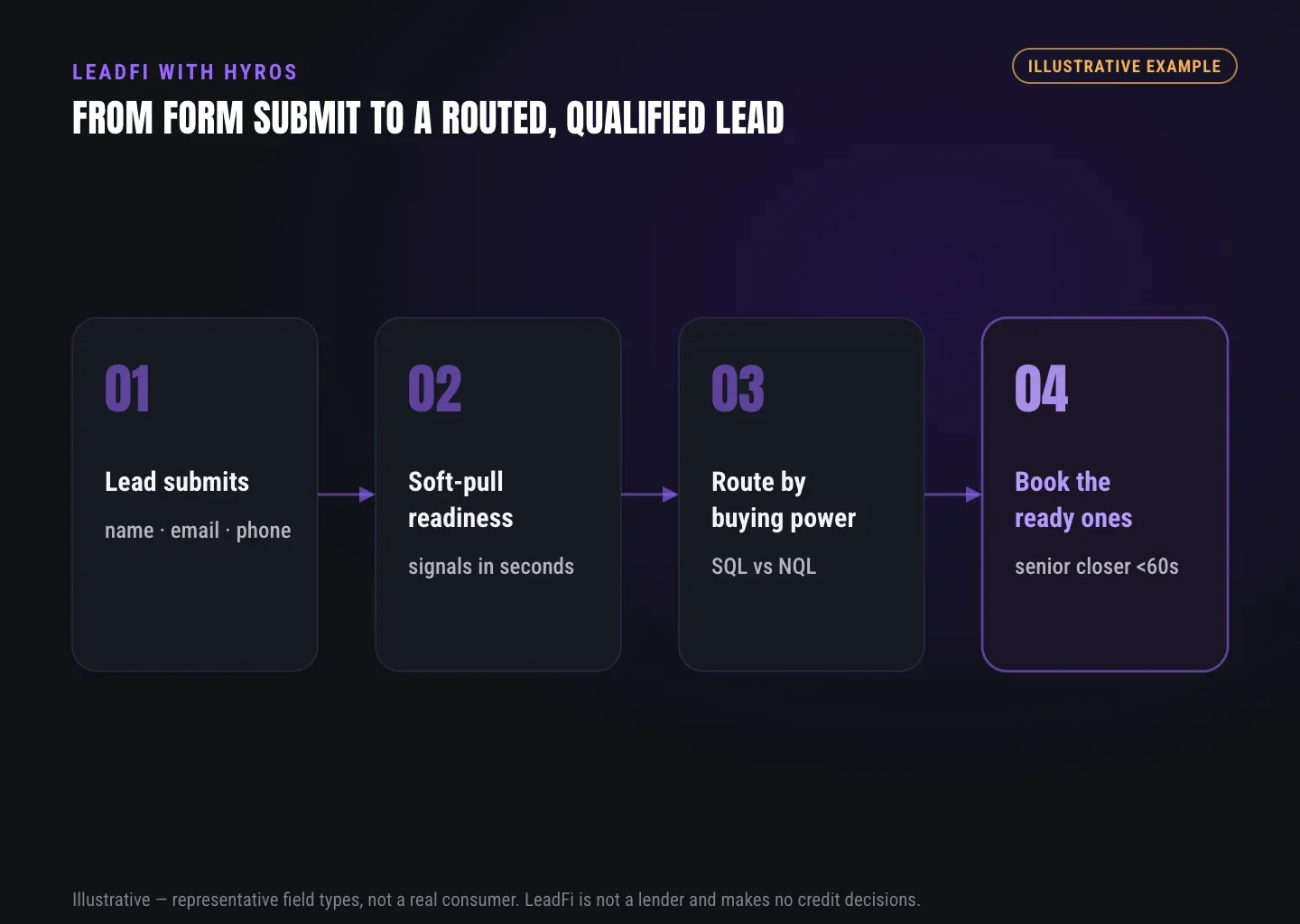
LeadFi runs after the lead submits. It reads permissioned readiness signals from name, email, and phone. Then it labels each lead SQL or NQL, so downstream tools know the difference.
INTELLIGENCE LAYER
Where a readiness signal fits the tracking picture
First, the lead comes in through your form, funnel, or booking page. Next, LeadFi reads readiness signals in near real time. Then it classifies the lead and passes the outcome downstream. As a result, attribution reflects lead quality, not just lead volume.
Let's define the terms once. An SQL is financially fit to buy your offer; an NQL is not financially fit to buy your offer. LeadFi does not approve or deny anyone. Instead, it labels leads so your team and your tools route them well.
SQL vs NQL, defined once
SQL means sales-qualified: the lead is financially fit to buy your offer. NQL means the lead is not financially fit to buy your offer — which does not make them worthless, it makes them a different next step. You set the thresholds, and LeadFi applies them after submission.
Financial-readiness signals in plain terms
Readiness can include VantageScore 4.0, income, available credit, debt, and debt-to-income ratio. Think of these as a read on buying power for routing, not a credit decision. LeadFi uses permissioned data, with consent and disclosures.
The soft pull, briefly
A soft-pull prescreen reads readiness with no impact on the consumer's credit score. It informs routing and rep prep. But it never approves or denies anyone.
How the signal reaches Hyros
LeadFi can fire a custom event or send data via webhook and API. For example, an "SQL confirmed" event can flow into your tracking and ad stack. Setup depends on your platforms and correct implementation.
GUIDE
Passing qualification through to reporting
Reporting is only as smart as the events feeding it. If every booked call looks equal, your dashboards hide the real story. That's why passing qualification through matters.
In practice, LeadFi tags the lead the moment it classifies. Then that tag rides along into the CRM and into your tracking events. So you can filter, segment, and optimize by readiness instead of guesswork.
Attribution for qualified leads, not just calls
Booked calls matter, but ready booked calls matter more. When you pass a readiness label into reporting, your attribution can separate calls that can close from calls that can't.
Feeding ad platforms a better event
You can send SQL events to Meta, Google, TikTok, or through Hyros where supported and permitted. Then the algorithm can learn from buyers with real capacity. No platform guarantees ROAS, but the signal quality improves what campaigns chase.
CRM fields carry the outcome
LeadFi writes to standard or custom fields, tags, and pipeline stages. So your reps see readiness where they already work. Meanwhile, your reporting can pull from the same fields.
Optimize for quality, not volume
More leads is easy. More ready leads is the point. With readiness in your events, campaign learning shifts toward buyers who can afford the offer.
GUIDE
What you set up: events, fields, CRM
None of this requires ripping out your stack. LeadFi sits behind your current capture and CRM. So you connect the pieces first, and the signal flows next.
Here's the practical order. First, start with the fields, then the event, then the routing rules. Finally, confirm your consent and disclosure language matches what the workflow does.
Events to define
Create an SQL event and an NQL event you can send downstream. For example, "SQL confirmed" can trigger a Hyros custom event and a Meta conversion. Map each event to the action you want it to teach.
CRM fields to add
Add fields for readiness status, SQL/NQL label, and routing outcome. Keep buyer dignity in mind: store the label, not a moral judgment. Your reps read context; they don't re-underwrite anyone.
Routing rules to configure
Decide what happens to each path. First, SQLs can hit a closer calendar for speed-to-lead. Meanwhile, NQLs can route to a low-ticket offer, a payment plan, or a financing path.
Connections to wire
LeadFi links through webhook, API, Zapier, Make, or a native workflow. So choose the path that fits how your stack already runs.
Compliance-aware setup, first
Align form disclosures, SMS consent, and CRM notes so prospects hear one story. LeadFi supports compliance-aware workflows and does not provide legal advice. Review your use case with counsel before launch.
See which of the leads you already have can actually afford to buy.
WHO IT'S FOR
Who this is for
This fits high-ticket teams already running Hyros—coaches, consultants, agencies, funding companies, mortgage, real estate, and insurance. If you sell offers roughly $1,000–$10,000+ and pay for ads, readiness signals help your campaigns learn from buyers who can actually afford you.
The pain is familiar. Ads drive call volume, but half the calendar can't afford the offer. As a result, reps burn hours and closers get cluttered calendars. That's the moment readiness pays off—when sales time is costly, filtering by buying power protects your best resource.
High-ticket coaches and consultants
Sales calls are your costliest asset. Send SQLs to closers fast, and route NQLs to a low-ticket offer or a payment plan. As a result, your calendar fills with buyers who can pay.
Agencies blamed for "broke leads"
Clients complain about broke leads that waste sales time. However, attach a readiness label before handoff, and you deliver prequalified leads, not raw opt-ins.
Funding, mortgage, and lending teams
Income and debt-to-income ratio shape which financing path fits. Use readiness to prep the call and route by affordability. LeadFi labels leads; it does not approve or deny consumers, and financing use cases should be reviewed with counsel.
GUIDE
Comparison: Hyros vs LeadFi (different jobs, same stack)
These tools solve different problems. The table below shows where each fits, and why teams often run both.
Bottom line: Hyros tells you what happened and what it earned. Meanwhile, LeadFi helps decide who's worth the call next, then feeds that back into your events. Run together, your campaigns can learn from qualified leads.
| Job | Hyros | LeadFi |
|---|---|---|
| Core role | Attribution and journey visibility | Financial-readiness qualification and routing |
| Main question answered | Which ads and channels drove revenue? | Can this lead afford the offer, and where should it go? |
| Timing | Tracks across the full journey | Reads readiness after the lead submits |
| Key output | Revenue attribution, journey data | SQL/NQL label, readiness signals |
| Feeds ad platforms | Tracks and reports conversions | Sends SQL-quality events (where permitted) |
| Relationship | Your attribution layer | Signal and routing layer behind your stack |
Key takeaways
The short version
- Hyros handles attribution and journey visibility; LeadFi adds a financial-readiness layer that labels leads SQL vs NQL after submission.
- Attribution treats every booked call equally—readiness signals separate calls that can afford your high-ticket offer from those that can't.
- LeadFi reads permissioned signals like VantageScore 4.0, income, available credit, debt, and debt-to-income from name, email, and phone via soft-pull prescreening.
- Passing SQL/NQL labels into Hyros events, your CRM, and ad platforms (where permitted) helps campaigns learn from buyers with real buying power.
- LeadFi does not approve or deny consumers or provide legal advice; compliance-aware setup with consent and disclosures comes before launch.
Quick answers
Fast answers before you dig in
What does attribution show and what does it miss?
Attribution tools like Hyros show which ads, channels, and touches led to calls, sales, and revenue—they measure the journey and the money. But they do not read a lead's real buying power before the call. That gap is what LeadFi fills with financial-readiness signals.
Where does a readiness signal fit in the tracking picture?
A readiness signal sits between capture and reporting. After a lead submits, LeadFi enriches it with financial-readiness data, then labels it SQL or NQL. That label can flow into Hyros events, your CRM, and ad platforms, so attribution reflects lead quality, not just volume.
How does qualification pass through to reporting?
LeadFi writes the SQL/NQL label and readiness status into your CRM, then can send matching events to Hyros and ad platforms where permitted. As a result, your attribution and campaign learning can weight qualified leads instead of just booked calls or opt-ins.
What do you set up to add readiness signals?
Setup has three parts—events, fields, and CRM. You define readiness thresholds, map an SQL/NQL event, and add CRM fields to store the outcome. LeadFi connects via webhook, API, Zapier, Make, or native workflow, with compliance-aware setup before launch.
FAQ
Common questions
What are Hyros qualified lead signals?
Does LeadFi replace Hyros?
How does LeadFi improve Hyros integration lead quality?
What is a soft-pull prescreen, and does it hurt credit?
Do I need a real address or DOB up front?
Can LeadFi send qualified leads to Meta or Google too?
What does setup involve, and how long until data flows?
Sources
References
- CFPB — What is a credit inquiry? (hard vs. soft) (opens in a new tab)Federal regulator confirms a soft inquiry, unlike a hard inquiry, does not affect the consumer's credit score.
- VantageScore — VantageScore 4.0 credit scoring model (opens in a new tab)Official page describing VantageScore 4.0, the tri-bureau, trended-data model used to assess credit risk.
- Experian — What Is a Soft Inquiry? (opens in a new tab)Major credit bureau explains soft inquiries are informational and have no impact on credit scores.
Know who is ready before your next sales call.
You already have attribution. What's missing is a read on who can actually afford the offer, before the rep spends time.