
LEAD VERIFICATION SOFTWARE FOR SALES TEAMS
Lead Verification Software for Sales: Alternative Approaches to Better Qualification
Lead verification software for sales should do more than confirm that a form was submitted or that contact details appear usable. For high-ticket teams, the more valuable question is whether an existing inbound lead meets the business’s financial-readiness rules—and what should happen next.
Watch a contact get pre-qualified.
This is exactly what your CRM gets back.
Your opt-in form
Soft pull · no impact to their credit
This is not a real soft pull. It's an example of the data points that land in your CRM contact record when a lead fills out your form.
LEADFI DEMO
Watch the demo, then start free or book a call.
WORKFLOW DESIGN
What lead verification should mean in a sales workflow
In this sales context, lead verification means qualifying an existing inbound lead by financial readiness before a representative follows up. The purpose is to improve the next action—not to provide identity-verification or fraud-screening conclusions.
Verify readiness after lead capture
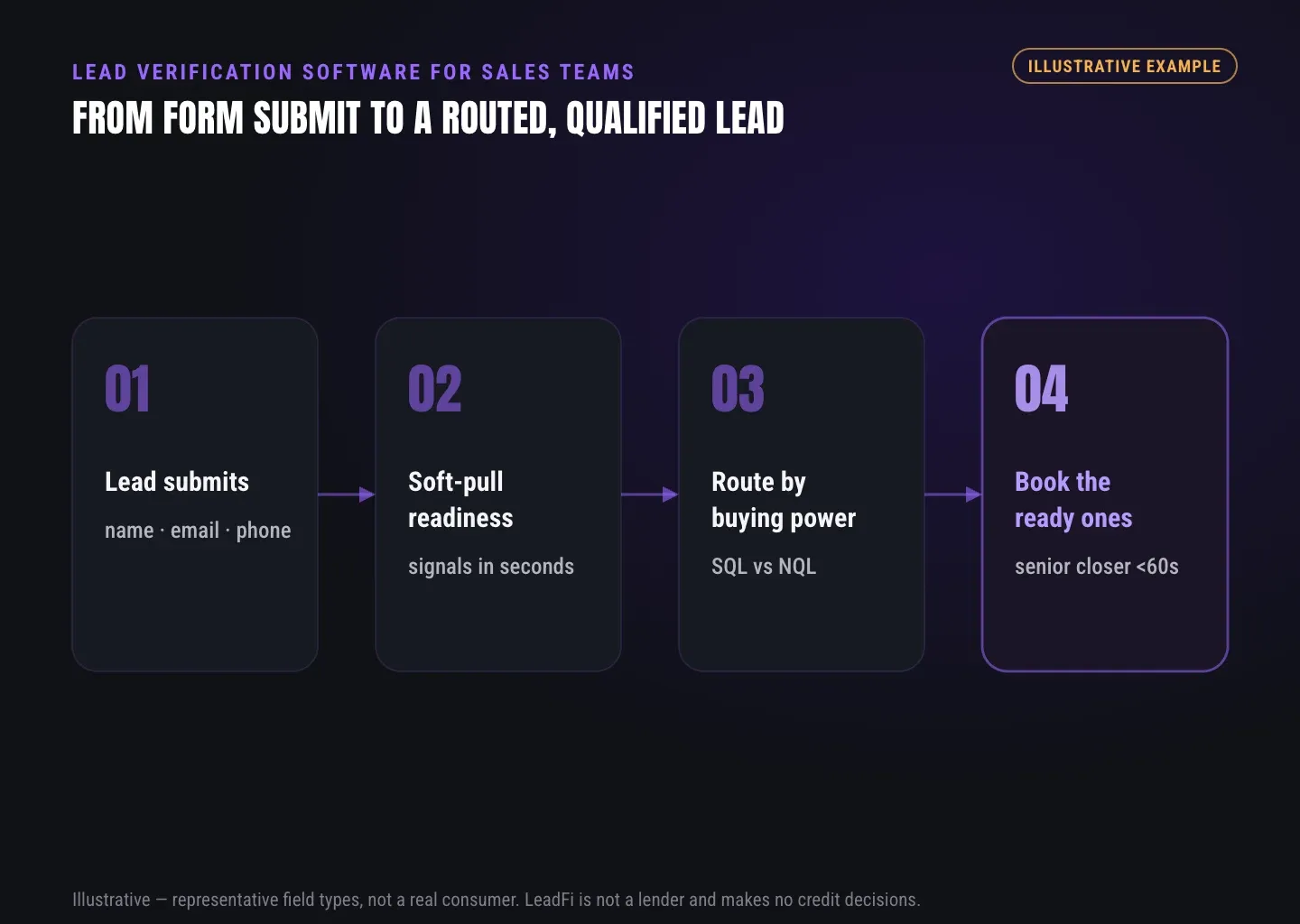
A prospect first submits a form, application, or booking request. LeadFi can then receive supported data through a webhook, API, Zapier, Make, or native workflow. For many configured use cases, the starting inputs can be name, email, and phone.
LeadFi’s patent-pending identity matching is designed to establish a high-confidence match before configured soft-pull prescreening. Identity-related information and identity signals, such as a current address, may be involved where supported. This matching step supports the readiness workflow; it is not fraud clearance or a guarantee that every submitted detail is accurate.
Define SQL and NQL by financial fit
An SQL, or Sales-Qualified Lead, is someone financially fit to buy your offer. An NQL, or Non-Qualified Lead, is someone not financially fit to buy your offer. These are internal routing categories generated from documented business rules, not judgments about a person’s worth or consumer credit decisions.
An SQL might reach a priority sales queue or closer calendar. An NQL might enter nurture, receive educational content, or see a suitable lower-ticket or alternate offer.
Separate interest from buying power
A completed form, booked call, or advertisement click shows intent. It does not establish financial fit for a $1,000–$10,000+ offer. Financial-readiness qualification adds buying-power context so teams can consider both intent and fit when allocating sales time.
Turn each result into an action
Useful lead verification software should return an actionable status rather than an isolated data field. The result can update a CRM with an SQL/NQL label, readiness band, routing reason, task owner, or next-step flag. Human discovery and the business’s documented rules remain part of the process.
Distinguish lead verification layers
Contact validation asks whether an email address or phone number appears usable. Identity matching supports a configured data workflow. Fraud screening looks for risk or abuse patterns. Financial-readiness qualification asks which sales or nurture path fits the business’s rules. LeadFi is designed around the financial-readiness layer and should not be treated as a general fraud-screening platform.
INTELLIGENCE LAYER
How financial readiness can inform qualification before follow-up
Financial readiness can help a team categorize inbound leads before sales follow-up. Depending on the configured workflow, consent and disclosures, and data availability, signals can include VantageScore 4.0, available credit, income, debt, debt-to-income ratio, current address, and optional asset or net-worth-style context.
Select signals that fit the offer
Choose signals because they change a route, priority, or rep-preparation step. No single field should become a universal rule for every offer. A consulting package, real estate service, and coaching program can require different internal qualification models.
Build actionable readiness bands
A binary cutoff can hide useful distinctions. Teams can instead define bands such as priority sales, standard sales, guided nurture, and alternate offer. Each label should map to a written action and rule version.
These categories support sales operations. They are not consumer approval or denial outcomes, and LeadFi does not make the business’s final customer-facing decision.
Use soft-pull prescreening as one input
Where appropriate for the configured workflow, soft-pull prescreening can supply financial-readiness context without affecting the consumer’s credit score. The business still needs a process aligned with applicable consent and disclosures, privacy practices, and use-case requirements.
LeadFi should not be reduced to generic soft-credit-check plumbing. Its role is to connect readiness signals to qualification, SQL/NQL routing, CRM actions, rep preparation, and permitted workflow feedback.
Limit what each representative sees
A closer may need only the readiness band, reason code, and suggested next action—not every raw field used by the routing model. Role-based access and focused CRM views can keep the sales process practical while reducing unnecessary data exposure.
Plan a path for every lead
An NQL should not automatically become a discarded record. Depending on the offer, that lead can move into nurture, educational content, a lower-ticket product, or another suitable path. The objective is to match follow-up to the team’s rules while reserving prompt sales attention for SQLs.
INTELLIGENCE LAYER
How to route existing inbound leads using readiness rules
Readiness data becomes useful when it changes what happens after capture. A practical flow covers submission, matching, qualification, routing, CRM updates, and follow-up.
Start with one capture event
Choose a stable event, such as a completed form or booking request, to initiate qualification. Starting with one event makes route testing, monitoring, and troubleshooting easier.
Pass a clean thin-input payload
For many configured workflows, LeadFi can begin with name, email, and phone. That thin-input approach may reduce initial form friction, but it does not remove consent and disclosures or other workflow responsibilities. Additional identity-related information may be needed for some use cases.
Apply documented routing rules
Turn relevant signals into an action category using rules tied to the offer, region, product line, lead source, or booking status. When a high-confidence match is not established, the workflow can pause the financial step, request more information, or send the record for appropriate review.
SQLs can be assigned to prompt follow-up, a closer, or a selected calendar. NQLs can enter nurture, see an alternate page, or receive a lower-ticket path. Those actions depend on the company’s stack and documented process.
Write outcomes into the CRM
Useful CRM fields can include qualification status, readiness band, route reason, rule version, and next action. The result can trigger tasks, ownership, lists, stages, sequences, or alerts through an API, webhook, Zapier, Make, or supported native workflow.
Return qualified signals to operating systems
Where permitted and configured correctly, financially qualified lead events can feed Meta, Google, TikTok, Hyros, CRM, and operations workflows. These signals can help teams optimize around lead quality rather than form volume alone, but LeadFi does not guarantee advertising or sales performance.
Before launch, test every route, field, task, redirect, and sequence. LeadFi supports compliance-aware setup and can assist with privacy and consent language, TCPA-aware practices, and FCRA-aware workflow guidance. LeadFi does not provide legal advice or guarantee compliance; clients should review their use case with counsel.
See which of the leads you already have can actually afford to buy.
GUIDE
Questions to ask when comparing lead verification options
Lead verification products solve different problems. Some validate contact details, some provide data through an API, and others focus on fraud patterns. LeadFi may fit when the central requirement is financial-readiness qualification and routing for existing inbound demand.
Clarify which verification job the product performs
Ask whether the product validates contact data, supports identity matching, screens for fraud, or qualifies financial readiness. Do not assume one category performs all four jobs. The output should answer a specific sales-operations question and trigger a usable next step.
Review inputs and available readiness signals
Confirm whether the workflow can start with name, email, and phone, when more information is required, and how unmatched records are handled. Ask which supported signals can drive routing rather than simply appearing as extra data.
Inspect SQL and NQL actions
Determine whether SQL results can trigger priority tasks, CRM stages, calendars, alerts, or redirects. Review whether NQLs can enter nurture, reach an alternate offer, or receive another planned path. The CRM should preserve the status, route reason, and applicable rule set.
Confirm integration and launch requirements
Review webhook, API, Zapier, Make, and native workflow options. Map required fields, tags, stages, user access, redirects, and error handling. Also confirm how onboarding supports compliance-aware workflow choices, including privacy language and consent and disclosures.
Choose the approach that fits the sales model
Financial-readiness qualification is most relevant when sales conversations are costly, offers are high-ticket, and SQLs and NQLs need different paths. Basic contact validation may be enough for simpler use cases. A custom data API may suit technical teams prepared to build their own classification and routing layer.
Related reading: a practical guide to financial readiness signals for sales teams, a practical guide to sql vs nql lead routing by financial readiness, practical insights on sales lead qualification.
| Approach | Best suited to | Typical strength | Common workflow gap |
|---|---|---|---|
| Email and phone validation | Teams cleaning contact records | Flags unusable contact details | Does not assess financial readiness |
| CRM lead scoring | Teams using engagement and form data | Uses existing CRM activity | Often depends on behavioral or self-reported inputs |
| Standalone financial-data API | Technical teams building custom logic | Returns configured data fields | Requires the team to build classification and routing |
| Form-based financial questions | Teams starting with simple qualification | Straightforward to deploy | Relies on self-reported answers |
| Fraud-screening platform | Businesses managing abuse patterns | Produces risk flags or review queues | Does not replace financial-readiness qualification |
| Financial-readiness engine | High-ticket teams qualifying inbound demand | Connects readiness signals to SQL/NQL actions | Requires documented rules and compliance-aware setup |
| Manual sales review | Low-volume teams with experienced representatives | Supports case-by-case judgment | Can be slow and difficult to standardize |
Key takeaways
The short version
- Lead verification here means financial-readiness qualification of existing inbound leads.
- LeadFi can support thin-input workflows using name, email, and phone.
- SQLs receive prioritized sales paths; NQLs receive planned alternate paths.
- Readiness results can trigger CRM, calendar, nurture, and permitted media workflows.
- Soft-pull and routing workflows still require appropriate consent and disclosures.
Quick answers
Fast answers before you dig in
What does lead verification software for sales mean here?
It means qualifying existing inbound leads by financial readiness before sales follow-up, then routing them to sales, nurture, or alternate paths. It does not mean identity verification or fraud screening.
How does financial-readiness lead verification work?
A configured workflow receives an inbound submission, applies permissioned readiness signals and documented business rules, assigns an SQL/NQL or readiness category, and returns the next action to the sales stack.
What is SQL vs NQL routing?
An SQL is someone financially fit to buy your offer, while an NQL is someone not financially fit to buy your offer. The labels are internal workflow categories used to select the appropriate follow-up path.
Can LeadFi support thin-input prescreening?
Yes. For many configured workflows, LeadFi can begin with name, email, and phone, use patent-pending identity matching, and support soft-pull prescreening before returning financial-readiness routing results.
What should teams compare in lead verification software for sales?
Compare the product’s job, required inputs, readiness signals, unmatched-record handling, SQL/NQL actions, CRM integrations, data access controls, and compliance-aware launch support.
FAQ
Common questions
What is lead verification software for sales?
How is financial-readiness qualification different from CRM lead scoring?
Can lead verification software for sales use a soft pull?
Can LeadFi work from name, email, and phone?
Does lead verification software for sales replace a CRM?
What is SQL/NQL lead routing?
Does LeadFi make consumer decisions?
Sources
References
- CFPB — What is a credit inquiry? (hard vs. soft) (opens in a new tab)Federal regulator confirms a soft inquiry, unlike a hard inquiry, does not affect the consumer's credit score.
- VantageScore — VantageScore 4.0 credit scoring model (opens in a new tab)Official page describing VantageScore 4.0, the tri-bureau, trended-data model used to assess credit risk.
- CFPB — Who can request to see my credit report? (opens in a new tab)Federal regulator explains the FCRA rules governing who may obtain a credit report.
Know who is ready before your next sales call.
Lead verification should produce a clear next step. Request a LeadFi demo or workflow assessment to explore how thin-input prescreening, financial-readiness signals, and SQL/NQL routing could work behind your existing form, funnel, calendar, or CRM.