
LEAD STATUS HUBSPOT
Lead Status HubSpot Guide: Route Leads With Financial Readiness
A lead status HubSpot workflow shows what is happening with sales follow-up. HubSpot Lead Status is a contact property with default values that RevOps teams can adapt to their operating workflow.
Watch a contact get pre-qualified.
This is exactly what your CRM gets back.
Your opt-in form
Soft pull · no impact to their credit
This is not a real soft pull. It's an example of the data points that land in your CRM contact record when a lead fills out your form.
LEADFI DEMO
Watch the demo, then start free or book a call.
GUIDE
How HubSpot Lead Status works
HubSpot Lead Status records the current state of sales follow-up on a contact. Common default values include New, Open, In Progress, Open Deal, Unqualified, Attempted to Contact, Connected, and Bad Timing. Portal configuration may differ, and RevOps teams can adapt the property options and workflows.
Lead Status tracks sales follow-up
Lead Status answers: What is sales doing with this record? A new inbound contact might move from New to Attempted to Contact after the first outreach attempt, then to Connected after a two-way exchange.
The field does not create demand, source leads, or determine financial readiness. Its job is to make follow-up activity and the next action visible.
Lifecycle Stage tracks the broader relationship
Lifecycle Stage describes the record’s broader relationship with the business, such as lead, opportunity, or customer. A record can remain in one lifecycle stage while its Lead Status changes several times.
Deal Stage tracks an active opportunity
Deal Stage belongs to the deal pipeline. It shows where an active opportunity sits, such as discovery, proposal, or closed. An Open Deal contact status should not replace a linked deal, named owner, and defined pipeline stage.
Ownership gives each status operational meaning
Every active status should identify an owner, required action, due time, and exit rule. For example, Attempted to Contact might remain with a setter during a defined outreach sequence, while Bad Timing should include a future review date or nurture path.
GUIDE
Using default HubSpot Lead Status values
HubSpot’s default values are useful starting points, but each value needs one agreed operational meaning. Automation magnifies unclear definitions, so define the process before connecting tasks, lists, alerts, or routing workflows.
Define statuses as work rules
- New: Sales has not started the required follow-up.
- Open: The record is ready for active sales work.
- In Progress: An assigned rep is actively working the lead.
- Attempted to Contact: Outreach occurred without a live connection.
- Connected: A two-way exchange occurred.
- Open Deal: The contact is associated with an active opportunity.
- Unqualified: The record does not meet one or more defined business rules.
- Bad Timing: The potential fit remains, but a timing issue requires a future action.
Keep status and reason separate
Status should describe the current work state. A separate reason field can explain why the record received a route or status, such as service mismatch, location, duplicate data, timing, or the team’s financial-readiness rules.
This separation keeps Lead Status useful without forcing one property to represent sourcing, qualification, outreach, and deal progress simultaneously.
Use a practical status matrix
| Lead Status | Owner | Required action | Common exit |
|---|---|---|---|
| New | Assignment queue or RevOps | Assign and prioritize | Open or In Progress |
| Open | Setter or rep | Begin outreach | In Progress |
| In Progress | Assigned rep | Continue planned follow-up | Connected or Attempted to Contact |
| Attempted to Contact | Assigned rep | Complete the outreach sequence | Connected, nurture, or Bad Timing |
| Connected | Setter or closer | Record the next step | Open Deal, nurture, or Unqualified |
| Open Deal | Deal owner | Manage the opportunity | Closed outcome or revised status |
| Unqualified | Sales or RevOps | Store a reason and route | Nurture, alternate offer, or closed path |
| Bad Timing | Marketing or sales | Set a future action date | Open or nurture |
INTELLIGENCE LAYER
Placing financial readiness alongside Lead Status
Financial readiness answers a different question from Lead Status. It provides buying-power context for a business’s existing inbound leads, while Lead Status records the follow-up work performed by the revenue team.
Treat readiness as one operational input
Teams can consider financial readiness alongside service fit, intent, timing, geography, engagement, and other operating inputs. Depending on configuration, available data, consent and disclosures, LeadFi can work from name, email, and phone and surface signals such as VantageScore 4.0, available credit, income, debt, debt-to-income ratio, age, current address, and optional asset context.
Patent-pending identity matching is designed to establish a high-confidence match before soft-pull prescreening and, where applicable, deeper bureau-backed workflows. These signals support routing and rep preparation for existing inbound leads.
Use SQL and NQL for routing
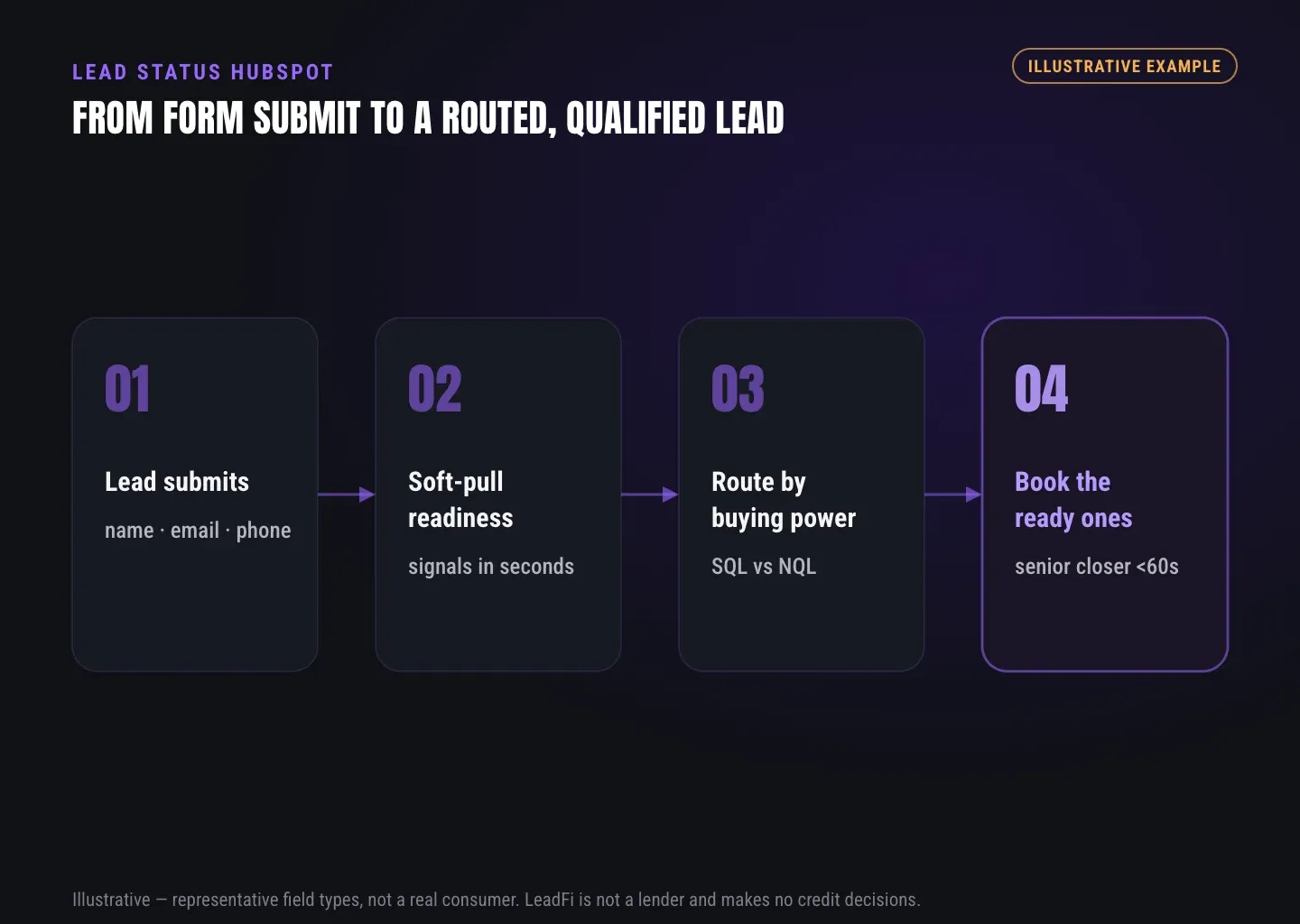
In LeadFi terminology, an SQL, or Sales-Qualified Lead, is someone who is financially fit to buy your offer. An NQL, or Non-Qualified Lead, is someone who is not financially fit to buy your offer.
Teams can prioritize SQLs for speed-to-lead while routing NQLs to nurture, lower-ticket products, education, or alternate offers. The readiness class informs the route, while HubSpot Lead Status continues to show whether sales has started work, made contact, or created an active opportunity.
Keep readiness in separate CRM fields
A clean data model might include:
- Readiness class: SQL, NQL, or exception.
- Readiness checked at: Date and time of the latest result.
- Readiness route: Setter, closer, nurture, alternate offer, or manual review.
- Qualification reason: An internal reason connected to defined rules.
- Lead Status: The current state of sales follow-up.
- Next action due: The required follow-up time.
- Record owner: The person or team responsible for that action.
Limit access to underlying signals according to role. Many sales users need only the class, route, and useful preparation context.
Confirm implementation before launch
LeadFi supports workflow patterns using webhooks, APIs, Zapier, Make, or native workflow paths where available. The specific field mapping, timing, error handling, and ownership rules depend on the client’s stack.
Financial readiness can inform how a team uses HubSpot Lead Status without implying a HubSpot partnership, endorsed connector, or automatic CRM write-back. Confirm the supported implementation before building live automation.
LeadFi also supports compliance-aware setup, including privacy and consent language and TCPA-aware workflow choices. LeadFi does not provide legal advice; clients should review their use case with counsel.
See which of the leads you already have can actually afford to buy.
ROUTING
Documenting routing rules and lifecycle handoffs
A CRM property cannot repair an unclear process. RevOps documentation should connect every status to an entry rule, owner, required action, due time, exit rule, and fallback.
Create a work contract for every status
Use this compact template:
- Meaning: What does the value say happened?
- Entry rule: What event puts the record here?
- Owner: Who takes the next action?
- Due time: When is that action required?
- Required task: What must the owner do?
- Exit rule: What changes the value?
- Fallback: What happens if data or ownership is missing?
- Reporting use: Which metric relies on the value?
Create a separate definition for financial readiness that covers the SQL/NQL rule, result timestamp, rule version, route, access controls, and exception handling.
Plan for missing results and exceptions
Identity matching may not return a usable result for every record. Unmatched leads should enter a defined fallback such as manual review or the standard follow-up queue rather than receiving a guessed readiness class.
Duplicates, invalid contact information, employee tests, and partner referrals may also need exception paths. Assign those records to a named owner so they do not become permanent CRM clutter.
Measure handoff quality
Useful reporting can include status age, owner coverage, response time, next-step completion, exception volume, and SQL/NQL mix. Keep source performance separate from follow-up execution: a promising source can still appear weak when ownership or outreach is slow.
| Workflow question | HubSpot approach | Salesforce approach | RevOps decision |
|---|---|---|---|
| Where is follow-up tracked? | Lead Status property on the contact record | Lead Status on the lead record before conversion | Select the source of truth |
| Can values be adapted? | Teams can adapt property options and workflows | Administrators can configure lead status values | Map meanings, not labels alone |
| Is it a lead-sourcing tool? | No | No | Store source separately |
| Does it show financial readiness by default? | No | No | Use a separate readiness field |
| Does it replace deal stages? | No | No | Keep opportunity stages separate |
| Can readiness inform routing? | Yes, through the team’s configured process | Yes, through the team’s configured process | Define fields, events, and owners |
| Does LeadFi replace the CRM? | No | No | Use LeadFi as a financial-readiness qualification layer |
INTELLIGENCE LAYER
Who benefits from readiness-aware status design?
Readiness-aware routing is most useful when a business already generates inbound demand, sells a meaningful-commitment offer, and needs to protect expensive sales capacity.
High-ticket sales and RevOps teams
Coaches, consultants, agencies, course creators, and other high-ticket operators can use readiness as one input for prioritizing inbound applications. RevOps can then keep ownership, follow-up, and lifecycle handoffs visible through stable Lead Status definitions.
Credit-adjacent businesses
Business funding, mortgage, lending, insurance, real estate, and auto-related teams may have more complex intake requirements. They should keep sales follow-up fields separate from specialized eligibility or regulated workflows and apply controls appropriate to their use case.
Media buyers and multi-system teams
Where platform rules, data policies, and configuration allow, teams may feed qualified-lead signals into Meta, Google, TikTok, Hyros, or reporting workflows. These signals can support campaign-quality analysis, but they do not guarantee advertising outcomes.
Teams operating HubSpot alongside Salesforce or another CRM should map meanings and events rather than labels alone. They should also document which system controls each field to avoid loops, stale values, or unclear ownership.
Related reading: a closer look at ai lead qualification, a practical guide to what is lead qualification, a practical guide to sales lead qualification.
Key takeaways
The short version
- HubSpot Lead Status is an adaptable contact property for sales follow-up.
- Lead Status does not generate, source, or financially qualify leads.
- Financial readiness should remain separate from outreach and deal fields.
- SQLs can receive priority while NQLs enter nurture or alternate paths.
- Confirm field mapping, ownership, fallbacks, and consent before launch.
Quick answers
Fast answers before you dig in
What is Lead Status in HubSpot?
HubSpot Lead Status is a contact property that tracks sales follow-up. Its default values can be adapted by RevOps to clarify ownership, outreach, and handoffs.
Is HubSpot Lead Status a lead-generation tool?
No. Lead Status records what sales is doing with an existing contact; it does not create demand, source leads, or capture forms.
How should financial readiness affect Lead Status?
Use financial readiness as a separate operational input that can inform priority, ownership, and routing while Lead Status continues to record sales activity.
Should SQL and NQL replace HubSpot Lead Status?
No. SQL and NQL describe financial-readiness classes for routing, while HubSpot Lead Status describes the current state of follow-up.
Does LeadFi automatically write results into HubSpot?
Do not assume automatic write-back. The supported workflow, field mapping, timing, and error handling depend on the client’s confirmed implementation.
FAQ
Common questions
What is Lead Status in HubSpot?
What are the default HubSpot Lead Status values?
How should a lead status HubSpot workflow use SQL and NQL?
Can financial readiness replace HubSpot Lead Status?
How does Salesforce Lead Status differ from HubSpot Lead Status?
Can LeadFi support a HubSpot readiness workflow?
What inputs can LeadFi use for financial-readiness qualification?
Sources
References
- CFPB — What is a credit inquiry? (hard vs. soft) (opens in a new tab)Federal regulator confirms a soft inquiry, unlike a hard inquiry, does not affect the consumer's credit score.
- VantageScore — VantageScore 4.0 credit scoring model (opens in a new tab)Official page describing VantageScore 4.0, the tri-bureau, trended-data model used to assess credit risk.
- CFPB — Who can request to see my credit report? (opens in a new tab)Federal regulator explains the FCRA rules governing who may obtain a credit report.
Know who is ready before your next sales call.
See how LeadFi could qualify your existing inbound leads by financial readiness while HubSpot remains the operating record for contacts, owners, tasks, and deals.