
LEAD QUALIFICATION PROCESS
Lead Qualification Process: A Staged Review for Financial Readiness
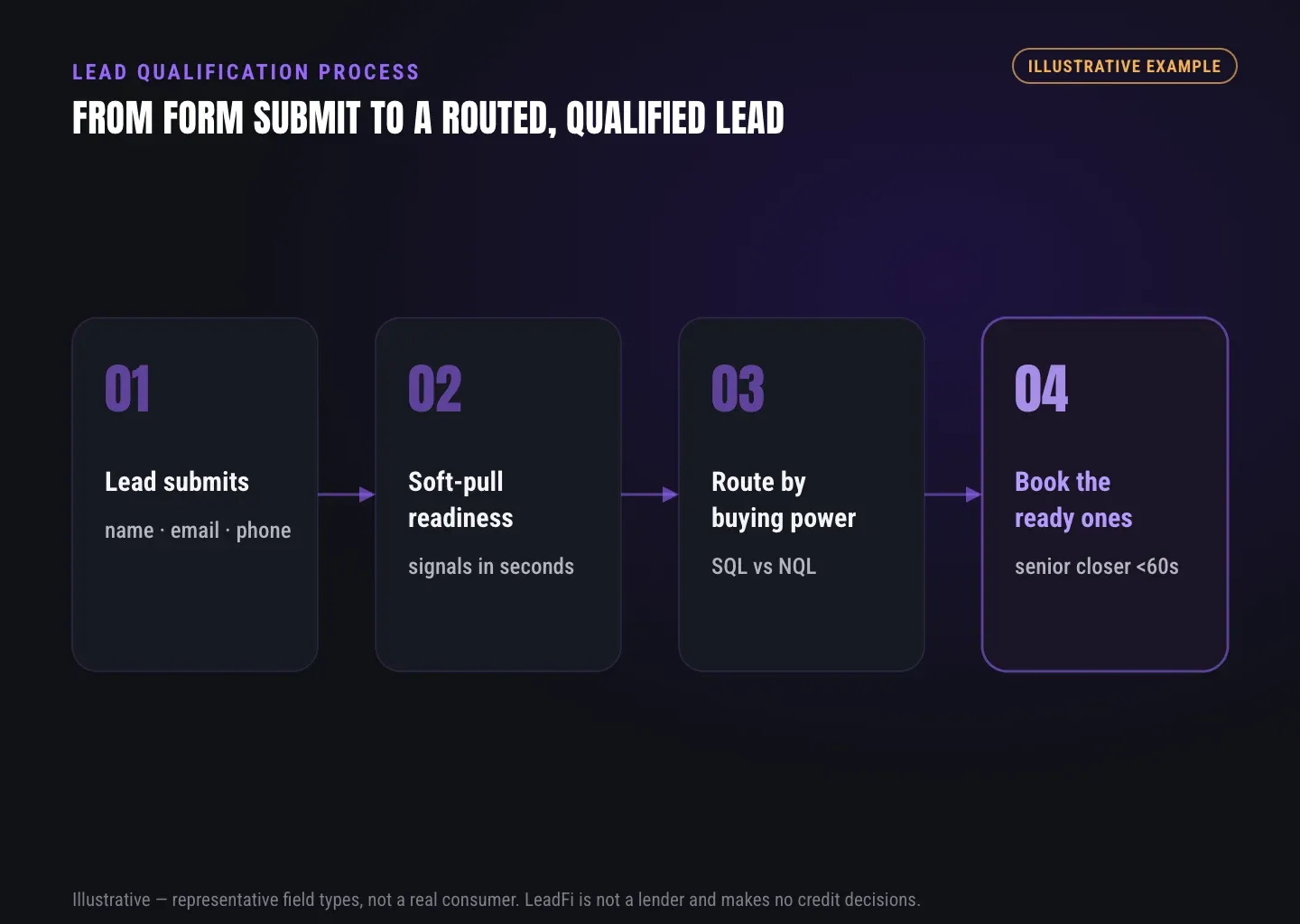
A strong lead qualification process evaluates whether an existing inbound lead fits the offer, appears financially ready, and should receive prompt sales follow-up or another useful path. LeadFi adds a financial-readiness layer behind forms, applications, calendars, and CRMs.
Watch a contact get pre-qualified.
This is exactly what your CRM gets back.
Your opt-in form
Soft pull · no impact to their credit
This is not a real soft pull. It's an example of the data points that land in your CRM contact record when a lead fills out your form.
LEADFI DEMO
Watch the demo, then start free or book a call.
GUIDE
Capture the context needed for a review
Quick answer: Capture enough information to identify the inbound lead, understand the requested offer, and start the configured financial-readiness review. A useful intake combines contact information, source and offer context, consent and disclosures, and a defined trigger.
Start with a clear lead event
Define the event that begins qualification, such as a submitted form, completed application, booking request, webinar registration, or CRM stage change. Choose one system as the authoritative source so the same lead is not reviewed repeatedly.
LeadFi can receive the submitted record through a webhook, API, Zapier, Make, or a supported native workflow. It then returns configured qualification and routing fields to the existing stack.
Collect the core identity fields
LeadFi can work from name, email, and phone in many thin-input workflows. Its patent-pending identity matching is designed to establish an identity match before configured soft-pull prescreening and, where applicable, deeper bureau-backed workflows.
Additional identity-related information and identity signals, such as current address or age, may support certain configurations. Using fewer initial fields does not remove consent and disclosures or other workflow obligations.
Preserve source and offer context
Store the campaign, page, offer, form version, and relevant tracking identifiers with each record. The same readiness signals may lead to different sales paths for a lower-cost course and a high-ticket consulting engagement.
Source and offer context also help marketing and sales assess lead quality by campaign rather than relying only on form-fill volume.
Design useful enrichment fields
Keep the primary CRM outputs easy to act on. Common fields include match status, readiness status, SQL or NQL, route reason, rule version, and review status. Approved users can access more detailed signals when the configured workflow supports them.
Build a reliable review trigger
Start the review only after the required intake fields and consent records are present. Add controls for duplicate submissions, retries, failed handoffs, and unmatched records. An uncertain result should enter an exception queue rather than being forced into SQL or NQL.
Intake example: A prospect submits name, email, and phone for a high-ticket coaching program. The form sends the record, offer ID, campaign ID, and consent timestamp to LeadFi. The CRM receives the configured readiness status and route without requiring the prospect to repeat the application.
INTELLIGENCE LAYER
Review fit and financial readiness in the lead qualification process
Quick answer: Review offer fit first, financial readiness second, and team-defined exceptions third. Permissioned financial signals can add useful context, but every threshold and qualification stage remains the team’s own sales-process choice.
Check business fit before readiness
Begin with information the business already controls: service need, target market, location, timeline, offer interest, or required experience. Remove spam, test records, unsupported requests, and obvious offer mismatches before applying readiness rules.
Keep business fit and financial readiness in separate fields. A financially ready lead can still request the wrong service, while a strong-fit lead may be better served by education, nurture, or an alternate offer.
Add permissioned readiness signals
Depending on configuration, consent and disclosures, LeadFi can surface signals such as VantageScore 4.0, available credit, income, debt, debt-to-income ratio, address, age, and optional asset or net-worth-style context where available.
Use these signals to prepare representatives, prioritize existing inbound leads, and select a sales path. Start with the smallest set of fields that produces a clear next action.
Use soft-pull prescreening where configured
Soft-pull prescreening can provide credit-based readiness context when the product configuration and customer-facing workflow support it. It should be treated as one component of a broader lead qualification process rather than the product’s entire value.
The resulting classification supports team-owned sales routing, rep preparation, nurture, and alternate-offer choices.
Define SQL and NQL rules
An SQL meets the team’s current criteria for prompt sales follow-up. An NQL does not enter that immediate path but can still receive nurture, education, a lower-ticket product, an alternate offer, or manual review.
Define what each label triggers. An SQL might create a closer task or calendar route, while an NQL might enter a named nurture sequence. The labels should describe the next sales step—not a person’s worth.
Set a criteria review cadence
Review criteria when offers, traffic sources, or sales capacity change. Track match results, SQL and NQL distribution, response time, route outcomes, and exception volume. Avoid frequent undocumented edits that make reporting difficult to interpret.
Keep exceptions visible
Create a separate exception state for missing data, uncertain identity matches, duplicate records, special referrals, and cases requiring human review. Assign an owner and record the eventual route so manual outcomes remain part of the feedback loop.
Readiness example: Two consulting prospects fit the target market. One meets the team’s rules for prompt closer follow-up. The other enters a structured nurture path under the current criteria. Both outcomes are sales-process choices configured by the team.
WORKFLOW DESIGN
Set team-owned next steps
Quick answer: Every qualification result needs an owner, a target response window, and a next action. SQL versus NQL routing should update CRM fields, assign the appropriate queue, and start the corresponding follow-up workflow.
Route SQLs while intent is fresh
Send SQLs to the fastest suitable sales path, such as a closer’s calendar, assigned setter, call task, or sales alert. LeadFi can support automated routing after the inbound record is submitted and reviewed.
Give the owner concise context: qualification status, offer, source, route reason, and approved readiness fields. Representatives should not need to search several systems before following up.
Give NQLs a useful path
Avoid treating every NQL as a dead record or placing all NQLs into one generic email list. Create a small number of purposeful routes such as nurture, education, lower-ticket, alternate offer, later review, or manual assessment.
Each path should have an owner and a success event. For example, completing an educational sequence or requesting a later consultation can trigger a new review.
Build the owner assignment process
Assignment rules may account for offer, location, language, account ownership, sales capacity, or round-robin balance. Financial readiness can inform priority while the business retains control over its assignment logic.
Define stage transition rules
Document how leads move through stages such as new, reviewed, routed, contacted, booked, nurtured, and closed. Each move should follow a defined event. Weak engagement signals, such as an isolated email open, should not automatically override the configured route.
Coordinate follow-up by route
SQLs may receive prompt call tasks and a focused multichannel sequence. NQLs may receive slower education, a different offer, or a scheduled reassessment. Keep form language, CRM notes, messages, and representative scripts consistent with the promised next step.
Record the handoff outcome
Use simple outcome fields such as reached, booked, no response, wrong contact, offer mismatch, nurture accepted, or sales-disqualified. These outcomes reveal whether the chosen route produced a useful sales action.
Routing example: A credit-adjacent business receives an existing inbound request. LeadFi returns the configured readiness label and route reason to the CRM, which assigns the appropriate sales queue. The output is used only to manage sales priority and follow-up.
INTEGRATIONS
Improve the process through feedback
Quick answer: Link qualification results to intake source, rule version, route, and later sales outcomes. Review weak handoffs, NQL activity, response time, and exceptions, then change one major rule or workflow step at a time.
Audit stage-level signal quality
Inspect each stage separately. Intake may capture complete records while identity information remains inconsistent. Qualification may return clear labels while CRM assignment creates delays. Stage-level counts and exception logs help locate the actual break.
Compare rules with sales outcomes
Connect each route to later outcomes. Look for SQLs repeatedly marked as offer mismatches and NQLs that successfully progress through alternate paths. Keep the applicable rule version on every result so teams know which criteria produced the route.
Review false starts
False starts include duplicate assignments, wrong-offer bookings, failed contact information, and records sent to the wrong team. These events can reveal workflow problems before revenue reporting does. Fix the stage where the problem begins instead of changing a readiness rule automatically.
Feed useful signals to marketing
Where the platform and configuration allow it, financially qualified lead signals can flow back into Meta, Google, TikTok, Hyros, or connected operations systems. This gives media teams a quality event beyond a raw form fill.
Use stable event names and definitions. LeadFi does not guarantee advertising or campaign performance; results depend on data quality, platform rules, campaign conditions, and implementation.
Run controlled criteria reviews
Change one major variable at a time, such as an offer-fit rule, SQL threshold, or NQL route. Log the owner, reason, rule version, and expected operational effect. Controlled changes make later comparisons more useful.
Keep compliance in the change process
Review new data fields, contact actions, consent language, and customer-facing disclosures before launch. LeadFi can support privacy- and consent-oriented workflow choices, TCPA-aware practices, and FCRA-aware implementation guidance. LeadFi supports compliance-aware workflows and does not provide legal advice; clients should review their use case with counsel.
Feedback example: A high-ticket agency finds that one campaign produces frequent offer mismatches. The team keeps its financial-readiness criteria but corrects the ad-to-offer alignment, then reviews subsequent handoff outcomes.
See which of the leads you already have can actually afford to buy.
GUIDE
Comparison: basic screening vs staged qualification
Basic screening confirms that a lead completed a form. Staged qualification determines what the team should do next and records why that route was selected.
LeadFi-supported workflows add permissioned financial-readiness context, automated SQL versus NQL routing, CRM actions, and useful feedback events. The business still defines every sales stage, threshold, owner, and follow-up path.
GUIDE
Who this lead qualification process is for
Quick answer: This lead qualification process fits lead-driven businesses with expensive sales time, high-ticket offers, and multiple valid buyer paths. It is also relevant to credit-adjacent teams seeking permissioned financial-readiness context before sales follow-up.
High-ticket sales teams
Coaches, consultants, course creators, info-product businesses, and agencies can use readiness qualification to supplement self-reported budget answers. Teams selling offers around $1,000 to $10,000 or more often benefit from separating prompt sales follow-up from nurture, education, and alternate offers.
Credit-adjacent operators
Business funding, mortgage, lending, real estate, insurance, and auto-loan teams may need additional readiness context before assigning sales resources. LeadFi can surface configured signals for routing and rep preparation based on the workflow’s consent and disclosures.
These teams should ensure that form language, CRM fields, contact practices, and data use remain aligned. Compliance-aware setup can be part of launch planning rather than an afterthought.
RevOps and sales leaders
RevOps teams need stable fields, reliable triggers, documented rules, and clear exception paths. Sales leaders need to prioritize scarce representative time. LeadFi connects those needs through financial-readiness classification and SQL versus NQL routing inside the existing stack.
Media and demand teams
Media teams can use qualified-lead events to evaluate sources by downstream quality instead of lead volume alone. Where supported and allowed, signals can pass to CRM, analytics, Hyros, Meta, Google, TikTok, or other connected systems. Performance depends on the quality and configuration of the broader workflow.
Related reading: practical insights on marketing lead qualification, practical insights on what is lead qualification, a closer look at lead qualification checklist.
| Process area | Basic form screening | Staged qualification | LeadFi-supported workflow |
|---|---|---|---|
| Input data | Self-reported answers | Identity, source, offer, and fit context | Name, email, and phone can support thin-input workflows |
| Identity review | Basic email or phone validation | Identity check before readiness review | Patent-pending identity matching is designed to establish a match |
| Financial context | Prospect estimates | Permissioned readiness review where relevant | Configured signals and soft-pull prescreening where supported |
| Qualification output | Generic score or pass/fail field | Fit, readiness, exception, and route fields | SQL or NQL status with configured route reasons |
| SQL path | Shared lead queue | Priority owner, calendar, or sales task | CRM updates, alerts, stages, and routing actions |
| NQL path | No action or generic nurture | Lower-ticket, education, alternate offer, or review | Configured paths tied to the team’s offer set |
| CRM handoff | Manual notes | Defined fields, owners, and stages | Webhook, API, Zapier, Make, or supported native workflow |
| Marketing feedback | Form fills and bookings | Qualified-lead events by source | Readiness or SQL signals where platforms and setup allow |
| Rule management | Informal changes | Versioned review cadence | Configured logic with trackable outputs |
| Operational role | Often unclear | Team-owned sales classification | Financial-readiness routing and rep preparation |
Key takeaways
The short version
- Qualify existing inbound leads before sales follow-up.
- Separate business fit from financial readiness.
- Use SQL and NQL labels to trigger clear actions.
- Route NQLs to nurture, education, or alternate offers.
- Feed documented outcomes back into sales and marketing.
Quick answers
Fast answers before you dig in
What is the first stage of a lead qualification process?
Define the inbound event, required identity fields, offer context, consent records, and system that will trigger the review.
How should teams review fit and financial readiness?
Check business and offer fit first, apply configured financial-readiness signals second, and send uncertain records to a visible exception path.
What is SQL vs NQL routing?
SQL versus NQL routing applies the team’s criteria to select the next sales action, such as prompt representative follow-up, nurture, an alternate offer, or manual review.
Can LeadFi qualify leads from thin inputs?
LeadFi can work from name, email, and phone in many configured workflows, with additional identity-related information used where applicable.
How does LeadFi support a high-ticket sales motion?
LeadFi helps prioritize financially qualified inbound leads, route NQLs into useful alternatives, update CRM workflows, and provide representatives with readiness context.
How should qualification rules be improved?
Connect each result to its source, rule version, route, and sales outcome, then test one significant workflow change at a time.
FAQ
Common questions
What is a lead qualification process?
What stages should a lead qualification process include?
How does financial-readiness lead qualification work?
How does SQL vs NQL routing differ from lead scoring?
Can a lead qualification process use soft-pull prescreening?
Can LeadFi work without an address on the first form?
How does LeadFi fit into an existing lead qualification process?
Sources
References
- CFPB — What is a credit inquiry? (hard vs. soft) (opens in a new tab)Federal regulator confirms a soft inquiry, unlike a hard inquiry, does not affect the consumer's credit score.
- VantageScore — VantageScore 4.0 credit scoring model (opens in a new tab)Official page describing VantageScore 4.0, the tri-bureau, trended-data model used to assess credit risk.
- CFPB — Who can request to see my credit report? (opens in a new tab)Federal regulator explains the FCRA rules governing who may obtain a credit report.
- VantageScore credit-scoring models (opens in a new tab)Background on VantageScore models, including VantageScore 4.0.
Know who is ready before your next sales call.
Give existing inbound leads a clear next step based on offer fit, financial readiness, and your team’s sales rules.