
ICLOSED SETTER TO CLOSER HANDOFF
iClosed Setter-to-Closer Handoff: What the Closer Should See First
iClosed supports the booking and sales flow from setter activity to the closer call. A clean iClosed setter closer handoff, however, needs more than contact details, call notes, and a stated budget. The closer should also receive a concise view of the lead’s financial readiness.
Watch a contact get pre-qualified.
This is exactly what your CRM gets back.
Your opt-in form
Soft pull · no impact to their credit
This is not a real soft pull. It's an example of the data points that land in your CRM contact record when a lead fills out your form.
LEADFI DEMO
Watch the demo, then start free or book a call.
GUIDE
What the setter learns that the closer never sees
Setters learn the prospect’s goal, timing, objections, decision process, and stated budget. Those details often land in a long note that the closer scans seconds before a call. A fixed handoff format prevents the facts that change the sales plan from getting buried.
Stated budget can hide the real gap
A prospect may state that they can invest $5,000, but the answer reflects intent rather than verified buying power. Financial-readiness qualification adds a separate signal that the closer can use alongside discovery rather than treating a form response as proof.
Setter notes lose detail under pressure
Free-form notes can mix goals, objections, history, and assumptions. Use structured fields for the route and short prose for the setter’s human context. The closer can then see what the system returned and what the setter observed without confusing the two.
Buying intent differs from buying power
Engagement shows interest. It does not necessarily show financial fit. LeadFi is designed to add buying-power context after capture so teams can use engagement and financial readiness together.
An SQL, or Sales-Qualified Lead, is someone who is financially fit to buy your offer. An NQL, or Non-Qualified Lead, is someone who is not financially fit to buy your offer. These workflow labels should always map to a defined next step.
Readiness belongs in the CRM record
The closer should not need to open multiple tools. Useful CRM fields include:
- Qualification status: SQL, NQL, review, or no result
- Readiness band: Priority, standard, review, or a configured label
- Route: Closer, specialist, nurture, low-ticket, or alternate offer
- Reason code: Brief sales context for the route
- Result time: When the readiness result was returned
- Setter summary: Goal, timing, objection, and decision context
- Next action: Call, keep booking, review, reroute, or nurture
Depending on the configured workflow, readiness signals can include VantageScore 4.0, available credit, income, debt, debt-to-income ratio, funding pre-approval signals, and optional asset context. These are inputs for qualification, routing, and rep preparation—not promises of funding or consumer approval decisions.
Thin-input matching cuts form friction
LeadFi can work from name, email, and phone in supported thin-input workflows. Its patent-pending identity matching is designed to establish a high-confidence match before soft-pull prescreening and, where applicable, deeper bureau-backed workflows.
Additional identity-related information or identity signals, such as a current address, may be required by the use case or configuration. Age should not be treated as a routine financial-readiness routing factor. Any use of identity signals must align with the configured workflow, consent and disclosures, access controls, and applicable requirements.
Permissioned signals need plain labels
Most closers need a readiness band, a short reason code, and a recommended action—not a raw list of financial values. Managers may need additional detail for workflow review, but access should follow each role’s operational need.
A configured soft-pull prescreening path can support financial-readiness qualification without affecting the consumer’s credit score. Teams should verify that statement for the exact path they deploy. LeadFi does not approve or deny consumers.
Who benefits from this handoff
This model is designed for high-ticket teams where sales time is expensive, including coaching, consulting, agencies, course creators, and other lead-driven businesses selling offers around $1,000 to $10,000 or more. Credit-adjacent and regulated businesses may also evaluate the workflow, but they should apply industry-specific legal and operational review before using financial signals for routing.
INTELLIGENCE LAYER
Putting the readiness band in the handoff note
A readiness band should reduce reading time rather than create another dashboard. Start the note with the decision signal, then show setter context, the route reason, and the next action.
Band labels should map to action
Avoid labels such as “good lead” and “bad lead.” Use workflow labels with explicit outcomes:
- Priority SQL: Fastest suitable closer path
- Standard SQL: Normal booking and follow-up path
- Review: Time-limited manual or specialist review
- NQL — alternate path: Nurture, low-ticket, or another configured offer
- Unmatched or no result: Request information or apply the fallback rule
The thresholds should reflect the offer, sales model, and approved use case. A $2,000 service may require different routing logic from a $20,000 program.
First line should carry the decision
The first line should answer three questions: What is the status, which band applies, and what happens next?
SQL | Priority band | $8,000 offer | Assign to priority closer queue
Next action | Contact within the team’s target response window
This format remains readable when a CRM preview truncates longer notes.
Reason codes should stay brief
Useful reason codes include “configured offer fit,” “alternate route,” “match review,” and “no result.” They should explain the workflow action without judging the person or exposing unnecessary data.
Setter context should add the human layer
Readiness does not replace discovery. The setter should still record:
- The prospect’s desired outcome
- Why the prospect wants to act now
- Who participates in the decision
- The main concern or constraint
- What the prospect expects to happen next
This human context shapes the conversation, while the readiness band guides priority and routing.
Notes should avoid raw-data overload
Do not place a long list of scores, balances, or ratios in the handoff note. Store only approved fields, apply role-based access, and avoid reading sensitive values back to a prospect without an approved reason and process.
Template: Closer handoff note
READINESS: [Priority SQL / Standard SQL / Review / NQL]
ROUTE: [Closer / Specialist / Nurture / Alternate offer]
OFFER: [Offer and price band]
TIMING: [Now / 30 days / 90+ days]
GOAL: [One sentence]
KEY CONSTRAINT: [One sentence]
SETTER NOTE: [Two or three short sentences]
NEXT ACTION: [Call / Keep booking / Review / Reroute]
RESULT TIME: [Timestamp]
The template should align with the team’s privacy policy, consent and disclosures, retention rules, and role-based access.
Example: Strong note versus weak note
A weak note says, “Great call. Seems interested and wants to start soon.” It gives the closer no consistent route or preparation signal.
A stronger note says:
SQL | Priority band | Standard high-ticket calendar
Goal: Add a client-acquisition channel this quarter.
Timing: Decision planned this week.
Constraint: Needs to confirm that delivery fits a small team.
Next action: Lead with delivery fit, then confirm the offer and payment path.
Soft-pull language should stay accurate
Use soft-pull claims only for the exact configured product path. LeadFi supports compliance-aware workflows, but it does not provide legal advice or remove consent and disclosure obligations. Clients should review their use case with counsel.
GUIDE
Re-ordering the closer's day by band
Booking time alone does not always reflect sales priority. Readiness bands can add a second operating queue while booked calls remain visible and intact.
Quick answer: Put priority SQLs at the top of callback and follow-up queues, assign standard SQLs to the normal cadence, and give NQLs a defined nurture, low-ticket, or alternate-offer path.
Priority SQLs need the fastest response
A priority SQL should trigger the fastest response the team can reliably support. That may be a CRM task, SMS or email alert, Slack notification, or owned callback queue. The rule should identify one owner and a realistic due time.
Standard SQLs need a clear owner
Standard SQLs can remain in the normal calendar and follow-up cadence, but each record should have an owner and deadline. Assignment can account for capacity, offer type, region, language, or rep skill where appropriate.
Review bands need a short deadline
A review queue can become a holding area unless the team defines who reviews it, what can be checked, and when the record must return to an SQL, NQL, or fallback route. Review should be an exception, not the default.
NQLs need a revenue path
An NQL is someone who is not financially fit to buy your offer. The lead should still receive a respectful, defined next step, such as nurture, a lower-ticket product, an alternate offer, or other suitable education. LeadFi does not approve or deny consumers.
No-shows need band-aware recovery
A missed call from a priority SQL may justify faster personal follow-up, while an NQL may enter a configured nurture path. The route should remain respectful and consistent with the team’s consent and communication practices.
Reps need workload guardrails
Priority routing should account for rep capacity. Use ownership limits, shift coverage, task load, and backup assignments so strong-fit leads do not sit untouched or overwhelm one closer.
Managers need outcome data
Track contact rate, show rate, close rate, selected offer, sales cycle, and revenue by readiness band. Also track no-result, unmatched, and review cases. These reports can identify workflow problems, but they do not prove that one signal caused an outcome.
Ad signals can improve the next cohort
Where policy, consent, platform rules, and configuration allow, teams can feed qualified-lead events into Meta, Google, TikTok, Hyros, or other advertising and attribution workflows. This can help campaign teams optimize toward lead quality rather than form volume alone. LeadFi does not guarantee platform performance, campaign results, or return on ad spend.
See which of the leads you already have can actually afford to buy.
GUIDE
What you set up in iClosed and the CRM
The paired workflow needs clear ownership. iClosed remains the booking and sales-workflow layer. LeadFi adds financial-readiness qualification after the supported capture or booking event. The CRM stores the shared record and triggers the next action.
Capture fields should stay lean
For supported workflows, LeadFi can begin with name, email, and phone. Add other fields only when they help matching, routing, rep preparation, consent and disclosures, or the buyer’s next step.
CRM fields should have one meaning
Use separate controlled fields for qualification status, readiness band, route, reason code, result time, owner, and review state. Avoid putting every concept into one generic lead-score field.
Routing rules should be explicit
Write the workflow as simple rules:
- If the result is priority SQL, assign the fastest suitable closer route.
- If the result is standard SQL, retain the normal booking and follow-up path.
- If the result is NQL, begin the configured alternate path.
- If no result returns, apply a visible fallback.
Rules should also cover integration errors, unmatched records, unavailable reps, and duplicate submissions.
Automation should support the rep
Useful actions include CRM updates, task creation, stage changes, alerts, nurture enrollment, and supported calendar or page redirects. One owned task with a due time is usually more useful than several duplicate alerts.
Outcome fields should close the loop
Record contact, show, close, lost reason, selected offer, and final value where appropriate. Managers can compare those outcomes with readiness bands and adjust the workflow based on their own results.
Integration paths should fit the stack
LeadFi can support connections through webhook, API, Zapier, Make, or available native workflows. The appropriate path depends on the actual systems, volume, latency, error handling, and supported actions. Teams should verify the exact iClosed, CRM, and automation configuration rather than assuming a direct native connection.
Operators refining staffing can also review practical insights on how many setters per closer. For adjacent qualification design, see a practical guide to iso broker crm readiness band and practical insights on ai lead qualification.
Setup should include compliance review
LeadFi can help teams think through privacy policy language, consent language, TCPA-aware practices, and FCRA-aware workflow choices. This is onboarding support, not legal advice or a compliance guarantee. Regulated and credit-adjacent teams should have counsel review their specific use case.
Use data minimization, role-based access, documented retention, security controls, and clear downstream CRM practices. Identity signals such as age should not be used as routine readiness criteria; any narrowly required identity use needs appropriate review.
Monitoring should catch silent failures
Monitor whether each lead received a result, reached the CRM, entered the correct route, and gained an owner. Test SQL, NQL, review, unmatched, no-result, duplicate, and error cases before launch and after major workflow changes.
Comparison: Roles in the combined stack
The useful comparison is between workflow roles, not products competing for the same job. iClosed handles booking and sales activity, LeadFi contributes financial-readiness classification, and the CRM coordinates the shared record and automations.
Launch checklist for operators
- Define offer-fit criteria and the sales paths they support.
- Set explicit SQL, NQL, review, and fallback routes.
- Select the form, application, booking, or CRM trigger.
- Create controlled CRM fields for status, band, route, reason, time, and owner.
- Put readiness first and setter context second in the handoff note.
- Set realistic owners and response targets.
- Align privacy language, consent and disclosures, and communication practices.
- Test successful, unmatched, no-result, duplicate, and error scenarios.
- Limit access to the data each role needs.
- Measure contact, show, close, and revenue outcomes by band.
Example: Full setter-to-closer flow
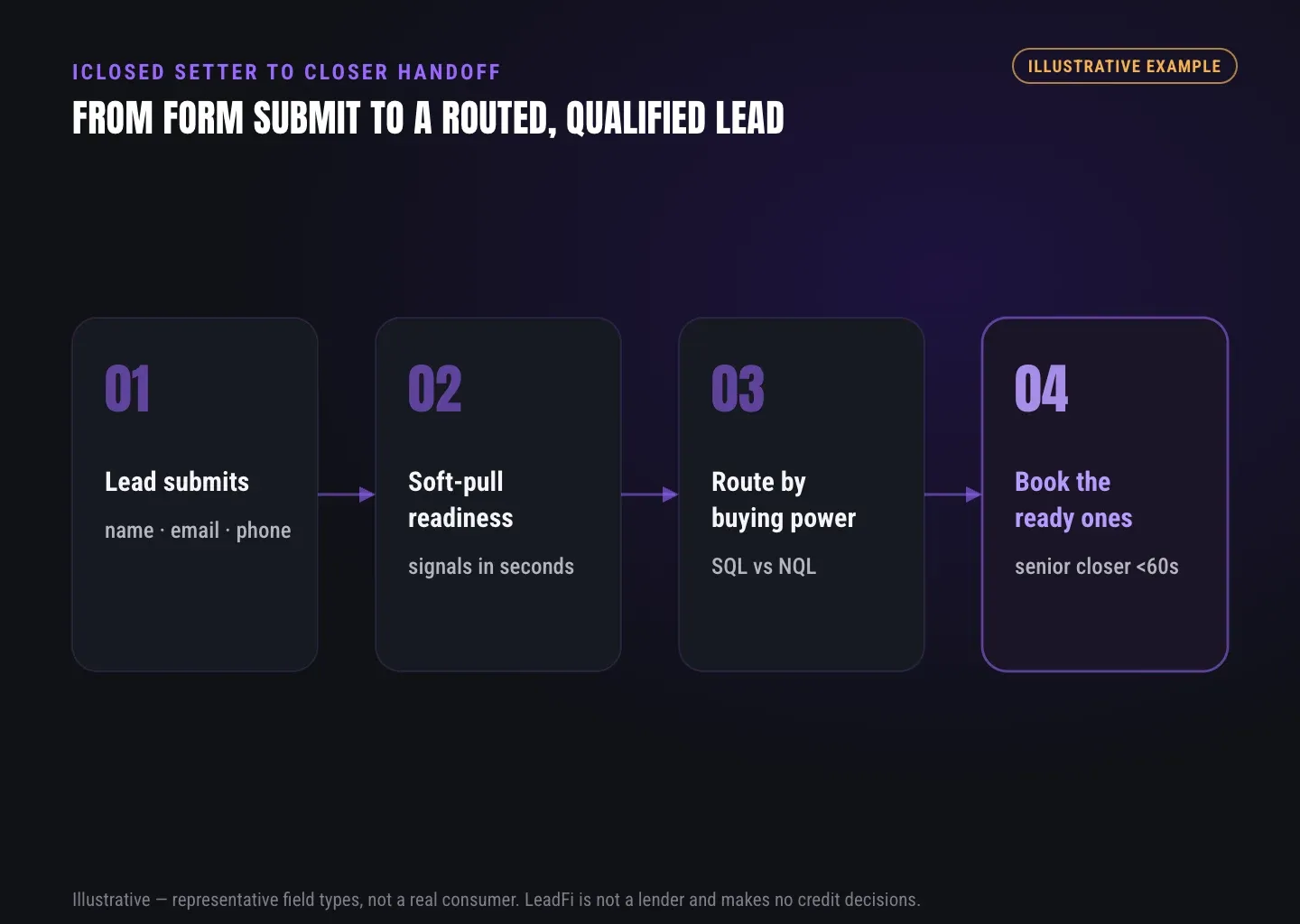
A lead submits a high-ticket application with name, email, and phone. Through the selected integration path, LeadFi processes the configured financial-readiness workflow and returns a result to the CRM.
The CRM records the SQL or NQL status, readiness band, route, result time, and owner. The setter adds the prospect’s goal, timing, decision context, and main concern. iClosed continues to manage booking and sales activity.
The closer opens one record and sees the route before the full note. Each tool retains a distinct role, and every lead receives a defined next step.
Related reading: practical insights on how many setters per closer, a practical guide to iso broker crm readiness band, practical insights on ai lead qualification.
| Workflow layer | Primary job | What sales should see | Typical action |
|---|---|---|---|
| iClosed | Booking and sales workflow | Appointment and sales context | Manage booking and rep activity |
| LeadFi | Financial-readiness qualification | SQL/NQL, readiness band, and route | Return a configured next-step signal |
| CRM | Shared lead and pipeline record | Fields, notes, stage, task, and owner | Trigger alerts, nurture, and reporting |
| Form or funnel | Lead capture | Contact and application data | Send the lead into the workflow |
| Ad or attribution stack | Campaign learning and reporting | Permitted qualified-lead events | Analyze and improve signal quality |
Key takeaways
The short version
- Put SQL/NQL status and the readiness band first.
- Keep setter context short, structured, and separate.
- Prioritize SQLs while giving NQLs a defined path.
- Pair LeadFi qualification with iClosed booking workflows.
- Use role-based CRM access and compliance-aware setup.
Quick answers
Fast answers before you dig in
What should the closer see first in an iClosed setter closer handoff?
The closer should first see SQL/NQL status, the readiness band, assigned route, setter summary, and one clear next action. Raw financial values should appear only when the approved workflow and the rep’s role require them.
How does LeadFi work with iClosed?
LeadFi complements iClosed by adding financial-readiness qualification after a supported form, funnel, booking, or CRM event. iClosed keeps its booking and sales role, while LeadFi returns readiness and routing fields through the configured integration stack.
How should SQL vs NQL routing change closer workflow?
Priority SQLs should enter the fastest suitable closer path, standard SQLs should keep a clearly owned normal cadence, and NQLs should move to a defined nurture, low-ticket, or alternate-offer route.
Can LeadFi use name, email, and phone for prescreening?
LeadFi can use name, email, and phone in supported thin-input workflows. Additional identity-related information, consent and disclosures, authentication, or bureau requirements may apply to the specific configuration.
FAQ
Common questions
What should an iClosed setter closer handoff include?
How does LeadFi fit into an iClosed setter workflow?
What are the best closer handoff notes?
Can LeadFi run thin-input soft-pull prescreening without an address?
Does a LeadFi soft pull affect the consumer’s credit score?
How should SQL vs NQL routing change a closer’s day?
Can readiness signals go back into the CRM and ad stack?
Sources
References
- CFPB — What is a credit inquiry? (hard vs. soft) (opens in a new tab)Federal regulator confirms a soft inquiry, unlike a hard inquiry, does not affect the consumer's credit score.
- VantageScore — VantageScore 4.0 credit scoring model (opens in a new tab)Official page describing VantageScore 4.0, the tri-bureau, trended-data model used to assess credit risk.
- CFPB — Who can request to see my credit report? (opens in a new tab)Federal regulator explains the FCRA rules governing who may obtain a credit report.
- VantageScore 4.0 (opens in a new tab)Official model information; teams should verify model availability and branding requirements for their configured workflow.
Know who is ready before your next sales call.
A better handoff does not ask the closer to read more. It puts the right signal first, keeps setter context concise, and gives SQLs and NQLs defined routes.