
CLOSED LOST REASONS
Closed-Lost Reasons: Separating Budget From Fit
“No budget” is an easy closed-lost reason to select. It is harder to use in a management meeting. Did the buyer say the offer was out of reach, reject its value, need a different service, or postpone a decision?
LEADFI DEMO
Watch the demo, then start free or book a call.
GUIDE
Why 'no budget' becomes the default loss reason
A convenient label can hide the next useful question
A closer finishes a call, marks the opportunity closed-lost, and chooses the nearest available reason. If the picklist has only “no budget,” “not interested,” and “other,” it cannot preserve the distinction between an unaffordable offer and an offer the buyer does not want. A manager reviewing that report cannot tell whether to examine the audience, the offer, or the conversation.
Write the reason from the conversation, not from the outcome alone. “Too expensive for the value I see” is a price/value objection. “This does not cover the service I need” is a fit issue. “I am not making a decision until my current project ends” is timing. Only record a capacity concern when the buyer states it. Silence, a missed call, or an unanswered proposal does not establish a budget problem.
Keep the intake route in its own field
For this workflow, financially qualified, or SQL, means the buyer can afford the offer being sold under the business's own intake routing rule. Not financially qualified, or NQL, means the buyer is not financially fit to buy that offer under the rule; the next conversation is a lower-ticket offer or another product that fits the buyer's financial capability. These are operational labels, not a complete picture of the person's circumstances.
This page describes a routing input, not a credit decision, approval, or eligibility determination.
An SQL can still decide the product is a poor fit. An NQL can still ask about the main offer. Neither situation licenses a closer to replace the buyer's words with the intake label. Store the SQL or NQL band separately from the closed-lost reason so the report can preserve that disagreement.
Give uncertainty a truthful home
Create an “unknown—no reason confirmed” option. A closer who cannot confirm the reason should use it, with a brief process note such as “proposal sent; no response recorded.” That is more useful than a confident but invented budget diagnosis. If the buyer later supplies a reason, update the reason with the date and retain the original history according to your existing record policy.
GUIDE
Closed-lost reason codes for capacity, fit and timing
Define the choice, the evidence, and the boundary
A small reason list is easier to use when each option says what evidence belongs there. Start with the distinctions your team can actually observe. Do not create a reason code for a buyer's score, income, debt, or available-credit figures. The financial-readiness field contains only the band or route, and the loss-reason field contains the buyer's stated commercial reason.
Use the proposed table below as a starting point for your own operating definitions. These are workflow suggestions, not a required CRM configuration. No software feature is assumed. Test the labels against existing, appropriately accessible call notes before adopting them; do not collect new personal financial data for this exercise.
| Proposed reason | Evidence to record | Do not infer it from |
|---|---|---|
| Capacity stated | Buyer says the offer is outside their financial capability | NQL alone, silence, or a missed call |
| Fit | Buyer names a need outside the offer’s scope | Financial-readiness band |
| Timing | Buyer states a later decision point | An unanswered proposal |
| Price/value | Buyer questions the value at the stated price | Personal financial figures |
| Another provider | Buyer says they chose another provider | A closer’s guess |
| Unknown | No reason was confirmed | A default budget label |
Choose one primary reason without discarding context
If a buyer says both “not now” and “not enough value,” the closer should confirm which concern stopped the current decision when the conversation permits. If it remains unclear, record that uncertainty. An optional brief note can preserve the secondary issue without making the primary report count the same opportunity twice.
The note should use the minimum useful commercial context. “Needs a service outside our scope” is enough to explain a fit loss. It does not need a financial profile. Reps and managers see the readiness band or route only; do not show underlying personal financial figures or quote them to the buyer.
Separate a lost opportunity from an unfinished conversation
Agree internally when the team closes an opportunity and when it remains open with a next step. Apply that operating definition consistently across SQL, NQL, and no-result records. An SQL whose next appointment is agreed is not automatically a lost deal because the first call ended without a purchase. An NQL is not automatically a closed-lost opportunity merely because its first conversation concerns a lower-ticket product.
For opportunities actually closed-lost, require a reason or the explicit unknown state. Review missing values separately from unknown reasons: one means the field was not completed; the other records that the team did not establish a reason.
INTELLIGENCE LAYER
Check loss reasons against the readiness band at opt-in
Use the result already held, never a new check for reporting
Use only readiness results the business already holds from its own intake form, collected with its disclosures and the lead's authorisation. Do not run a new check on open deals, past leads, or existing customers to populate this report. An intake record without a result belongs in a separate no result group, not NQL. Field placement is covered in financial-readiness signals in your CRM.
Keep the intake band as it was recorded. A later loss reason should not rewrite the historical SQL or NQL value. If the business changes its routing rule, separate records by the applicable rule version before comparing them. Otherwise, a change in the meaning of SQL can look like a change in buyer behaviour.
Set the cohort before counting
Choose one offer and a defined intake period, then state the reporting cut-off. Count unique opportunities consistently and show open opportunities separately. A report of only closed-lost opportunities can describe reasons within that group; it cannot establish the win rate of the entire intake cohort.
Here is a fictional counting example, not a benchmark or reported LeadFi result. A team's review file contains 120 closed-lost opportunities: 60 SQL, 40 NQL, and 20 no result. The SQL group contains 18 capacity, 12 fit, 15 timing, and 15 unknown reasons. The NQL group contains 20 capacity, 8 fit, 4 timing, and 8 unknown. The no-result group contains 5 capacity, 5 fit, 4 timing, and 6 unknown. Each group reconciles to its stated total.
In this invented file, capacity is 18 ÷ 60 = 30% of SQL losses and 20 ÷ 40 = 50% of NQL losses. Those percentages describe this fictional set of losses only. They do not mean either band causes losses, predict another business's results, or establish which group is more likely to purchase. Across all three groups, unknown is 29 ÷ 120, approximately 24%. That may be the first report-quality question to investigate before drawing a commercial conclusion.
Read disagreement as a review queue
An SQL/capacity pair deserves a review of the stated objection, offer context, and historical routing rule. It does not prove the band was wrong or that the buyer concealed anything. An NQL/fit pair still records a fit objection; recoding it as budget would manufacture agreement between the two fields.
Review a small set of records with the same checklist: was the reason stated, was the correct offer selected, was the intake band preserved, and was the opportunity counted once? Use commercial notes and existing authorised band data. The purpose is to understand the process without expanding access to a buyer's financial information.
See which of the leads you already have can actually afford to buy.
ROUTING
Turn loss-reason reports into routing and offer questions
Match the action to what the report can support
A cluster of fit reasons can prompt a review of who the offer is for and how its scope is explained. Timing reasons can prompt a review of the next-step agreement. Unknown reasons can prompt a review of note quality and the point at which opportunities are closed. None of those actions requires treating a financial-readiness band as the reason the buyer declined.
Capacity reasons across SQL and NQL groups can raise a question about how the business defines offer fit at intake. Review that question using your own written routing rule and approved process. Keep any proposed routing change separate from the historical report, and document the change before applying it to later intake. The guide to routing leads to calendars by qualification covers first-call handling.
Keep payment decisions out of the routing report
Do not use the band to decide who receives a payment plan, instalment terms, deposit terms, a discount, or third-party financing. Payment options follow one written policy applied to every buyer. A closer should not encourage a buyer to borrow, open credit, or finance a gap to rescue a deal. This report is also not a decline notice or an adverse-action script.
A lower-ticket conversation should concern a product suited to the buyer's financial capability. It is not a direction to change payment terms on the main offer. For the distinction between budget, need, and timing, see LeadFi’s guide to BANT qualification; keep those conversation questions separate from a spreadsheet label.
Test the definitions before changing the operation
Run an internal calibration exercise using a small fictional note set. Have reviewers apply the proposed reason definitions independently, compare disagreements, and revise ambiguous definitions. If one reviewer calls a statement fit and another calls it capacity, fix the definition before treating the report as decision evidence.
After adoption, inspect missing and unknown reasons alongside the commercial categories. Keep the SQL, NQL, and no-result groups visible, along with the cohort and rule version. Do not promise that a structured reason list raises win rate by any amount. Its immediate purpose is narrower: make the report's labels traceable to the conversation so the team can ask a better operating question.
LeadFi qualifies a client's existing inbound leads; it does not generate or buy leads. Its role here is financial-readiness qualification and routing, while the business owns its reason definitions, offer decisions, contact practices, and compliance process. Confirm the configured use case with your counsel. LeadFi is not a lender and makes no credit decisions.
Key takeaways
The short version
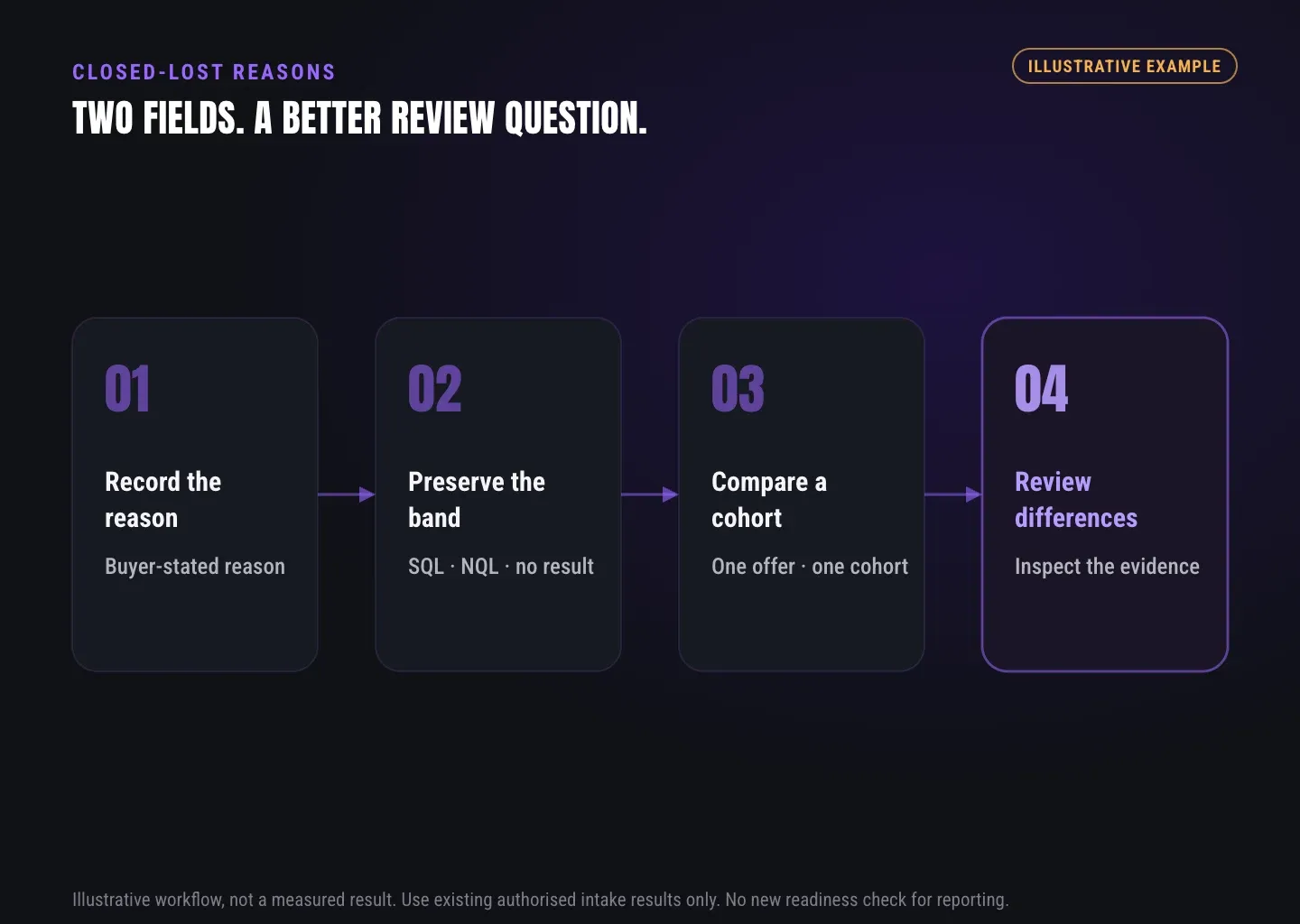
- Record what the buyer said; do not infer budget from silence or a routing label.
- Keep SQL, NQL, and no result separate from the primary loss reason.
- Use only existing authorised intake results, with no new check for reporting.
- Reconcile opportunity counts and state the cohort before interpreting a report.
Quick answers
Fast answers before you dig in
What are useful closed-lost reason codes?
Separate buyer-stated capacity, fit, timing, price/value and another-provider reasons, plus an explicit unknown state. Keep the intake SQL or NQL band in a different field; it is not the loss reason.
FAQ
Common questions
Should no budget be a closed-lost reason?
Can an SQL opportunity be lost for budget reasons?
How should records without a readiness result be reported?
Does a better loss-reason list increase win rate?
Know who is ready before your next sales call.
Bring your written routing rule, loss-reason definitions, and an empty reporting template to a LeadFi workflow assessment. Discuss how to keep the intake band separate from the buyer’s stated reason, using only the authorised results your business already holds.