
ADDRESS FIELD LEAD FORM CONVERSION
Lead Form Address Field Conversion: Why the Address Field May Cost You Leads
A lead form address field conversion problem often starts with timing. Asking for a full address before a prospect understands why it matters can add effort, doubt, and privacy concerns at the point where abandonment risk is highest.
Watch a contact get pre-qualified.
This is exactly what your CRM gets back.
Your opt-in form
Soft pull · no impact to their credit
This is not a real soft pull. It's an example of the data points that land in your CRM contact record when a lead fills out your form.
LEADFI DEMO
Watch the demo, then start free or book a call.
GUIDE
What each additional intake field costs you
Quick answer: Every additional field creates another task and another opportunity to abandon the form. An address may carry more perceived sensitivity than a basic contact field, so its conversion cost can exceed the time required to type it.
Effort rises with every field
Each field requires the prospect to read, recall, type, and verify information. That burden compounds on mobile devices. A request that initially looked simple can begin to feel like a detailed application.
Compare a four-field form with a nine-field form. The longer version creates five more opportunities for errors or hesitation, especially when several fields do not affect the immediate next step.
Sensitive fields create extra doubt
An address is identity-related information. A first-time visitor may wonder why an unfamiliar brand needs it before explaining the process or providing value. This concern can be stronger with cold paid traffic than with returning customers.
Clear field labels and nearby explanations can help, but they do not make every early address request necessary. The client should first determine whether the field has a defined role in its intake design.
Mobile input carries a higher burden
Autocomplete can reduce effort, but apartment numbers, validation rules, and keyboard changes can still interrupt completion. A required address can turn a quick mobile action into a task the prospect postpones.
Use responsive layouts, appropriate autocomplete attributes, and clear error messages. The client should test the actual form on common devices rather than relying only on a desktop preview.
Error handling can hide the real loss
A CRM usually records completed forms, not visitors who leave during an error loop. Track field focus, validation errors, corrections, and exits to locate friction before submission.
If street, city, state, and postal code are separate required inputs, treat them as separate friction points in the analysis. One address request may function like several fields.
Form cost extends past conversion
A shorter form can increase submissions while also increasing sales workload. Measure valid leads, duplicates, SQL yield, booked calls, and sales effort—not only completion rate.
An NQL is a Non-Qualified Lead under the client's current routing rules. It is an action label for the workflow, not a judgment about a person or a consumer approval or denial.
Example: A cold-traffic application
A coaching company selling a $5,000 program asks for contact details, business information, budget, and a full address before the visitor can continue. The team tests moving the address and other non-routing questions to a later stage.
It keeps the offer, traffic allocation, qualification rules, and follow-up stable. The team then checks whether valid submissions and SQL yield improve without overloading sales.
ROUTING
Which fields are actually load-bearing for routing
A load-bearing field changes what happens next. It might determine a service area, owner, calendar, page, stage, or follow-up path. If removing a field changes nothing in the client's workflow, it may not belong on the first screen.
Contact fields support the handoff
The first-stage form should collect what the client needs to create a usable record and conduct the planned follow-up. The right field set depends on the client's intake design: a call request, event registration, and later-stage application may require different information.
Consent fields support the planned action
Form language should align with what happens after submission. If the workflow includes calls, texts, or soft-pull prescreening, the client should review its consent and disclosures, privacy language, and follow-up process for that use.
Shortening a form does not remove these responsibilities. LeadFi supports compliance-aware workflows but does not provide legal advice, and clients should review their use case with counsel.
Routing fields need a clear branch
A useful routing question creates a specific operational split. A service-area field, for example, may direct inquiries to different teams. An offer-selection field may direct visitors to different pages.
Ask whether the answer changes the page, owner, calendar, stage, or follow-up plan. If it does not, consider collecting it later.
Sales context can move downstream
Goals, timing, and background details may help a closer prepare without controlling the first route. The client can collect that context through a second step, booking page, pre-call survey, or rep task.
Field order matters as much as field count. Moving a useful question downstream can preserve context while reducing first-step friction.
Address should earn its position
An address belongs in the first step when the client's intake design gives it a defined job at that stage. If the only rationale is that sales might want it later, test requesting it later instead.
Teams examining adjacent software categories can also review the Soft Credit Pull Software For Lead Generation: Qualify By Buying Power, while keeping the current test focused on their own form structure and routing plan.
| Intake design | First-step experience | Qualification approach | Typical client-configured route | Main risk | Best fit |
|---|---|---|---|---|---|
| Long first-step form | More fields before capture | Primarily first-party answers | Often a single booking or review path | Friction and hidden abandonment | Intake where every field is needed immediately |
| Short form with no qualification | Fast submission | Minimal fit context | Every submission follows the same path | Poor-fit calls may consume sales time | Low-cost or nurture-led offers |
| Staged form | Short capture followed by later questions | Answers collected by stage | Branches after relevant responses | Broken handoffs may lose context | High-ticket teams with clear funnel stages |
| Short form with readiness routing | Focused first step | Client-defined financial-readiness rules | SQL and NQL paths receive different actions | Unclear rules can create poor routes | High-ticket teams with expensive sales capacity |
GUIDE
Designing a shorter form without losing qualification
Quick answer: Shorten the first step rather than eliminating the decision process. Capture the initial inquiry, apply the client's established qualification rules, and give SQLs and NQLs defined next steps.
Separate capture from qualification
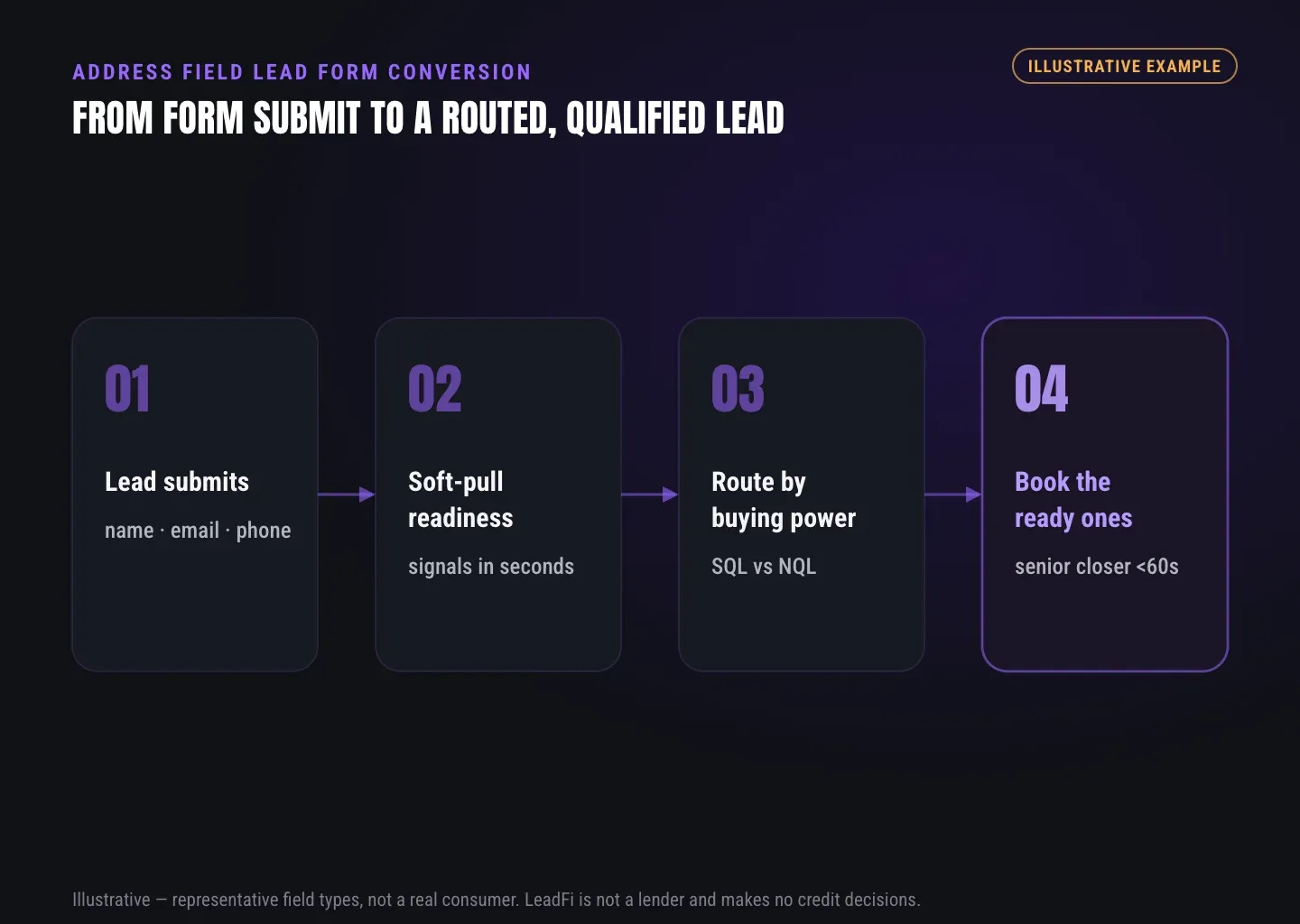
Map the minimum first-stage capture event. Then identify questions that can move to a later form, booking step, or rep workflow. A short form becomes ineffective only when the rest of the client's intake process cannot sort or follow up on submissions.
Define financial readiness once
Financial readiness is an operational concept the client can use to prioritize the next sales action under its rules. It supports buying-power-aware qualification for high-ticket or credit-adjacent sales motions; it is not a consumer approval or denial.
Document the definition before testing the form. Changing qualification criteria during the experiment makes it difficult to tell whether the field change affected lead quality.
Use SQL and NQL as action labels
An SQL is a Sales-Qualified Lead under the team's established criteria. Its route might include faster review or a priority sales queue. An NQL can move to nurture, a lower-ticket option, another offer, or later follow-up.
These labels should trigger client-configured actions rather than remain unused CRM fields. Different campaigns and offers may require different definitions.
Keep soft-pull prequalification in context
Where appropriate for the client's workflow, soft-pull prescreening can form part of financial-readiness qualification. The commercial value is buying-power-aware routing after intake—not avoiding an address requirement through a workaround.
The client's setup must still account for consent and disclosures, privacy language, and the intended follow-up. LeadFi does not approve or deny consumers, guarantee compliance, or replace legal counsel.
Readers looking specifically at form strategy can explore Soft Credit Check Without Address for Lead Qualification in practice. The relevant question remains whether an address has a defined first-stage purpose in the client's intake design.
Return decisions to the working stack
Qualification matters only when the client's routing plan defines what happens next. Before launch, document the intended CRM stage, owner, page, calendar, or nurture path for each client-defined class.
Keep the implementation discussion at the workflow level during the form test. Confirm that the client's existing systems preserve the submission and apply the intended route without making assumptions about product-specific results.
Keep measurement tied to the form test
Do not expand an address-field experiment into a simultaneous advertising, scoring, and sales-process overhaul. Keep campaign settings and downstream rules stable so the client can evaluate the intake change itself.
Measure lead quality as a guardrail, but treat the form variant as the experimental variable.
GUIDE
Intake design comparison: long form vs staged form
The correct design depends on the offer and the client's workflow. A staged approach is worth testing when first-screen questions do not control an immediate branch.
Use the comparison below to identify a test candidate, not to declare a universal winner. The best design balances valid submissions, prospect trust, routing clarity, and sales capacity.
See which of the leads you already have can actually afford to buy.
WHO IT'S FOR
Short scenarios for high-ticket teams
These scenarios focus on form friction and choices within the client's intake design. They do not assume that removing an address will improve every funnel.
Coaching: protect the closer calendar
A coaching company moves goals and address details from its first form to a pre-call survey because those fields do not change the initial route. The team keeps its SQL and NQL definitions stable and compares submission quality and closer workload.
Agency: improve speed-to-lead
An agency discovers that its first-step address field does not control a route. It tests moving the field downstream while keeping the same sales queue and follow-up rules. The team evaluates whether more valid submissions reach the appropriate client-defined path.
Funding: stage the intake
A funding business may require a detailed application later, but that does not automatically mean every question belongs on the first screen. It can test a focused initial inquiry followed by a contextualized later stage, with consent and disclosures reviewed for the planned workflow.
Lead aggregator: deliver a usable label
A lead aggregator can assess whether each intake question supports a buyer-approved branch. The resulting client-defined SQL or NQL label should map to a specific receiving workflow without exposing unnecessary detail.
LeadFi can support a financial-readiness qualification strategy, but it does not generate leads or source, sell, or supply consumer lists.
Real estate: route by the next useful step
A real estate team moves agent-preparation questions to a second stage while retaining first-step fields that control location or inquiry-type routing. It then compares completion, valid records, and agent workload.
GUIDE
How to test the change safely
Quick answer: Change one field group at a time, keep routing rules stable, and evaluate downstream quality. A completion lift is not a win if it creates invalid records or overwhelms sales.
Set one primary hypothesis
Use a specific statement such as: “Moving the address field after submission will increase valid completion without reducing SQL yield per 1,000 visitors.” Select a primary metric and a small set of guardrails before launch.
Keep the split clean
Send comparable traffic to the control and variant. Avoid giving one version branded search traffic and the other cold social traffic. Do not change the headline, offer, calendar, and follow-up sequence during the same test.
Measure the full funnel
Track unique form starters, field views, validation errors, exits, valid submissions, duplicates, SQL yield, NQL yield, booked calls, and sales effort. Use the same definitions for both variants.
Key calculations include:
- Completion rate: Valid submissions divided by unique form starters.
- Address abandonment: Exits after address-field interaction divided by address-field viewers.
- SQL yield: Client-defined SQLs divided by visitors or valid submissions.
- Sales load: Attempted calls or rep time per valid submission.
- NQL progression: Movement into the client's nurture or alternate path.
Pick a sample before reading results
Set a minimum run time and sample target before launch. The appropriate target depends on baseline conversion, traffic, and the minimum useful improvement. Avoid stopping after a single strong day.
Audit the handoff before launch
Send test records through every client-configured path. Check field mapping, duplicate handling, CRM stages, alerts, redirects, and calendar rules. Confirm that removing a field does not overwrite valid information already stored elsewhere.
Test the SQL and NQL paths separately. A shorter form that sends every submission to the same sales calendar has moved friction rather than solved qualification.
Review consent and disclosures
Review form language, privacy language, and planned follow-up before the test begins. A change in field order can affect what the prospect understands at each stage.
LeadFi supports compliance-aware setup as part of workflow planning. It does not guarantee compliance or provide legal advice.
OUTCOMES
Lead form address field conversion test plan
Use this checklist before changing the live intake:
- Purpose: Record why the address is collected today.
- Route: Name the exact client-defined branch or action it controls.
- Timing: Decide whether that need exists before first submission.
- Variant: Move or remove only the address field group.
- Events: Track focus, errors, corrections, exits, and valid submissions.
- Quality: Keep SQL and NQL definitions stable.
- Handoff: Test CRM fields, stages, alerts, and redirects.
- NQL path: Confirm that nurture or alternate routing works.
- Consent: Review consent and disclosures for the revised sequence.
- Decision: Compare completion, SQL yield, and sales load.
Document the winning design and its limits. A result from one offer, device mix, or traffic source may not transfer to another.
Related reading: the Soft-Pull Pre-Qualification Tools: An OmniaIQ Alternative Buyer’s Guide, the Soft Credit Pull Software For Lead Generation: Qualify By Buying Power, Soft Credit Check Without Address for Lead Qualification in practice.
Key takeaways
The short version
- An early address request can add disproportionate form friction.
- Every first-step field should control a defined intake action.
- Move useful but non-routing questions to a later stage.
- Judge tests by SQL yield and sales load, not volume alone.
- Shorter forms still require appropriate consent and disclosures.
Quick answers
Fast answers before you dig in
Why can an address field reduce lead form conversion?
It adds typing, validation risk, and a request for identity-related information before the prospect may understand why it is needed.
Should every lead form remove the address field?
No. Keep it when it controls a defined first-stage action; otherwise, test moving it to a later intake step.
How can a shorter form preserve qualification?
Separate initial capture from the client's qualification process, keep SQL/NQL rules stable, and assign each class a clear next step.
What should an address-field test measure?
Measure valid completion, address-field abandonment, SQL yield, NQL progression, duplicates, booked calls, and sales workload.
What is LeadFi's role in this workflow?
LeadFi is a financial-readiness engine for high-ticket teams. It supports compliance-aware qualification and routing strategies without approving or denying consumers.
FAQ
Common questions
Does removing an address field always increase conversion?
What is lead form address field conversion?
How should I measure lead form address field conversion?
Can soft-pull prescreening fit a shorter intake?
How does SQL vs NQL routing reduce form friction?
Does LeadFi approve or deny consumers?
Sources
References
- CFPB — What is a credit inquiry? (hard vs. soft) (opens in a new tab)Federal regulator confirms a soft inquiry, unlike a hard inquiry, does not affect the consumer's credit score.
- VantageScore — VantageScore 4.0 credit scoring model (opens in a new tab)Official page describing VantageScore 4.0, the tri-bureau, trended-data model used to assess credit risk.
- Experian — What Is a Soft Inquiry? (opens in a new tab)Major credit bureau explains soft inquiries are informational and have no impact on credit scores.
Know who is ready before your next sales call.
Removing an address field is useful only when the client's intake design still supports clear qualification and routing. LeadFi helps high-ticket teams evaluate financial-readiness qualification, SQL/NQL paths, and the operational steps surrounding a lower-friction form.