
LEADFI VS OMNIAIQ
LeadFi vs OmniaIQ: Choosing a Financial-Readiness Qualification Workflow
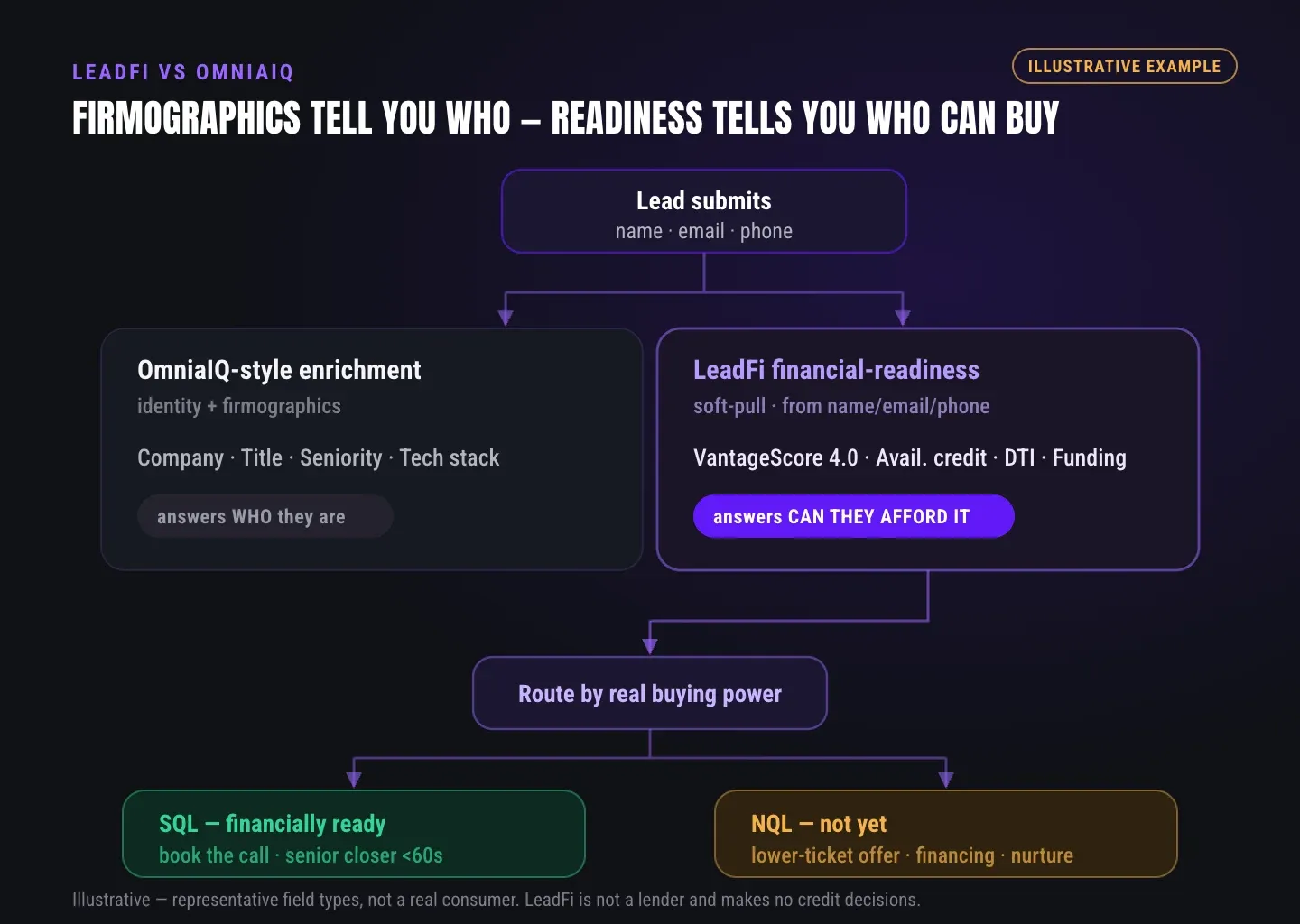
High-ticket teams searching "leadfi vs omniaiq" are usually deciding one thing: which leads reach a closer, and which branch to a low-ticket, payment-plan, or financing path after the submit. Both tools sit near the same job.
Watch a contact get pre-qualified.
This is exactly what your CRM gets back.
Your opt-in form
Soft pull · no impact to their credit
This is not a real soft pull. It's an example of the data points that land in your CRM contact record when a lead fills out your form.
LEADFI DEMO
Watch the demo, then start free or book a call.
GUIDE
What OmniaIQ appears to focus on
OmniaIQ's public materials describe a financial qualification workflow that runs before a phone call. The pages suggest a soft pull that reads a credit score, open credit, and debt-to-income (DTI) — the share of income that goes to debt. In addition, the public pages describe entity and owner checks against Secretary of State and IRS records. For lenders and funding teams, that's a meaningful piece of the puzzle.
Public positioning
OmniaIQ positions itself as financial qualification before the call, with a soft-pull read and program matching. The public home page describes pre-qualifying every application within seconds, soft pull only, with no SSN and no score impact. The public comparison page describes inputs as name, phone, and email. Named product areas include Real-Time Qualification, Program Matching, an Intelligent Routing Engine, Calendar Intelligence, and Universal Integration.
What OmniaIQ appears to do well
Several things stand out in the public pack. First, pricing is published per run: the public pricing page describes one run as one lead checked for a soft pull, identity, program match, and routing decision. Next, loan-program matching spans named programs — SBA 7(a), Term Loan, Business LOC, Equipment Lease, MCA, Conventional, FHA, VA, Jumbo, and BNPL names like Affirm, Klarna, and Bread. Finally, form coverage is broad: the public materials list integrations like HubSpot, Typeform, Webflow, WordPress, Zapier, Calendly, ClickFunnels, Gravity Forms, GoHighLevel, Jotform, Kajabi, and Salesforce.
The Verified File artifact
OmniaIQ's public comparison page describes a Verified File artifact. For lending and mortgage teams, a structured record of a run can help a rep prep and support a clean handoff. That's a genuine strength when your workflow leans document-heavy. LeadFi's shape is different, and we'll get to it below.
Why teams look at alternatives
Teams shop around for ordinary reasons, not because any one tool is weak. For example, some want native ad-platform feedback wired straight into Meta, Google, and TikTok. Others build on AI-agent stacks and want a live MCP connection. Still others run on Close, Pipedrive, or Zoho and want first-class coverage there. Fit — not fault — drives most of these searches, and that's exactly the lens this page uses.
GUIDE
What LeadFi and OmniaIQ each optimize for
Both tools run readiness-based qualification and route the result. So the split is less about "which does qualification" and more about what each optimizes around after the read. OmniaIQ leans into program matching and a verified record. In contrast, LeadFi leans into signal feedback loops and agent-stack delivery.
Concise answer: OmniaIQ optimizes for program matching and a Verified File record, per its public materials. LeadFi optimizes for feeding SQL-quality signals back into ad platforms and CRMs, plus a live MCP path for AI-agent builders. Both classify readiness and route the lead; the difference is what happens to the signal afterward.
SQL vs NQL routing, defined once
LeadFi splits leads into two buckets. An SQL is a sales-qualified lead — someone ready to buy your high-ticket offer. An NQL is a non-qualified lead — someone who isn't ready at the price today. That split drives every downstream action. For example, SQLs get speed-to-lead, while NQLs get a low-ticket, payment-plan, or financing path.
Readiness signals for rep prep
LeadFi surfaces readiness signals, not a verdict. Depending on your setup, consent, and disclosures, those can include VantageScore 4.0, open credit, income, debt, DTI, funding pre-approval signals, age, and address. Treat these as operational readiness for the next call — never a judgment of a person's worth. LeadFi does not approve or deny consumers.
Where the signal goes next
This is LeadFi's center of gravity. After the read, LeadFi can write outcomes into CRM fields, tags, stages, and workflows. For example, it can trigger a thank-you redirect, pick which calendar an SQL reaches, and send an NQL to your low-ticket offer. Moreover, it can feed SQL-quality events back into ad systems where permitted and correctly set up — no ROAS guarantees.
GUIDE
The decision axes to compare
Before you compare feature lists, name the axes that actually change your day-to-day. Four matter most for high-ticket teams. Each maps to a real workflow decision, not a spec-sheet checkbox.
Concise answer: Compare four axes — output (a routing decision vs a verified record artifact), workflow placement (where the tool sits in your stack), stack delivery (native CAPI, MCP, and CRM coverage), and pricing presentation (per-run published pricing vs configured pricing). Rank them by what your funnel needs first.
Output: decision vs artifact
Ask what you want back. If your reps need a structured record to review, a Verified File — which OmniaIQ's public pages describe — fits that motion. However, if you want a routing decision that fires the next step on its own, that's LeadFi's shape. Neither output is "better"; they serve different rep habits.
Workflow placement in your stack
Both tools sit behind capture and act after submit. So map your capture surface first — the form, funnel, application, or booking page. Then ask which tool triggers the redirect, CRM update, and calendar choice you want. LeadFi is built to sit behind that surface and route by readiness.
Stack delivery: CAPI, MCP, and CRM coverage
Here the public pack gives a clear, attributed split. OmniaIQ's LeadFi comparison page attributes native Meta, Google, and TikTok CAPI, a live MCP for agent stacks, and Close, Pipedrive, and Zoho coverage to LeadFi. If those channels are central to your build, that attribution matters. As a result, this axis often decides the call for ad-heavy or agent-stack teams.
Pricing presentation
OmniaIQ's public pricing page describes per-run pricing — one run checks one lead. That clarity helps teams model cost fast. LeadFi pricing is set with your team by volume and workflow scope. When you compare, cite OmniaIQ's pricing page directly rather than a single figure, since reviewed pages differ.
GUIDE
Where OmniaIQ is strong
Let's be direct about fit. OmniaIQ is a capable financial-qualification tool, and for several jobs it works well. If your priorities line up with the strengths below, it deserves a real look — this isn't a teardown.
Concise answer: OmniaIQ is strong when you want published per-run pricing, loan-program matching across named lending and mortgage programs, a Verified File record for rep handoff, and broad no-code form coverage. For lenders and funding teams that live in program matching, those strengths carry real weight.
Published per-run pricing
Per-run pricing is easy to reason about: one run, one lead checked — soft pull, identity, program match, and routing decision, per the public pricing page. Finance-minded buyers like modeling cost that way. That clarity is a genuine plus early in an evaluation.
Loan-program matching
The named program coverage is broad. For example, SBA 7(a), Term Loan, Business LOC, Equipment Lease, MCA, and mortgage programs like Conventional, FHA, VA, and Jumbo appear in the public materials, plus BNPL names. For a lender routing to the right product, that matching is core to the job.
Verified File and no-code form coverage
The Verified File gives reps a structured record to work from. Meanwhile, the long list of named no-code form integrations means many teams can wire capture without a developer. Together, those two make OmniaIQ easy to adopt for form-heavy funnels.
GUIDE
Where LeadFi fits best
LeadFi's edge shows up when the signal after the read is the whole point. If you optimize ads on real buying signals, build on AI-agent tooling, or run on CRMs like Close, Pipedrive, or Zoho, LeadFi's shape lines up.
Concise answer: LeadFi may be a better fit when native Meta, Google, and TikTok CAPI, a live MCP for AI-agent stacks, or broad CRM coverage including Close, Pipedrive, and Zoho is central. OmniaIQ's own public comparison page attributes these to LeadFi. LeadFi turns a readiness read into CRM updates, redirects, calendar routing, and permitted ad signals.
Native ad-platform feedback loops
LeadFi can send real SQL events back to Meta, Google, and TikTok. This trains ad algorithms on actual buying signals rather than opt-ins. In practice, that shifts optimization away from cheap leads and toward financially qualified demand. No platform guarantees apply; correct setup and platform policy still govern the result.
Live MCP for agent stacks
LeadFi's MCP connection is live. As a result, AI-agent builders in Claude, Cursor, Antigravity, or any IDE can connect to LeadFi and prequalify a lead inside their own flow. For agencies and software companies that resell leads, that means shipping prequalified leads — each tagged with a buyer-fit label — instead of raw name, email, and phone.
Broad CRM coverage and write-back
LeadFi writes qualification outcomes where your team already works: standard and custom fields, tags, lists, pipeline stages, workflow triggers, and rep alerts. It connects via webhook, API, Zapier, and Make. Additionally, OmniaIQ's public comparison page attributes Close, Pipedrive, and Zoho coverage to LeadFi.
Compliance-aware setup as onboarding
LeadFi helps teams stand up a compliance-aware qualification workflow before launch. That covers privacy-policy alignment, consent and disclosure language, and TCPA-aware practices — as onboarding help, not legal advice. LeadFi does not guarantee compliance and does not replace your counsel.
See which of the leads you already have can actually afford to buy.
WHO IT'S FOR
Practical LeadFi workflows for high-ticket teams
Here's how the routing plays out in two common setups. Each shows who submits what, what the read returns, and what fires next. These are patterns, not promises — actual behavior depends on your stack and setup.
Example 1 — High-ticket coaching funnel
A coaching brand runs ads to an application funnel for a $5,000 program. Here's the flow:
- Capture: A prospect submits name, email, and phone on the application page.
- Read: LeadFi runs the soft pull and returns readiness signals for routing.
- SQL path: Financially ready leads redirect to a closer calendar for fast speed-to-lead follow-up.
- NQL path: Lower-readiness leads route to a low-ticket offer under $3,000 or a payment plan.
- CRM: The outcome writes to a tag and a pipeline stage so reps see status at a glance.
- Ads: SQL events feed back to Meta and Google where permitted, so the algorithm learns which leads actually buy.
As a result, closers spend calendar time on ready buyers instead of chasing opt-ins.
Example 2 — Funding / lending workflow
A funding agency wants affordability clear before the call. The flow looks like this:
- Capture: An applicant submits contact details on a lending form or booking page.
- Read: LeadFi surfaces income, debt, DTI, and open credit as readiness signals.
- SQL path: Applicants who clear the team's thresholds book with a closer right away.
- NQL path: Applicants below the cutoff route to a financing or credit-building path instead of a dead end.
- CRM: Readiness fields and a buyer-fit tag land on the record for rep prep — never a raw score on a public-facing surface.
- Reprocess: The team can run an existing backlog of leads through the same rules to surface hidden SQLs.
For funding-eligible workflows, teams often set thresholds around income, credit score, and DTI. Those cutoffs are yours to tune, and you should review such use cases with counsel. LeadFi surfaces the signals; it does not approve or deny anyone.
WORKFLOW DESIGN
How to choose the workflow that fits your funnel
Start with the output you need, then work backward. If your reps want a verified record to review before a call, weight that heavily. However, if you want a routing decision that fires the next step and feeds your ad platforms, weight that instead.
Next, map your stack honestly. List your capture surface, your CRM, your calendar, and your ad channels. Then check which tool covers them first-class versus through a workaround. Finally, model cost against your monthly lead volume, because fit beats feature counts every time.
One more point worth naming: these two tools can coexist. For example, LeadFi can complement a lending stack by sitting behind capture and routing by readiness while your team keeps the program-matching and record habits that already work. So this isn't a rip-and-replace decision by default.
| Dimension | OmniaIQ public positioning | LeadFi workflow fit |
|---|---|---|
| Core focus | Public materials describe financial qualification before a call, program matching, and routing | Financial-readiness qualification, SQL/NQL routing, and signal feedback after submit |
| Lead data / identity inputs | Public comparison page describes name, phone, email | Name, email, and phone; patent-pending identity matching for a high-confidence match before the soft pull |
| Qualification approach | Public materials describe a soft pull reading a credit score, open credit, and DTI, plus entity/owner checks | Soft-pull prescreening with readiness signals including VantageScore 4.0, income, debt, DTI, and open credit |
| Routing | Public materials name an Intelligent Routing Engine and Calendar Intelligence | SQL to closer calendar and speed-to-lead; NQL to low-ticket, payment-plan, or financing path |
| CRM / workflow actions | Public materials describe Universal Integration and named CRM connectors including Salesforce | Writes fields, tags, stages, workflows, and alerts; Close, Pipedrive, Zoho attributed by OmniaIQ's comparison page |
| Form / funnel / calendar fit | Public materials list broad no-code form coverage (HubSpot, Typeform, ClickFunnels, GoHighLevel, and more) | Sits behind forms, funnels, applications, and booking pages via webhook, API, Zapier, Make, and MCP |
| Ad optimization signals | Public materials do not describe native ad-platform feedback | Sends SQL-quality events to Meta, Google, and TikTok CAPI where permitted and correctly set up |
| Best fit by use case | Lenders and funding teams wanting program matching and a Verified File record | Ad-optimizing, agent-stack, and CRM-centric high-ticket teams wanting signal loops after the read |
RELATED READING
Related guides
Explore a closer look at LeadFi with Hyros and practical insights on choosing an OmniaIQ alternative for related context.
Key takeaways
The short version
- Both LeadFi and OmniaIQ run a soft-pull pre-qualification workflow from name, phone, and email and route the result — the difference is what happens to the signal after the read.
- OmniaIQ's public materials center on program matching (SBA, MCA, mortgage programs) and a Verified File record — strong for lenders and funding teams.
- LeadFi centers on feeding SQL-quality signals back into Meta, Google, and TikTok CAPI and writing outcomes into CRM fields, tags, stages, and workflows.
- OmniaIQ's own public comparison page attributes native CAPI, a live MCP for agent stacks, and Close, Pipedrive, and Zoho coverage to LeadFi.
- LeadFi does not approve or deny consumers and does not guarantee compliance; it supports compliance-aware setup as onboarding help, not legal advice.
Quick answers
Fast answers before you dig in
What's the core difference in LeadFi vs OmniaIQ?
Both run a soft-pull pre-qualification workflow from name, phone, and email and route the result. OmniaIQ's public materials center on program matching and a Verified File record. LeadFi centers on turning the readiness read into CRM updates, redirects, calendar routing, and permitted ad-platform signals. Choose by which output your funnel needs first.
Which tool fits an AI-agent or reseller stack better?
LeadFi's MCP connection is live, so AI-agent builders in Claude, Cursor, or any IDE can prequalify leads inside their own flow, then resell prequalified leads tagged with a buyer-fit label. If MCP delivery is central, LeadFi may be a better fit.
Does either tool need an SSN?
Per OmniaIQ's public comparison page, its inputs are name, phone, and email — no SSN. LeadFi also works from name, email, and phone, using patent-pending identity matching to set a high-confidence match before the soft pull. The value is readiness-based routing, not skipping a field.
FAQ
Common questions
What's the core difference in LeadFi vs OmniaIQ?
Does either tool need an SSN?
Can LeadFi feed signals back into Meta, Google, and TikTok?
Which tool fits an AI-agent or reseller stack better?
Do I have to replace my current stack to use LeadFi?
Is LeadFi compliant, and does it approve or deny consumers?
Sources
References
- CFPB — What is a credit inquiry? (hard vs. soft) (opens in a new tab)Federal regulator confirms a soft inquiry, unlike a hard inquiry, does not affect the consumer's credit score.
- VantageScore — VantageScore 4.0 credit scoring model (opens in a new tab)Official page describing VantageScore 4.0, the tri-bureau, trended-data model used to assess credit risk.
- Experian — Hard Inquiry vs. Soft Inquiry (opens in a new tab)Major credit bureau contrasts hard and soft inquiries and confirms soft inquiries do not affect a credit score.
Know who is ready before your next sales call.
You don't have to guess where either tool fits. See the routing run against your own funnel first.